
Arduino MKR WiFi 1010
Image Gallery
Overview
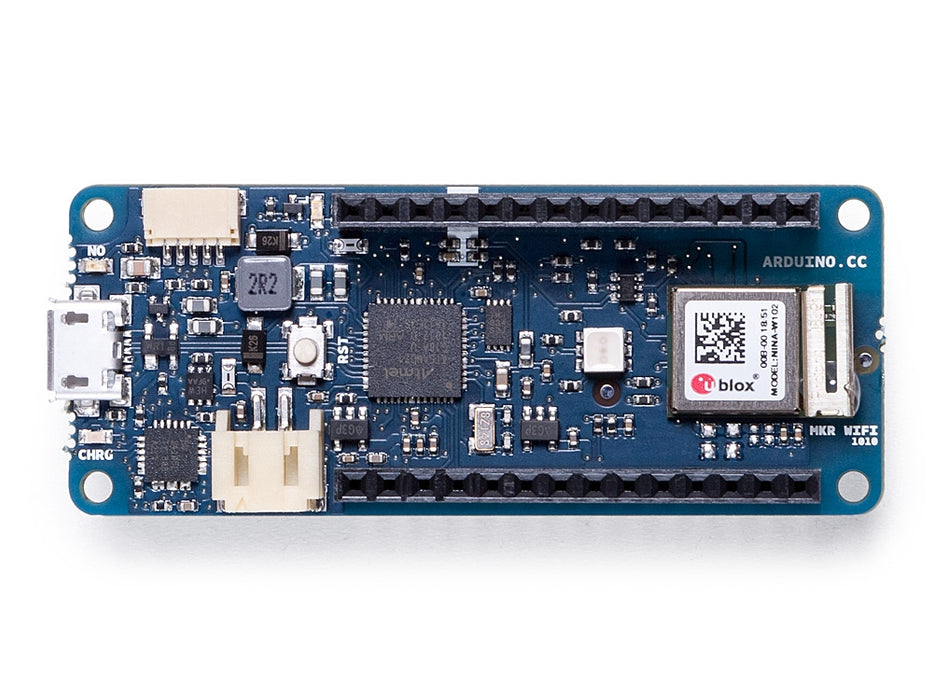
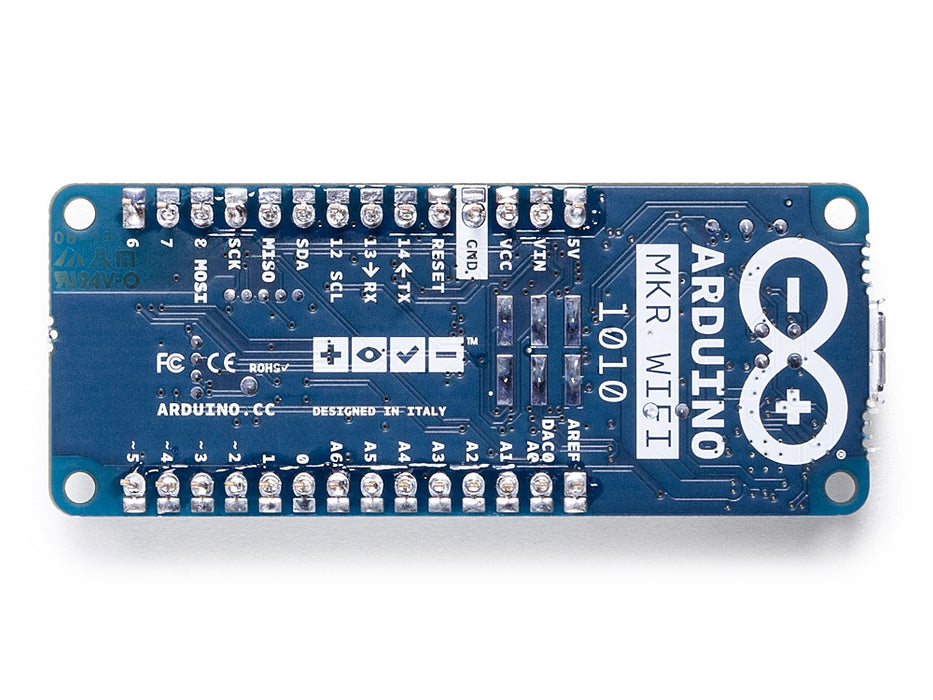
The Arduino MKR WiFi 1010 (SKU: ABX00023) is the flagship board of the MKR family for Wi-Fi and Bluetooth IoT applications. Released in 2018, it succeeds the MKR 1000 WiFi by replacing the u-blox WINC1500 module with the more capable u-blox NINA-W102 (ESP32-based), which adds Bluetooth 4.2 Low Energy alongside 802.11 b/g/n Wi-Fi.
The board pairs the Atmel SAMD21G18A ARM Cortex-M0+ microcontroller with the NINA-W102 wireless module and an ECC508A CryptoAuthentication chip for hardware-level security. It is the most actively maintained board in the MKR family and the primary recommended option for Arduino IoT Cloud projects.
The MKR WiFi 1010 uses the WiFiNINA library for Wi-Fi operations and the ArduinoBLE library for Bluetooth Low Energy. Both libraries are well-maintained and receive regular updates.
Key Features
- ARM Cortex-M0+ MCU (SAMD21G18A) at 48 MHz
- U-blox NINA-W102 (ESP32-based): Wi-Fi 802.11 b/g/n + Bluetooth 4.2 LE
- Hardware security via Microchip ECC508A
- Li-Po battery connector with on-board USB charger
- Compact MKR form factor (25 × 67.6 mm)
- Full Arduino IoT Cloud support (current recommended MKR board)
- Compatible with WiFiNINA and ArduinoBLE libraries
- 3.3V logic — not 5V tolerant on I/O pins
- Dual wireless: simultaneous Wi-Fi + BLE operation possible
Technical Specifications
| Parameter | Value |
|---|---|
| MCU | Atmel SAMD21G18A (ARM Cortex-M0+) |
| Clock Speed | 48 MHz |
| Flash Memory | 256 KB |
| SRAM | 32 KB |
| Operating Voltage | 3.3V |
| Input Voltage (USB) | 5V via Micro-USB |
| Input Voltage (Li-Po) | 3.7V (1-cell Li-Po) |
| Digital I/O Pins | 8 |
| PWM Pins | 12 (max) |
| Analog Input Pins | 7 (12-bit ADC) |
| Analog Output Pins | 1 (DAC, 10-bit) |
| UART | 1 |
| SPI | 1 |
| I2C | 1 |
| Wi-Fi Module | u-blox NINA-W102 (ESP32-based) |
| Wi-Fi Standards | 802.11 b/g/n (2.4 GHz) |
| Bluetooth | BLE 4.2 via NINA-W102 |
| Security Chip | Microchip ECC508A |
| Board Dimensions | 25 × 67.6 mm |
| Weight | ~32 g |
Pinout
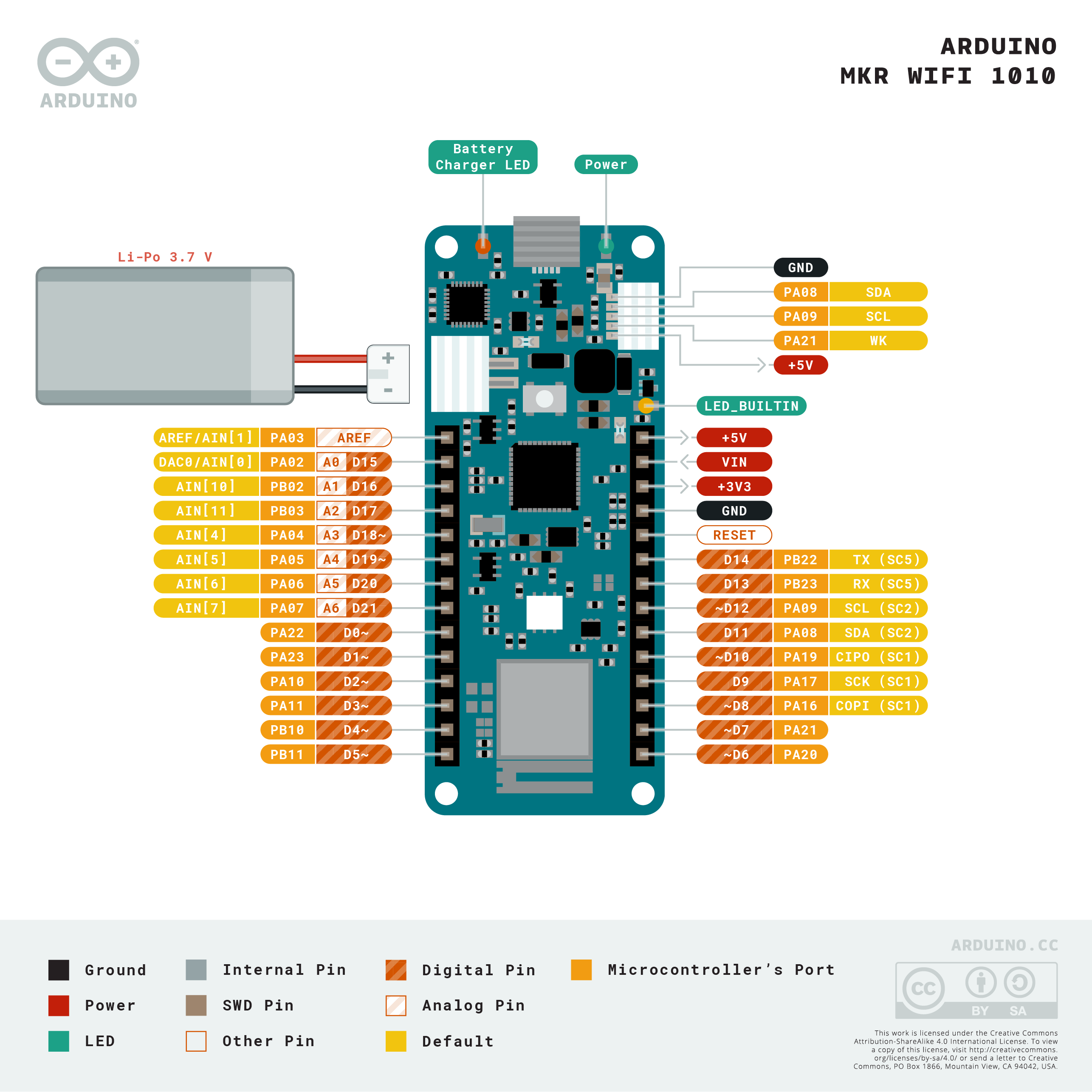
| Pin Label | Function |
|---|---|
| D0 | Digital I/O / RX (UART) |
| D1 | Digital I/O / TX (UART) |
| D2 | Digital I/O / PWM |
| D3 | Digital I/O / PWM |
| D4 | Digital I/O / PWM |
| D5 | Digital I/O / PWM |
| D6 | Digital I/O / PWM |
| D7 | Digital I/O / PWM |
| A0 | Analog In (12-bit) / DAC Out |
| A1 | Analog In (12-bit) |
| A2 | Analog In (12-bit) |
| A3 | Analog In (12-bit) |
| A4 | Analog In (12-bit) / SDA |
| A5 | Analog In (12-bit) / SCL |
| A6 | Analog In (12-bit) |
| SPI MOSI | SPI Data Out |
| SPI MISO | SPI Data In |
| SPI SCK | SPI Clock |
| SPI CS | SPI Chip Select |
Power
The MKR WiFi 1010 operates at 3.3V logic and supports two power inputs:
- USB (Micro-USB): 5V input, regulated on-board to 3.3V. Simultaneously charges a connected Li-Po battery via the on-board charger.
- Li-Po Battery: 1-cell 3.7V lithium polymer battery via the JST PH 2-pin connector. The battery charger IC manages charge cycles when USB is also connected.
During active Wi-Fi transmission, peak current draw from the NINA-W102 module can reach 250 mA or more. Ensure the power source (USB or battery) can supply sufficient current for reliable operation.
The 3.3V pin can supply limited current to external peripherals. Avoid drawing more than ~100 mA total from the 3.3V rail for external use.
Wireless Connectivity
Wi-Fi (WiFiNINA)
The u-blox NINA-W102 provides 802.11 b/g/n Wi-Fi on the 2.4 GHz band. The WiFiNINA library is the standard interface:
Bluetooth Low Energy (ArduinoBLE)
The same NINA-W102 module provides BLE 4.2. The ArduinoBLE library exposes a straightforward API for creating BLE peripherals and centrals:
Getting Started
Requirements
- Arduino IDE 1.8.x or Arduino IDE 2.x
- Board package: "Arduino SAMD Boards (32-bits ARM Cortex-M0+)" — install via Board Manager
- Libraries: WiFiNINA, ArduinoBLE — install via Library Manager
Steps
- Open Arduino IDE and go to Tools > Board > Boards Manager.
- Search for "Arduino SAMD Boards" and install the package.
- Select "Arduino MKR WiFi 1010" from the board list.
- Install WiFiNINA and ArduinoBLE from the Library Manager.
- Connect via Micro-USB and select the correct COM port.
- Try File > Examples > WiFiNINA > ConnectWithWPA as a starting point.
Programming
The MKR WiFi 1010 is programmed via the Arduino IDE using the standard SAMD upload process over USB. The board appears as a USB serial device (CDC).
The NINA-W102 module firmware can be updated separately using the "Firmware Updater" tool bundled with the WiFiNINA library. Keeping NINA firmware up to date ensures security patches and protocol improvements.
The ECC508A chip integrates with the ArduinoECCX08 library to provision TLS certificates for secure cloud connections without exposing private keys in software.
Applications
- Arduino IoT Cloud dashboards and automation
- Wi-Fi connected environmental monitors
- BLE beacons and proximity sensors
- BLE-controlled actuators (via smartphone app)
- MQTT clients for home automation (Node-RED, Home Assistant)
- Dual-mode Wi-Fi + BLE data bridge
- Secure HTTPS REST API clients
- Remote sensor nodes with battery backup
Where to Buy
| Retailer | Link | |
|---|---|---|
| Arduino Store (Official) | https | //store.arduino.cc/products/arduino-mkr-wifi-1010 |
| Amazon | https | //www.amazon.com/s?k=Arduino+MKR+WiFi+1010 |
| Arduino Docs | https | //docs.arduino.cc/hardware/mkr-wifi-1010 |
Equivalent Boards
| Board | Wireless | Key Difference |
|---|---|---|
| Arduino MKR 1000 WiFi | Wi-Fi only | Predecessor; no BLE, older WINC1500 module |
| Arduino Nano 33 IoT | Wi-Fi + BLE 4.2 | Nano form factor; same NINA-W102 module |
| Arduino Nano 33 BLE | BLE 5.0 only | No Wi-Fi; nRF52840 MCU; more GPIO |
| Arduino MKR GSM 1400 | GSM/3G | Cellular; no Wi-Fi |
| Arduino MKR WAN 1310 | LoRaWAN | Long-range LPWAN; no Wi-Fi |
| ESP32 DevKit | Wi-Fi + BLE | Third-party; more GPIO, faster MCU |
Documentation
| Resource | URL | |
|---|---|---|
| Official Product Page | https | //store.arduino.cc/products/arduino-mkr-wifi-1010 |
| Arduino Docs | https | //docs.arduino.cc/hardware/mkr-wifi-1010 |
| WiFiNINA Library | https | //www.arduino.cc/reference/en/libraries/wifinina/ |
| ArduinoBLE Library | https | //www.arduino.cc/reference/en/libraries/arduinoble/ |
| Schematic (PDF) | https | //docs.arduino.cc/resources/schematics/MKR-WIFI-1010-schematic.pdf |
| Pinout Diagram | https | //docs.arduino.cc/static/637fd4af3cb7b6f6ecadcba3bc15efb2/ABX00023-full-pinout.pdf |
Notes
- 3.3V Logic: All I/O pins operate at 3.3V. Do NOT connect 5V signals directly — use a level shifter for 5V peripherals.
- WiFiNINA vs WiFi101: This board requires the WiFiNINA library. The older WiFi101 library (for MKR 1000 WiFi) is NOT compatible.
- NINA Firmware Updates: Update the NINA-W102 firmware periodically for security fixes. Use the Firmware Updater sketch in the WiFiNINA library examples.
- MKR Shields: All MKR-format shields (MKR ENV Shield, MKR IoT Carrier, MKR Relay Proto Shield, etc.) are physically and electrically compatible.
- Simultaneous Wi-Fi + BLE: The NINA-W102 can run both Wi-Fi and BLE simultaneously, though this increases power consumption.
- IoT Cloud: This is the primary recommended MKR board for Arduino IoT Cloud. The cloud agent handles secure provisioning via the ECC508A.
Community
- Arduino Forum — official community
- Arduino Discord — real-time chat
- r/arduino (Reddit) — community
- Arduino Project Hub — projects
Revision History
| Version | Date | Notes |
|---|---|---|
| v1.0 | 2026-06 | Initial entry |