
Arduino MKR Zero
Image Gallery
Overview
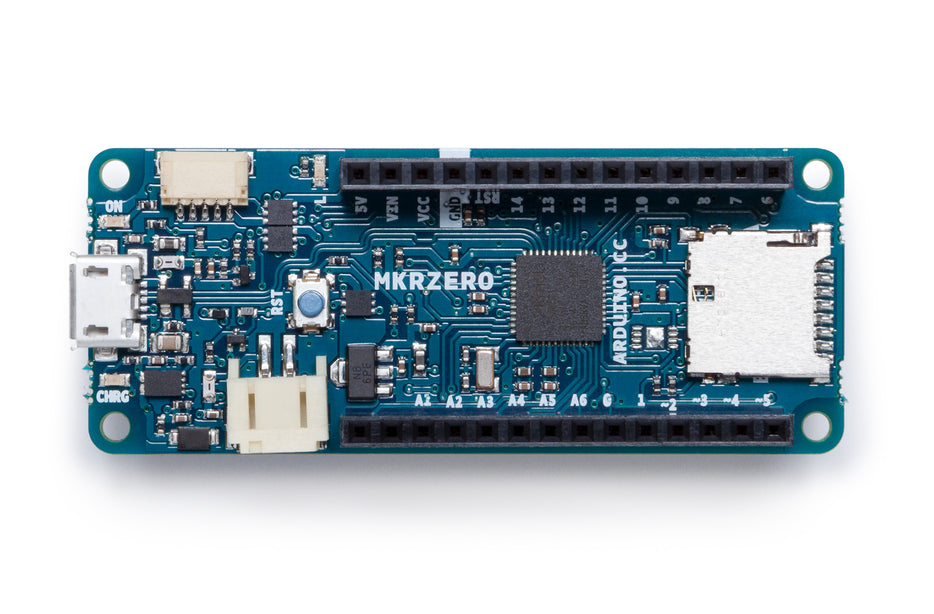
The Arduino MKR Zero (SKU: ABX00012) is a compact MKR-form-factor board built around the Atmel SAMD21G18A (ARM Cortex-M0+ at 48 MHz). Launched in 2017, it is the audio-focused member of the MKR family, distinguished by its built-in I2S interface, on-board microSD card slot, and a JST connector for single-cell 3.7V Li-Po batteries with an integrated charger circuit.
Designed for maker projects that need high-quality audio I/O in a small, battery-powered package, the MKR Zero can connect directly to I2S DACs, I2S ADCs, and MEMS microphones without any additional glue logic. Paired with the ArduinoSound library and the SD library, it becomes a self-contained audio player, recorder, or effects processor.
All I/O operates at 3.3V logic. The board is not 5V tolerant — connecting 5V signals to the GPIO pins will damage the MCU.
Quick Overview
| Feature | Detail |
|---|---|
| MCU | Atmel SAMD21G18A (ARM Cortex-M0+, 48 MHz) |
| Flash | 256 KB |
| SRAM | 32 KB |
| Logic Voltage | 3.3V (NOT 5V tolerant) |
| Key Interface | I2S audio (built-in) |
| Storage | microSD card slot (SPI) |
| Battery | Li-Po 1-cell 3.7V connector + on-board charger |
| USB | micro-USB (programming + serial) |
| Dimensions | 67.64 × 25 mm |
Key Features
I2S Audio Interface
The I2S (Inter-IC Sound) bus is the defining feature of the MKR Zero. It allows direct connection to I2S-compatible DACs (such as the MAX98357A), I2S ADCs, and digital MEMS microphones (such as the SPH0645) without any additional conversion circuitry. This enables studio-quality, 24-bit / 96 kHz audio processing on a board the size of a credit card.
On-Board microSD Slot
The integrated microSD card slot connects via SPI and works with the standard Arduino SD library. Combined with the I2S interface, the board can read WAV or raw PCM audio files from the card and stream them directly to an I2S DAC — making it a capable standalone audio player.
Li-Po Battery Connector and Charger
A JST PH 2-pin connector accepts a single-cell 3.3V / 3.7V Li-Po battery. The on-board MCP73831 charger tops up the battery when USB power is present, enabling fully portable, rechargeable audio projects without any external charging module.
MKR Form Factor
At 67.64 × 25 mm, the MKR Zero shares the same compact footprint and pinout standard as all other Arduino MKR boards (MKR WiFi 1010, MKR GSM 1400, etc.), allowing shields and accessories designed for the MKR ecosystem to be used interchangeably.
ArduinoSound Library
Arduino provides the ArduinoSound library specifically for this board. It abstracts the I2S peripheral into simple read/write calls, greatly reducing the code needed to implement audio playback, recording, and frequency analysis.
Technical Specifications
| Parameter | Value |
|---|---|
| MCU | Atmel SAMD21G18A |
| Architecture | ARM Cortex-M0+ |
| Clock Speed | 48 MHz |
| Flash Memory | 256 KB |
| SRAM | 32 KB |
| Operating Voltage | 3.3V |
| Input Voltage (USB) | 5V via micro-USB |
| Input Voltage (Li-Po) | 3.7V (1-cell Li-Po) |
| Digital I/O Pins | 8 |
| PWM Channels | Up to 12 |
| ADC Resolution | 12-bit |
| I2S Interface | Yes (built-in, for digital audio) |
| microSD Slot | Yes (SPI interface) |
| Li-Po Connector | Yes (JST PH 2-pin, with charger) |
| UART | 1 |
| I2C | 1 |
| SPI | 1 |
| USB Interface | micro-USB (USB native support) |
| Dimensions | 67.64 × 25 mm |
| Weight | ~32 g |
Pinout
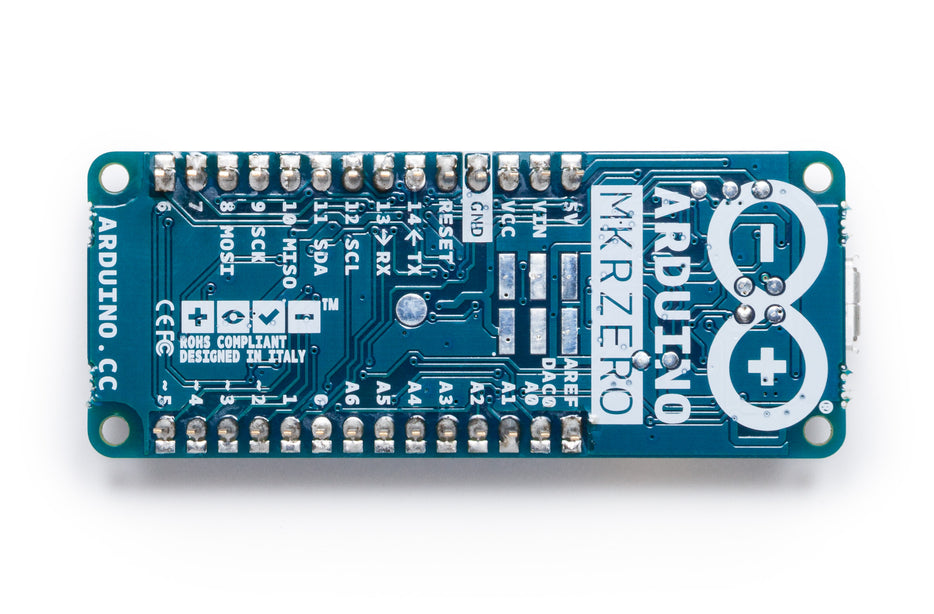
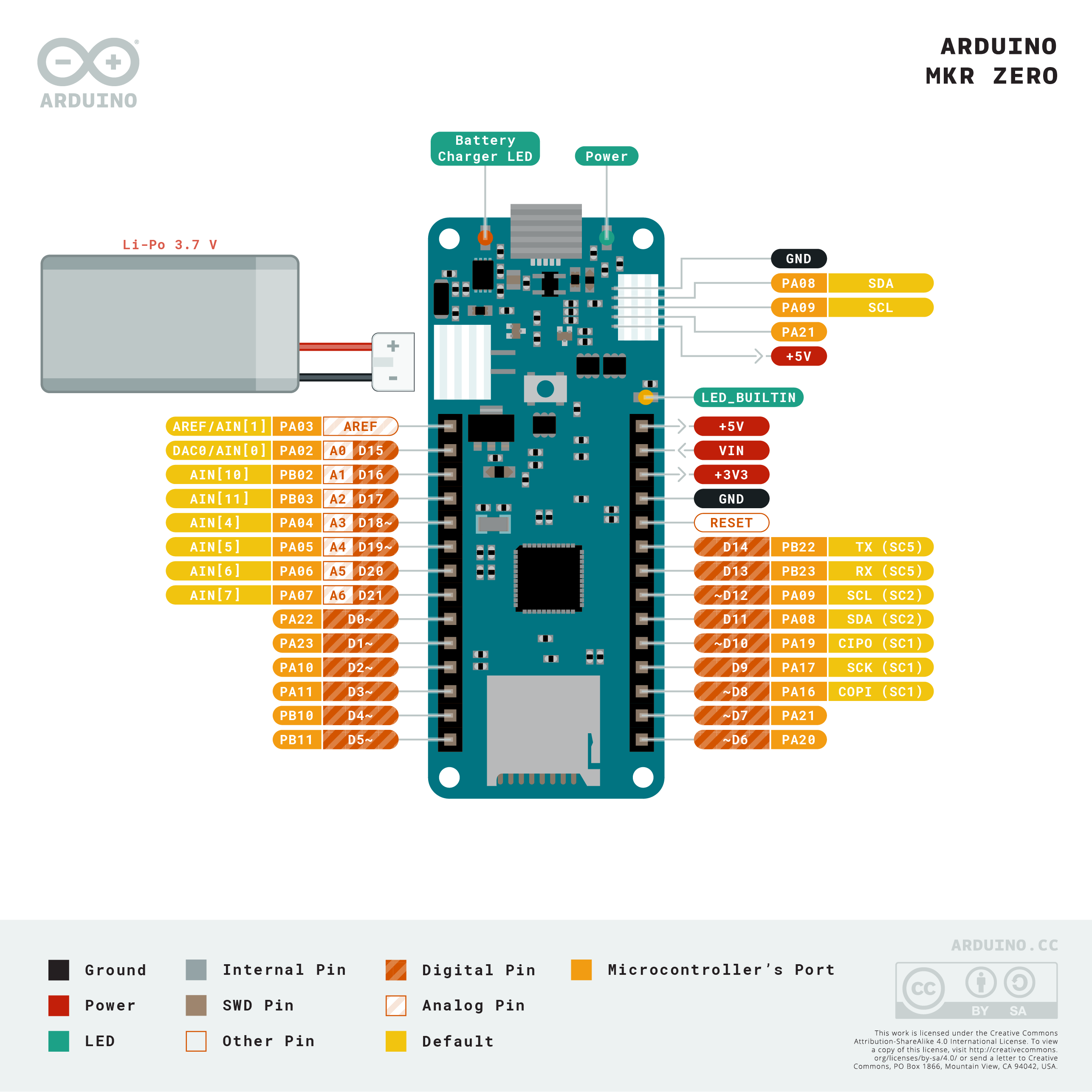
The MKR Zero exposes its pins on two edge-mounted headers following the standard MKR layout:
Left Header (top to bottom)
AREF, DAC0 (A0), A1, A2, A3, A4, A5, A6, D0 (also used for I2S), D1, D2, D3, D4, D5, D6, D7
Right Header (top to bottom)
5V (from USB only), VCC (3.3V regulated), GND, RESET, D8 (SCK/I2S SCK), D9 (MISO), D10 (MOSI / I2S SD), D11 (SDA / I2S FS), D12 (SCL), RX (D13), TX (D14)
I2S Pins
I2S uses SD (Serial Data) on D10, SCK (Bit Clock) on D8, and FS (Frame Select / Word Select) on D11. These are shared with SPI and I2C, so I2S and SPI/I2C cannot be used simultaneously on the same lines.
microSD (Internal SPI)
The microSD card slot is wired to an internal SPI bus separate from the header pins. No user pin assignment is needed — simply use the SD library.
Power
The MKR Zero can be powered in three ways:
| Source | Connector | Voltage | Notes |
|---|---|---|---|
| USB | micro-USB | 5V | Powers board and charges Li-Po |
| Li-Po Battery | JST PH 2-pin | 3.7V nominal | On-board charger (MCP73831) |
| External VCC | Pin header | 3.3V | Directly powers regulated rail; use with caution |
The on-board 3.3V regulator supplies all logic. The Li-Po charger activates automatically when USB is connected. When running on battery only, the 5V pin is unpowered.
Getting Started
What You Need
- Arduino MKR Zero board
- Micro-USB cable
- MicroSD card (FAT32 formatted) — optional for audio playback
- I2S DAC breakout (e.g. MAX98357A) — optional for audio output
- Arduino IDE 1.8+ or Arduino IDE 2.x
Install Board Support
- Open Arduino IDE and go to File > Preferences.
- Add the following URL to "Additional Boards Manager URLs": https://downloads.arduino.cc/packages/package_index.json
- Go to Tools > Board > Boards Manager, search for "SAMD", and install "Arduino SAMD Boards".
- Select Tools > Board > Arduino MKR Zero.
Install Libraries
In the Library Manager (Sketch > Include Library > Manage Libraries), install:
- SD (built-in, for microSD access)
- ArduinoSound (for I2S audio playback and recording)
Programming
Reading a WAV File from the SD Card
The example below opens a WAV file stored on the microSD card and plays it through an I2S DAC connected to the I2S pins (D8, D10, D11).
Notes on the Code
- SDCARD_SS_PIN is a pre-defined constant for the MKR Zero's internal SD CS pin.
- The WAV file must be placed in the root directory of a FAT32-formatted microSD card.
- The I2S DAC (e.g. MAX98357A) connects: BCLK to D8, LRC (WS) to D11, DIN to D10.
Package Contents
| Item | Quantity |
|---|---|
| Arduino MKR Zero board | 1 |
| Headers (unsoldered) | 1 set |
MicroSD card and Li-Po battery are not included.
Applications
- Portable audio file players (WAV playback from microSD)
- Digital audio recorders (using I2S microphones)
- Music synthesizers and sequencers
- Audio effects pedals (real-time DSP)
- MIDI controllers with audio output
- Battery-powered sound modules for installations
- Educational audio DSP projects
Where to Buy
- Arduino Official Store — official source
- Amazon — marketplace listings
Equivalent Boards
| Board | Key Difference |
|---|---|
| Arduino MKR WiFi 1010 | Adds Wi-Fi + BLE; no I2S header breakout, no microSD slot |
| Arduino Due | Larger SAM3X8E, dual DAC + I2S, 3.3V, no Li-Po connector, not MKR form |
| Teensy 4.1 | Far more powerful audio (480 MHz Cortex-M7), I2S, SD, larger and pricier |
Documentation
Notes
3.3V Logic Warning
The MKR Zero operates at 3.3V logic on all I/O pins. The SAMD21 is NOT 5V tolerant. Connecting any 5V signal (from a 5V Arduino, sensor, or module) directly to a GPIO pin will permanently damage the microcontroller. Use a logic level shifter when interfacing with 5V devices.
microSD Card Format
The SD card must be formatted as FAT16 or FAT32. Cards larger than 32 GB may require special formatting tools to use FAT32. Recommended capacity: 4 GB to 32 GB.
I2S and SPI Conflict
The I2S peripheral shares physical pins with the SPI bus exposed on the header. Using I2S audio output/input at the same time as SPI devices connected to the header pins (D8, D10, D11) is not possible without hardware multiplexing. The internal SD card slot uses a separate internal SPI bus and is not affected.
Community
- Arduino Forum — official community
- Arduino Discord — real-time chat
- r/arduino (Reddit) — community
- Arduino Project Hub — projects
Revision History
| Version | Date | Notes |
|---|---|---|
| v1.0 | 2026-06 | Initial entry |