
Arduino Nano 33 BLE
Image Gallery
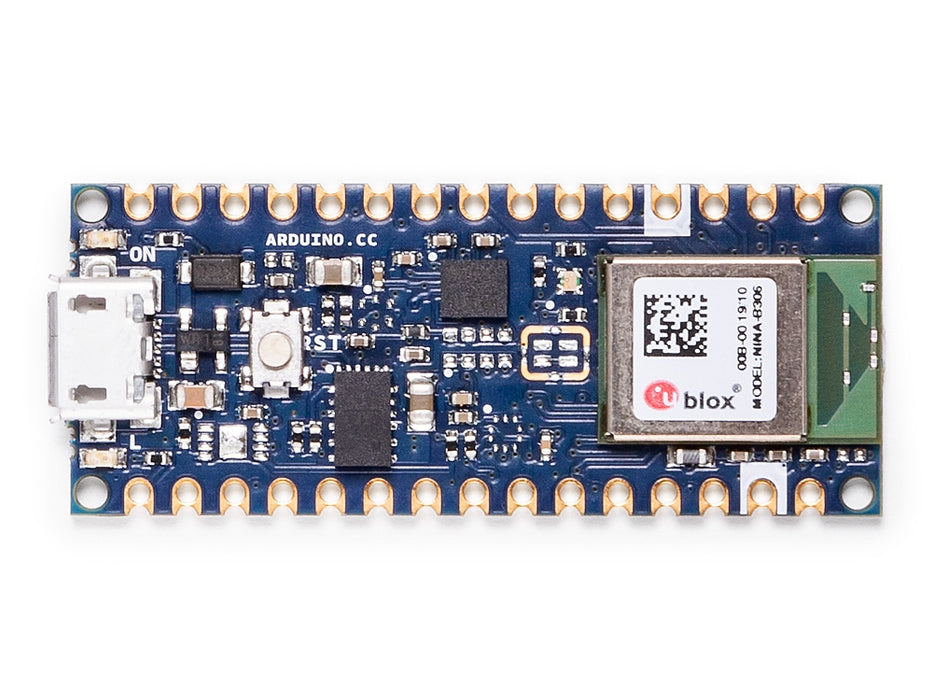
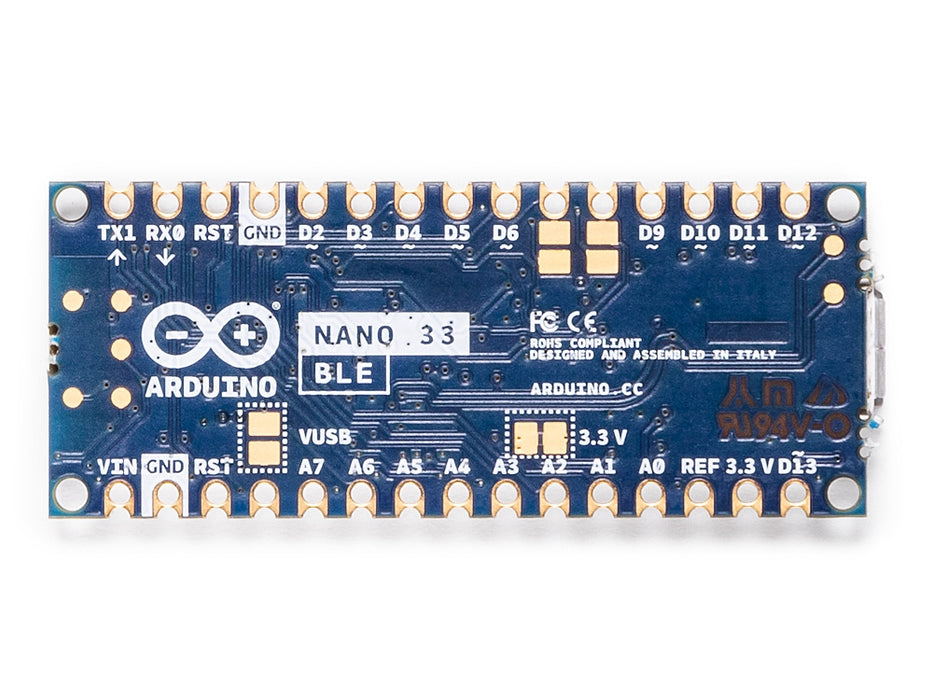
Overview
The Arduino Nano 33 BLE is a compact 32-bit board built around the Nordic nRF52840 ARM Cortex-M4 microcontroller, packaged inside a u-blox NINA-B306 module. Released in 2019, it represents a major step up from the classic AVR-based Nano in terms of processing power and memory: 1 MB of Flash and 256 KB of SRAM, running at 64 MHz, make it capable of tasks that would overwhelm the 2 KB SRAM of the ATmega328P.
Alongside the more powerful MCU, the Nano 33 BLE includes a built-in LSM9DS1 9-axis inertial measurement unit (IMU) combining a 3-axis accelerometer, 3-axis gyroscope, and 3-axis magnetometer. This makes the board immediately useful for motion-sensing, orientation, and gesture-recognition projects without additional hardware.
Bluetooth Low Energy 5 is provided by the nRF52840's integrated radio. The board is BLE-only — there is no Wi-Fi and no classic Bluetooth. For projects requiring Wi-Fi or both Wi-Fi and BLE, consider the Nano 33 IoT or Nano RP2040 Connect.
The board operates at 3.3V logic throughout. It is physically pin-compatible with the classic Nano footprint but is NOT electrically compatible with 5V peripherals on its I/O pins.
Quick Overview
| Feature | Detail | |
|---|---|---|
| Microcontroller | Nordic nRF52840 (via u-blox NINA-B306) | |
| CPU | ARM Cortex-M4 with FPU | |
| Clock Speed | 64 MHz | |
| Operating/Logic Voltage | 3.3V (NOT 5V tolerant) | |
| Flash Memory | 1 MB | |
| SRAM | 256 KB | |
| Bluetooth | BLE 5.0 (no Wi-Fi, no classic Bluetooth) | |
| IMU | LSM9DS1 (9-axis | accelerometer + gyroscope + magnetometer) |
| Digital I/O Pins | 22 | |
| PWM Pins | 9 | |
| Analog Input Pins | 8 (12-bit ADC) | |
| USB Interface | micro-USB | |
| Dimensions | 18 × 45 mm |
Key Features
- Nordic nRF52840 ARM Cortex-M4 at 64 MHz with hardware floating-point unit (FPU)
- 1 MB Flash and 256 KB SRAM — dramatically more than the classic Nano
- Bluetooth Low Energy 5 built in (BLE peripheral and central roles supported)
- LSM9DS1 9-axis IMU onboard: accelerometer, gyroscope, and magnetometer
- 9 PWM-capable pins for motor and LED control
- 12-bit ADC on 8 analog input pins
- Hardware UART, I2C, and SPI
- Pin-compatible with classic Arduino Nano (same 18 × 45 mm footprint)
- Board package: Arduino Mbed OS Nano Boards
- 3.3V logic throughout — suited for modern low-voltage sensors and modules
Technical Specifications
| Parameter | Value |
|---|---|
| Microcontroller | Nordic nRF52840 (via u-blox NINA-B306 module) |
| CPU Core | ARM Cortex-M4 with FPU |
| Clock Speed | 64 MHz |
| Operating/Logic Voltage | 3.3V |
| Input Voltage (USB) | 5V via micro-USB |
| Input Voltage (VIN) | 4.5–21V |
| USB Connector | micro-USB (USB-to-serial bridge) |
| Flash Memory | 1 MB |
| SRAM | 256 KB |
| Bluetooth | BLE 5.0 |
| Classic Bluetooth | Not supported |
| Wi-Fi | Not supported |
| IMU | LSM9DS1 (3-axis accelerometer, gyroscope, magnetometer) |
| Digital I/O Pins | 22 |
| PWM Channels | 9 |
| Analog Input Pins | 8 (A0–A7) |
| ADC Resolution | 12-bit |
| UART | 1 |
| I2C | 1 |
| SPI | 1 |
| Board Dimensions | 18 × 45 mm |
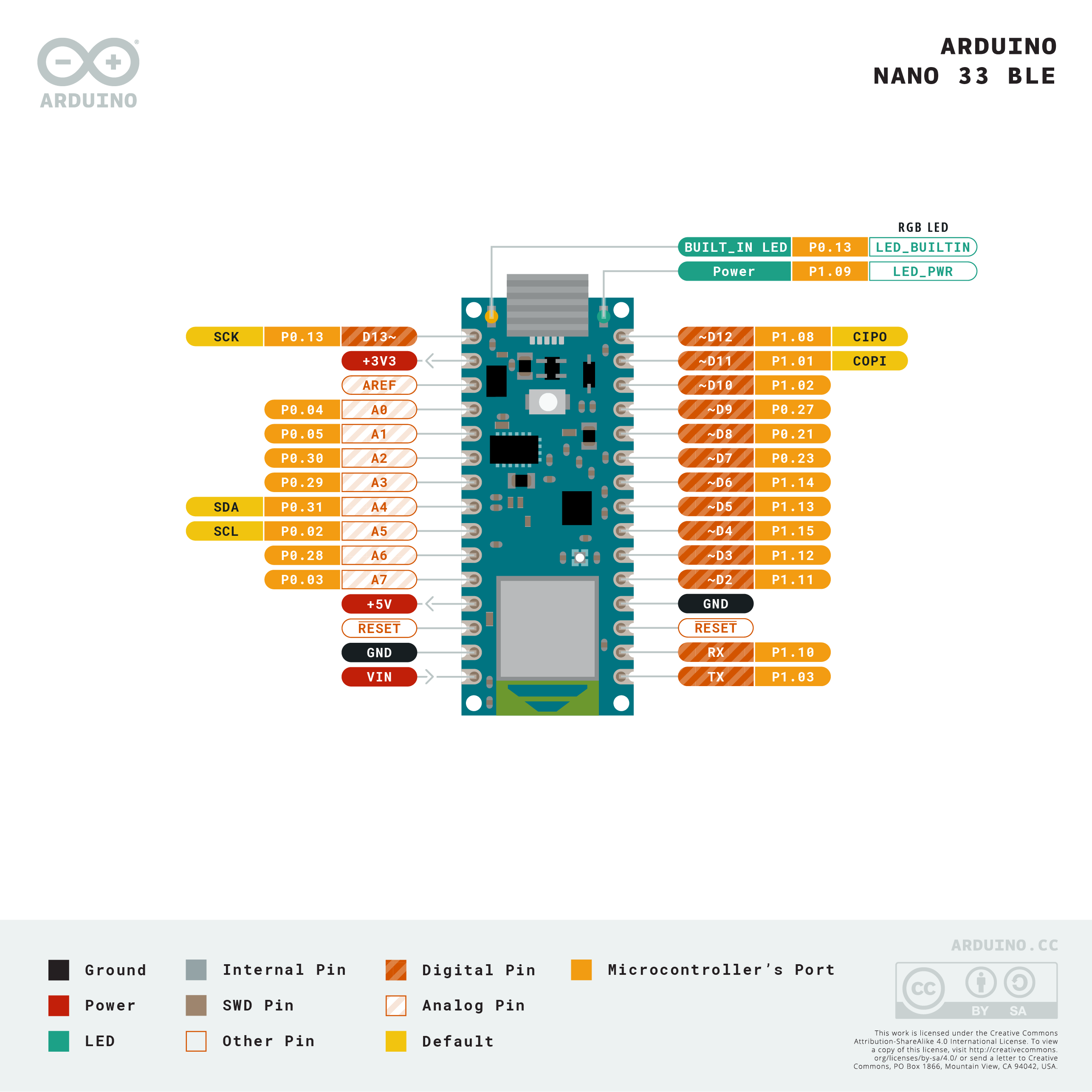
Pinout
Digital Pins
22 digital I/O pins are available in the standard Nano layout. D0 (RX) and D1 (TX) are shared with the hardware UART.
PWM Pins
9 pins support PWM output via analogWrite(). The nRF52840 uses configurable hardware PWM peripherals.
Analog Pins
8 analog input pins (A0–A7) are connected to the nRF52840's 12-bit SAR ADC.
Communication Pins
| Interface | Pins |
|---|---|
| UART | D0 (RX), D1 (TX) |
| I2C | A4 (SDA), A5 (SCL) |
| SPI | D10 (SS), D11 (MOSI), D12 (MISO), D13 (SCK) |
Power Pins
| Pin | Function |
|---|---|
| VIN | External supply input (4.5–21V) |
| 5V | 5V output from regulator |
| 3.3V | 3.3V regulated output (from onboard regulator) |
| GND | Ground |
| RESET | Resets the microcontroller |
Power
The Arduino Nano 33 BLE is powered via:
- Micro-USB: 5V from USB bus, regulated to 3.3V onboard.
- VIN pin: accepts 4.5–21V, regulated down to 3.3V.
All I/O operates at 3.3V. Idle current draw is approximately 5 mA without BLE radio active; BLE advertising adds a few milliamps depending on interval.
On-Board Components
| Component | Description | |
|---|---|---|
| LSM9DS1 IMU | 9-axis IMU | 3-axis accelerometer, 3-axis gyroscope, 3-axis magnetometer |
| u-blox NINA-B306 | Module containing the Nordic nRF52840 SoC and BLE antenna | |
| Onboard LED | Single LED on D13 (LED_BUILTIN) | |
| RGB LED | Onboard RGB LED (red, green, blue channels) |
The LSM9DS1 is accessible via the Arduino_LSM9DS1 library (install via Library Manager). It communicates with the nRF52840 over I2C internally.
Wireless Connectivity
The Nano 33 BLE supports Bluetooth Low Energy 5.0 only. Classic Bluetooth and Wi-Fi are not available on this board. Use the ArduinoBLE library for BLE communication.
BLE Peripheral Example
Getting Started
Install the Board Package
In the Arduino IDE, open Tools > Board > Boards Manager. Search for "Arduino Mbed OS Nano Boards" and install it. Select Arduino Nano 33 BLE from the board list.
Install Required Libraries
From the Library Manager, install:
- ArduinoBLE (for Bluetooth Low Energy)
- Arduino_LSM9DS1 (for the onboard IMU)
Blink Example
Programming
The Nano 33 BLE is programmed via the Arduino IDE using the Arduino Mbed OS Nano Boards package. The board uses Mbed OS as its underlying RTOS, which enables advanced features like threads and mutexes for experienced users.
Uploading is done via the micro-USB port. If the board does not appear as a COM port, double-press the RESET button to enter bootloader mode — the onboard LED will pulse to indicate bootloader mode is active.
Package Contents
| Item | Quantity |
|---|---|
| Arduino Nano 33 BLE board | 1 |
| micro-USB cable | 1 (included with some retail versions; check listing) |
Applications
- BLE beacons and proximity sensors
- Motion detection, gesture recognition, and orientation tracking (using LSM9DS1)
- Wearable fitness and health monitors
- Robotics with wireless feedback
- BLE-connected smart home devices
- Low-power portable data loggers
- Educational projects involving 32-bit ARM and Bluetooth
Where to Buy
| Retailer | Link | |
|---|---|---|
| Arduino Official Store | https | //store.arduino.cc/products/arduino-nano-33-ble |
| Amazon | https | //www.amazon.com/s?k=Arduino+Nano+33+BLE |
Equivalent Boards
| Board | Key Difference |
|---|---|
| Arduino Nano 33 BLE Sense | Same board plus environmental sensors (humidity, pressure, mic, gesture) |
| Arduino Nano 33 IoT | Wi-Fi + BLE 4.2, SAMD21 MCU (32-bit ARM M0+), 3.3V |
| Arduino Nano RP2040 Connect | RP2040 dual-core MCU, Wi-Fi + BLE, same NINA-W102 module, 3.3V |
Documentation
| Resource | Link | |
|---|---|---|
| Official Product Page | https | //store.arduino.cc/products/arduino-nano-33-ble |
| Documentation & Pinout | https | //docs.arduino.cc/hardware/nano-33-ble |
| ArduinoBLE Library | https | //www.arduino.cc/reference/en/libraries/arduinoble/ |
| Arduino_LSM9DS1 Library | https | //www.arduino.cc/reference/en/libraries/arduino_lsm9ds1/ |
| nRF52840 Product Spec | https | //infocenter.nordicsemi.com/pdf/nRF52840_PS_v1.7.pdf |
Notes
- WARNING: The Nano 33 BLE operates at 3.3V logic. I/O pins are NOT 5V tolerant. Connecting 5V signals to any I/O pin can permanently damage the board. Use a level shifter when interfacing with 5V devices.
- The board is BLE-only. There is no Wi-Fi radio. If your project needs Wi-Fi, consider the Nano 33 IoT or Nano RP2040 Connect instead.
- If the board is not recognized over USB, double-press the RESET button to enter bootloader mode (LED will pulse). Then re-upload your sketch.
- The Mbed OS board package enables RTOS features (threads, semaphores). This is optional but available for advanced scheduling needs.
- The onboard LSM9DS1 connects to the nRF52840 via an internal I2C bus. The external I2C pins (A4/A5) are on a separate bus and can be used simultaneously.
Community
- Arduino Forum — official community for questions and projects
- Arduino Discord — real-time chat with the Arduino community
- r/arduino (Reddit) — share projects and ask questions
- Arduino Project Hub — browse community-submitted projects
Revision History
| Version | Date | Notes |
|---|---|---|
| v1.0 | 2026-06 | Initial entry |