
Arduino Nano 33 IoT
Image Gallery
Overview
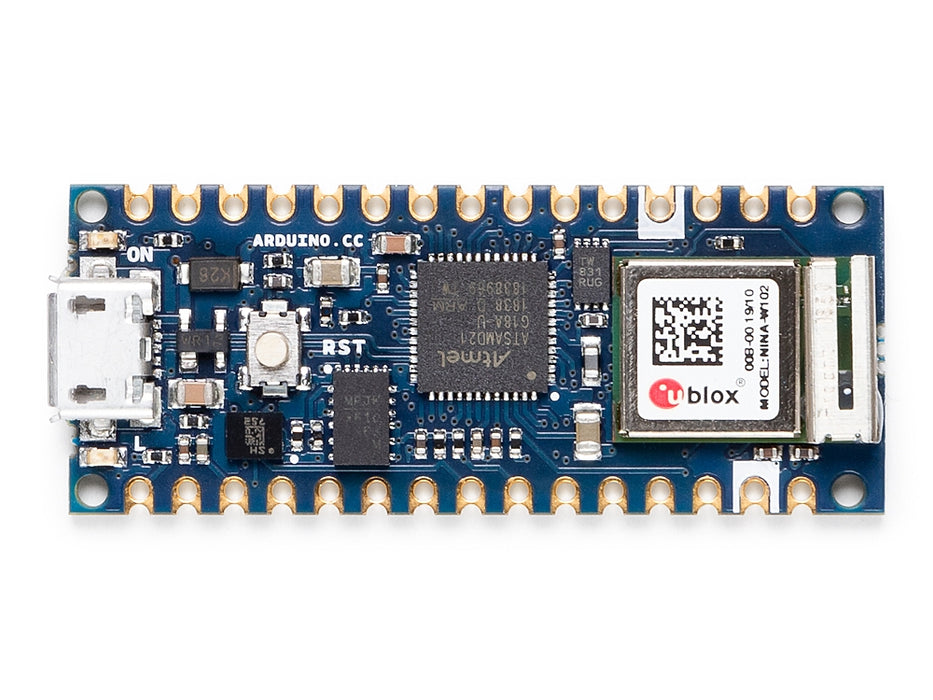
The Arduino Nano 33 IoT, released in 2019, brings Wi-Fi and Bluetooth connectivity to the compact Nano form factor. Its main microcontroller is the Atmel SAMD21G18A — a 32-bit ARM Cortex-M0+ running at 48 MHz with 256 KB of Flash and 32 KB of SRAM. Wi-Fi (802.11 b/g/n) and Bluetooth 4.2 Low Energy are handled by a separate u-blox NINA-W102 module, which is an ESP32-based radio module running u-blox firmware.
Beyond connectivity, the Nano 33 IoT includes a u-blox LSM6DS3 6-axis IMU (accelerometer and gyroscope) and an ATECC608A cryptographic coprocessor for secure key storage and TLS handshake acceleration — an important feature for IoT devices that must communicate securely over the internet.
The board operates at 3.3V logic, making it compatible with modern low-voltage sensors but requiring care when interfacing with 5V devices. It uses the WiFiNINA library for wireless communication and is officially supported on the Arduino IoT Cloud platform.
Physically, the Nano 33 IoT shares the same 18 × 45 mm footprint and pin layout as the classic Nano and Nano Every, making it a straightforward mechanical replacement for those boards in enclosures designed to the Nano form factor.
IMPORTANT: The Nano 33 IoT operates at 3.3V logic. I/O pins are NOT 5V tolerant.
Quick Overview
| Feature | Detail | |
|---|---|---|
| Microcontroller | Atmel SAMD21G18A (ARM Cortex-M0+, 48 MHz) | |
| Operating/Logic Voltage | 3.3V (NOT 5V tolerant) | |
| Flash Memory | 256 KB | |
| SRAM | 32 KB | |
| Wireless Module | u-blox NINA-W102 (ESP32-based) | |
| Wi-Fi | 802.11 b/g/n (2.4 GHz) | |
| Bluetooth | BLE 4.2 | |
| IMU | LSM6DS3 (6-axis | accelerometer + gyroscope) |
| Crypto | ATECC608A (hardware security) | |
| Digital I/O Pins | 22 | |
| PWM Pins | 11 | |
| Analog Input Pins | 8 (12-bit ADC) | |
| USB Interface | micro-USB | |
| IoT Cloud | Yes (officially supported) | |
| Dimensions | 18 × 45 mm |
Key Features
- SAMD21G18A ARM Cortex-M0+ at 48 MHz: 256 KB Flash, 32 KB SRAM
- Wi-Fi 802.11 b/g/n (2.4 GHz) via u-blox NINA-W102 (ESP32-based)
- Bluetooth Low Energy 4.2 via NINA-W102 (simultaneous Wi-Fi and BLE)
- ATECC608A hardware crypto coprocessor for secure IoT communication
- LSM6DS3 6-axis IMU: 3-axis accelerometer and 3-axis gyroscope
- 11 PWM-capable digital pins
- 12-bit ADC on 8 analog input pins
- 3.3V logic — suited for modern sensors and BLE modules
- WiFiNINA library for Wi-Fi and BLE control from the SAMD21
- Officially supported on Arduino IoT Cloud
- Pin-compatible with the classic Nano footprint (18 × 45 mm)
- Board package: Arduino SAMD Boards
Technical Specifications
| Parameter | Value |
|---|---|
| Microcontroller | Atmel SAMD21G18A |
| CPU Core | ARM Cortex-M0+ |
| Clock Speed | 48 MHz |
| Operating/Logic Voltage | 3.3V |
| Input Voltage (USB) | 5V via micro-USB |
| Input Voltage (VIN) | 4.5–21V |
| USB Connector | micro-USB (USB-to-serial bridge) |
| Flash Memory | 256 KB |
| SRAM | 32 KB |
| EEPROM | None (emulated in Flash if needed) |
| Wireless Module | u-blox NINA-W102 (ESP32-based) |
| Wi-Fi | 802.11 b/g/n, 2.4 GHz |
| Bluetooth | BLE 4.2 (Low Energy) |
| IMU | LSM6DS3 (3-axis accelerometer, 3-axis gyroscope) |
| Crypto Chip | ATECC608A |
| Digital I/O Pins | 22 |
| PWM Channels | 11 |
| Analog Input Pins | 8 (A0–A7) |
| ADC Resolution | 12-bit |
| DAC | 1 (10-bit, on A0) |
| UART | 1 |
| I2C | 1 |
| SPI | 1 |
| Board Dimensions | 18 × 45 mm |
Pinout
Digital Pins
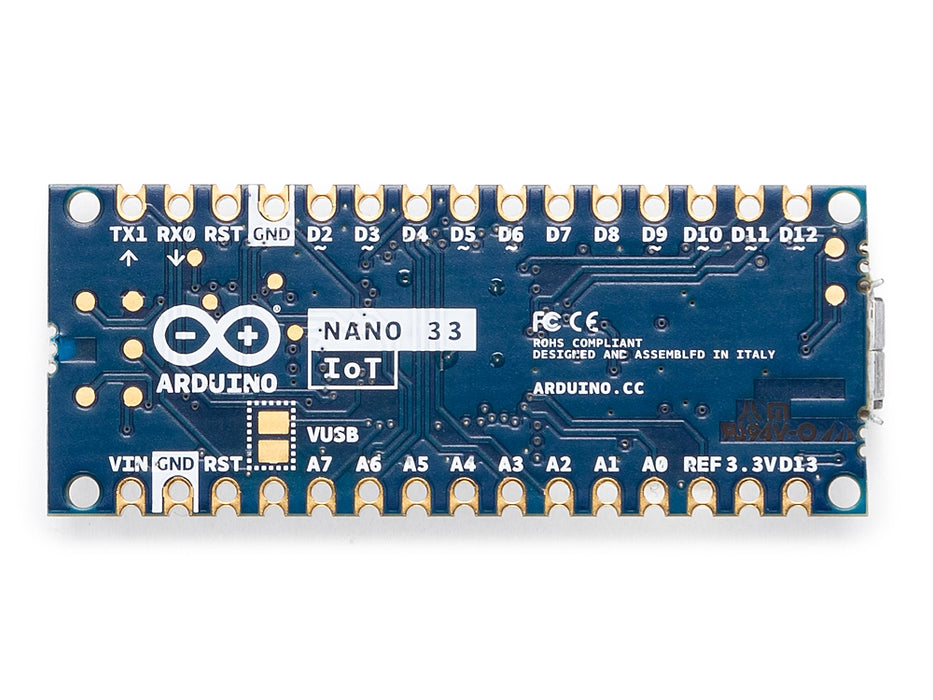
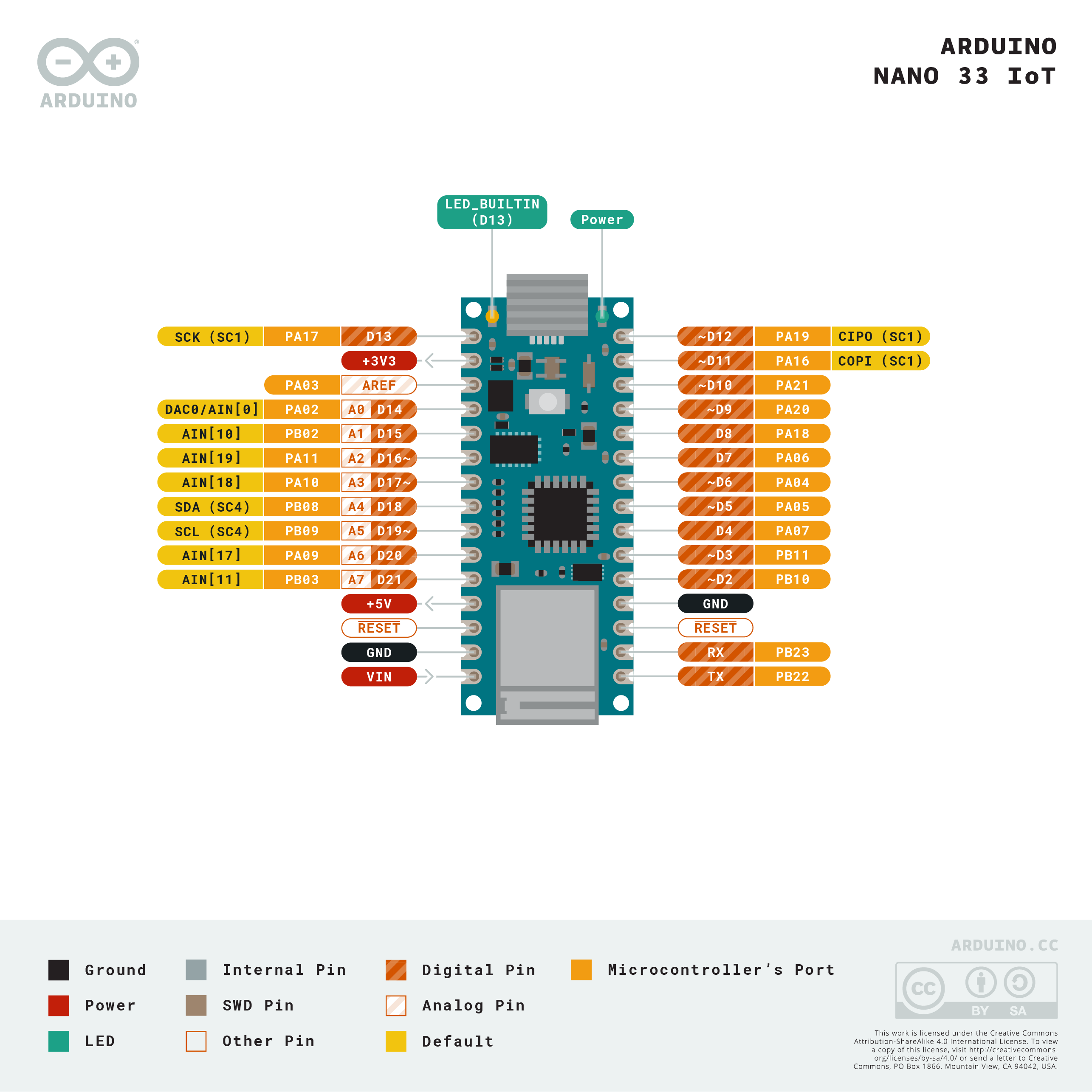
22 digital I/O pins in the standard Nano layout. D0 (RX) and D1 (TX) are shared with the hardware UART.
PWM Pins
11 pins support PWM via analogWrite(). The SAMD21's TCC and TC timer modules provide hardware PWM.
Analog Pins
8 analog input pins (A0–A7) with 12-bit resolution. A0 also doubles as a 10-bit DAC output.
Communication Pins
| Interface | Pins |
|---|---|
| UART | D0 (RX), D1 (TX) |
| I2C | A4 (SDA), A5 (SCL) |
| SPI | D10 (SS), D11 (MOSI), D12 (MISO), D13 (SCK) |
| DAC Output | A0 |
Power Pins
| Pin | Function |
|---|---|
| VIN | External supply input (4.5–21V) |
| 5V | 5V output from regulator |
| 3.3V | 3.3V regulated output |
| GND | Ground |
| RESET | Resets the microcontroller |
Power
The Arduino Nano 33 IoT is powered via micro-USB (5V USB bus) or the VIN pin (4.5–21V). All logic operates at 3.3V. The NINA-W102 Wi-Fi module requires up to 200 mA peak during TX bursts — use a stable USB or regulated VIN supply. Idle current without Wi-Fi active is approximately 8–10 mA.
On-Board Components
| Component | Part | Function |
|---|---|---|
| Main MCU | SAMD21G18A | ARM Cortex-M0+ application processor |
| Wireless Module | u-blox NINA-W102 | Wi-Fi 802.11 b/g/n + Bluetooth 4.2 LE (ESP32-based) |
| IMU | LSM6DS3 | 6-axis accelerometer and gyroscope |
| Crypto Coprocessor | ATECC608A | Hardware key storage and crypto acceleration |
| LED | Onboard | LED on D13 (LED_BUILTIN) |
The LSM6DS3 communicates with the SAMD21 over an internal I2C bus. The NINA-W102 communicates with the SAMD21 over an internal SPI bus — not the user-accessible SPI pins.
Wireless Connectivity
The Nano 33 IoT's wireless capabilities are handled by the u-blox NINA-W102 module. The SAMD21 communicates with this module over an internal SPI interface using the WiFiNINA library. Both Wi-Fi and BLE 4.2 can be active simultaneously.
Wi-Fi with WiFiNINA
Bluetooth Low Energy
Use the ArduinoBLE library together with the NINA-W102 module for BLE peripheral and central communication.
IoT Cloud
The Nano 33 IoT is officially supported on the Arduino IoT Cloud platform. Once provisioned, the board can push and receive data from cloud dashboards, trigger automations, and participate in multi-device IoT systems. The ATECC608A crypto chip is used during the cloud provisioning process to securely store device credentials.
Setup steps:
- Create an account at https://cloud.arduino.cc
- Add the Nano 33 IoT as a new device
- Follow the provisioning wizard — credentials are written to the ATECC608A
- Create cloud variables and build a dashboard
Getting Started
Install the Board Package
In the Arduino IDE, open Tools > Board > Boards Manager. Search for "Arduino SAMD Boards" and install. Select Arduino Nano 33 IoT from the board list.
Install Required Libraries
- WiFiNINA (Wi-Fi and BLE via NINA-W102)
- ArduinoBLE (BLE)
- Arduino_LSM6DS3 (onboard IMU)
Blink and Serial Test
Programming
The Nano 33 IoT is programmed using the Arduino IDE with the Arduino SAMD Boards package. Upload via micro-USB. If the board is not detected, double-press RESET to enter bootloader mode.
The SAMD21 supports true 12-bit ADC readings (use analogReadResolution(12) to enable) and has one true DAC output on pin A0 (analogWriteResolution(10) + analogWrite(A0, value)).
Package Contents
| Item | Quantity |
|---|---|
| Arduino Nano 33 IoT board | 1 |
| micro-USB cable | 1 (included with some retail versions; check listing) |
Applications
- Wi-Fi connected IoT sensors and data loggers
- Smart home automation nodes
- BLE beacons and proximity-triggered actions
- Motion-triggered wireless alerts (using LSM6DS3)
- Secure IoT communication using ATECC608A
- Arduino IoT Cloud dashboards
- Wearable connected devices
- Remote sensor monitoring and control
Where to Buy
| Retailer | Link | |
|---|---|---|
| Arduino Official Store | https | //store.arduino.cc/products/arduino-nano-33-iot |
| Amazon | https | //www.amazon.com/s?k=Arduino+Nano+33+IoT |
Equivalent Boards
| Board | Key Difference |
|---|---|
| Arduino Nano ESP32 | ESP32-S3 as main MCU (more powerful), same Nano size, 3.3V, Wi-Fi + BLE 5 |
| Arduino Nano 33 BLE | Same Nano size, nRF52840 (ARM M4), BLE 5 only (no Wi-Fi), more SRAM |
| Arduino Nano RP2040 Connect | RP2040 MCU, same NINA-W102 Wi-Fi + BLE module, adds microphone, 3.3V |
Documentation
| Resource | Link | |
|---|---|---|
| Official Product Page | https | //store.arduino.cc/products/arduino-nano-33-iot |
| Documentation & Pinout | https | //docs.arduino.cc/hardware/nano-33-iot |
| WiFiNINA Library Reference | https | //www.arduino.cc/reference/en/libraries/wifinina/ |
| ArduinoBLE Library | https | //www.arduino.cc/reference/en/libraries/arduinoble/ |
| Arduino IoT Cloud | https | //cloud.arduino.cc |
| SAMD21 Datasheet | https | //ww1.microchip.com/downloads/en/DeviceDoc/SAM_D21_DA1_Family_DataSheet_DS40001882F.pdf |
Notes
- WARNING: The Nano 33 IoT operates at 3.3V logic. I/O pins are NOT 5V tolerant. Do not connect 5V signals to any I/O pin. Use a level shifter for 5V peripherals.
- The NINA-W102 Wi-Fi module requires up to 200 mA peak current during Wi-Fi transmission. Use a USB power source or regulated VIN supply capable of at least 500 mA total.
- The ATECC608A crypto chip stores device credentials for secure Arduino IoT Cloud pairing. Do not attempt to erase or reprogram it — this will break cloud connectivity.
- The SAMD21 has no built-in EEPROM. Use FlashStorage library or write to Flash if non-volatile storage is needed.
- A0 can be used as a 10-bit DAC output via analogWrite(A0, value) after calling analogWriteResolution(10).
- To achieve 12-bit ADC readings, call analogReadResolution(12) in setup(). Default is 10-bit for compatibility.
Community
- Arduino Forum — official community for questions and projects
- Arduino Discord — real-time chat with the Arduino community
- r/arduino (Reddit) — share projects and ask questions
- Arduino Project Hub — browse community-submitted projects
Revision History
| Version | Date | Notes |
|---|---|---|
| v1.0 | 2026-06 | Initial entry |