
Arduino Nano ESP32
Image Gallery

Overview
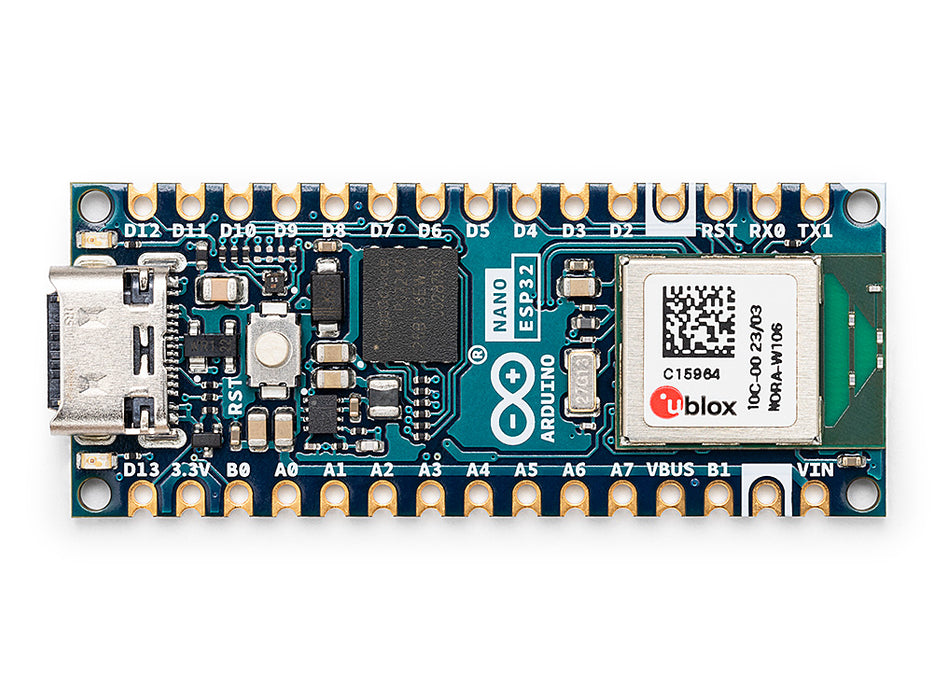
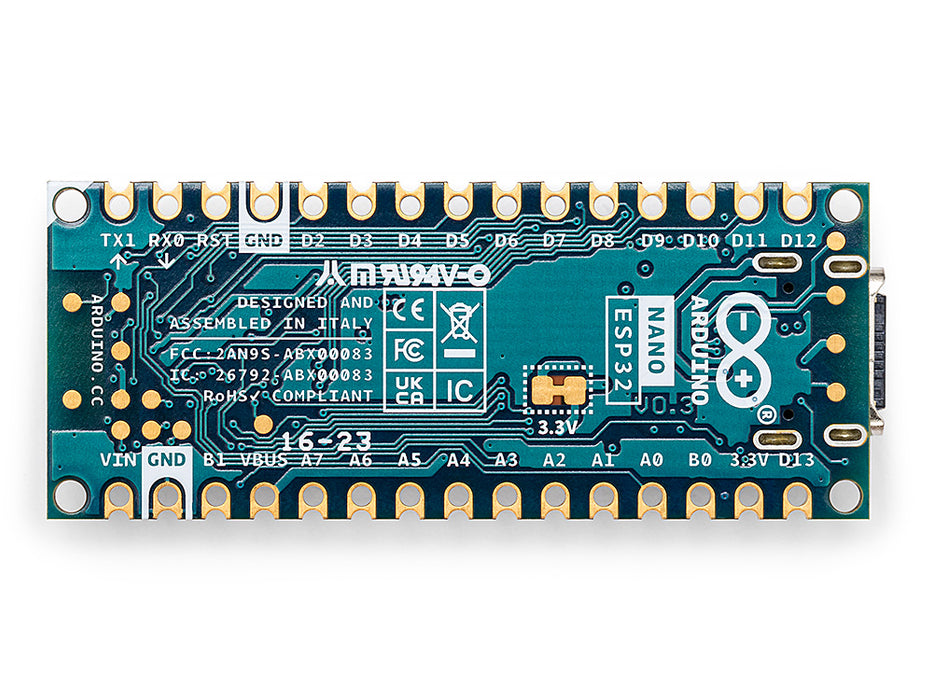
The Arduino Nano ESP32, released in 2023, is the first Arduino Nano board to feature the ESP32-S3 microcontroller — a dual-core, 240 MHz Xtensa LX7 processor with native Wi-Fi and Bluetooth Low Energy 5 built in. The wireless radio is integrated via the u-blox NORA-W106 module, which packages the ESP32-S3 with its antenna into a certified radio module, simplifying regulatory compliance for product builders.
The Nano ESP32 is a significant architectural departure from earlier Nano boards. It runs the Arduino ESP32 Boards package rather than the classic AVR or ARM Mbed toolchains. It operates at 3.3V logic — not 5V — and includes a USB-C port with native USB OTG support, enabling USB HID (keyboard, mouse, gamepad emulation) without additional hardware.
With 16 MB of QSPI Flash, 8 MB of PSRAM, a 12-bit ADC across 20 analog-capable pins, and official Arduino IoT Cloud support, the Nano ESP32 is aimed at connected IoT applications, advanced prototyping, and projects that previously required a standalone ESP32 module alongside an Arduino board.
IMPORTANT: The Nano ESP32 operates at 3.3V logic. Its I/O pins are NOT 5V tolerant. Connecting 5V signals directly to any I/O pin may damage the board permanently.
Quick Overview
| Feature | Detail |
|---|---|
| Microcontroller | u-blox NORA-W106 (ESP32-S3, dual-core Xtensa LX7) |
| Clock Speed | 240 MHz |
| Operating/Logic Voltage | 3.3V (NOT 5V tolerant) |
| Flash Memory | 16 MB (QSPI) |
| PSRAM | 8 MB |
| Wi-Fi | 802.11 b/g/n (2.4 GHz) |
| Bluetooth | BLE 5 |
| Digital I/O Pins | 22 |
| Analog Input Pins | 20 (12-bit ADC) |
| USB Interface | USB-C (native USB OTG) |
| HID Support | Yes (native USB) |
| IoT Cloud | Yes (officially supported) |
| Dimensions | 18 × 45 mm |
Key Features
- Dual-core ESP32-S3 at 240 MHz — significantly more processing power than AVR Nano boards
- Wi-Fi 802.11 b/g/n (2.4 GHz) and Bluetooth Low Energy 5 built in
- 16 MB QSPI Flash and 8 MB PSRAM for memory-intensive applications
- Native USB-C with USB OTG: supports USB HID (keyboard, mouse, MIDI, gamepad emulation)
- 20 analog-capable pins with 12-bit ADC (vs. 10-bit on classic Nano)
- 3.3V logic throughout — designed for modern low-voltage peripherals
- Input: 5V via USB-C or 5–21V via VIN pin
- Officially supported on Arduino IoT Cloud
- Board package: Arduino ESP32 Boards (install via Boards Manager)
- Same 18 × 45 mm breadboard-compatible Nano footprint
Technical Specifications
| Parameter | Value |
|---|---|
| Microcontroller | u-blox NORA-W106 (ESP32-S3) |
| CPU | Dual-core Xtensa LX7 |
| Clock Speed | 240 MHz |
| Operating/Logic Voltage | 3.3V |
| Input Voltage (USB-C) | 5V |
| Input Voltage (VIN) | 5–21V |
| USB Connector | USB-C |
| USB Type | Native USB OTG (no separate bridge chip) |
| Flash Memory | 16 MB (QSPI) |
| PSRAM | 8 MB |
| Wi-Fi | 802.11 b/g/n, 2.4 GHz |
| Bluetooth | BLE 5 (Bluetooth Low Energy) |
| Digital I/O Pins | 22 |
| PWM | Available on most digital pins (software-configurable) |
| Analog Input Pins | 20 (12-bit ADC) |
| ADC Resolution | 12-bit |
| UART | 2 |
| I2C | 1 |
| SPI | 1 |
| HID Support | Yes (via native USB OTG) |
| IoT Cloud | Yes (Arduino IoT Cloud) |
| Board Dimensions | 18 × 45 mm |
Pinout
https://electronicswiki.com/images/products/arduino-nano-esp32-pinout.png
Digital Pins
The Nano ESP32 exposes 22 digital I/O pins in the standard Nano layout. Most pins are capable of PWM output since the ESP32-S3 uses software-configurable timers rather than fixed hardware PWM assignments.
Analog Pins
20 pins are connected to the ESP32-S3's 12-bit SAR ADC. Note that ESP32-S3 ADC2 (used when Wi-Fi is active) may have reduced accuracy — prefer ADC1 pins for precise analog readings.
Communication Pins
| Interface | Pins |
|---|---|
| UART0 | D0 (RX), D1 (TX) |
| UART1 | Configurable |
| I2C | A4 (SDA), A5 (SCL) |
| SPI | D10 (SS), D11 (MOSI), D12 (MISO), D13 (SCK) |
Power Pins
| Pin | Function |
|---|---|
| VIN | External supply input (5–21V) |
| 5V | 5V output (from USB-C or VIN regulator) |
| 3.3V | 3.3V regulated output |
| GND | Ground |
| RESET | Resets the microcontroller |
Power
The Arduino Nano ESP32 is powered via:
- USB-C port: provides 5V from USB, regulated internally to 3.3V.
- VIN pin: accepts 5–21V, regulated to 5V and then 3.3V onboard.
I/O pins operate at 3.3V. The board's regulator provides 3.3V to the entire system. Current draw is higher than AVR Nano boards due to the dual-core processor and Wi-Fi radio — plan for up to 250 mA peak during Wi-Fi transmission.
Wireless Connectivity
The Nano ESP32 integrates Wi-Fi 802.11 b/g/n (2.4 GHz) and Bluetooth Low Energy 5 through the u-blox NORA-W106 module. Both radios are available simultaneously.
Wi-Fi Example
Bluetooth Low Energy
Use the ArduinoBLE library for BLE peripheral and central roles. The ESP32-S3's BLE 5 stack supports extended advertising and improved range over BLE 4.2.
HID Support
Because the Nano ESP32 uses native USB OTG (not a separate USB-to-serial chip), it can enumerate as a USB HID device directly. This enables keyboard emulation, mouse emulation, MIDI, and gamepad support without additional hardware.
IoT Cloud
The Arduino Nano ESP32 is officially supported on the Arduino IoT Cloud platform. Use the Arduino IoT Cloud editor or the desktop Arduino IDE with the ArduinoIoTCloud library to connect the board to cloud dashboards, automate data logging, and trigger remote actions.
Setup steps:
- Create an account at https://cloud.arduino.cc
- Add a new device and select the Arduino Nano ESP32
- Follow the cloud agent setup to provision credentials to the board
- Create IoT Cloud variables linked to your sketch
Getting Started
Install the Board Package
In the Arduino IDE, open Tools > Board > Boards Manager. Search for "Arduino ESP32 Boards" and install the package. Select Arduino Nano ESP32 from the board list.
First Sketch
Programming
The Nano ESP32 is programmed via the Arduino IDE using the Arduino ESP32 Boards package. Code is uploaded through the USB-C port. The board enters bootloader mode automatically during upload.
If DFU mode is needed (e.g., to recover from a failed upload), hold the BOOT button while pressing RESET, then release RESET. The board will appear as a DFU device on the host computer.
Python (MicroPython) is not officially supported on this board — for MicroPython, consider the Arduino Nano RP2040 Connect.
Package Contents
| Item | Quantity |
|---|---|
| Arduino Nano ESP32 board | 1 |
| USB-C cable | 1 (included with some retail versions; check listing) |
Applications
- Wi-Fi connected IoT sensors and data loggers
- BLE beacons, proximity sensors, and BLE mesh nodes
- USB HID devices (custom keyboards, gamepads, MIDI controllers)
- Arduino IoT Cloud dashboards and remote monitoring
- Smart home automation nodes
- Machine-to-machine (M2M) communication projects
- High-performance embedded processing (dual-core advantage)
- Camera and display projects leveraging PSRAM
Where to Buy
| Retailer | Link | |
|---|---|---|
| Arduino Official Store | https | //store.arduino.cc/products/arduino-nano-esp32 |
| Amazon | https | //www.amazon.com/s?k=Arduino+Nano+ESP32 |
Equivalent Boards
| Board | Key Difference |
|---|---|
| Arduino Nano 33 IoT | Same Nano size, SAMD21 + NINA-W102 (ESP32), 3.3V, less powerful MCU |
| Arduino UNO R4 WiFi | Same ESP32-S3 wireless chip, Uno form factor, 5V-compatible I/O on main MCU |
| ESP32 Dev Module | Full ESP32 (or S3), not Nano form factor, more GPIO |
Documentation
| Resource | Link | |
|---|---|---|
| Official Product Page | https | //store.arduino.cc/products/arduino-nano-esp32 |
| Documentation & Pinout | https | //docs.arduino.cc/hardware/nano-esp32 |
| Arduino IDE Download | https | //www.arduino.cc/en/software |
| Arduino IoT Cloud | https | //cloud.arduino.cc |
| ESP32-S3 Datasheet | https | //www.espressif.com/sites/default/files/documentation/esp32-s3_datasheet_en.pdf |
Notes
- WARNING: The Nano ESP32 operates at 3.3V logic. I/O pins are NOT 5V tolerant. Applying 5V signals to any I/O pin can permanently damage the board. Always use a level shifter when interfacing with 5V peripherals.
- The ESP32-S3's ADC2 is shared with the Wi-Fi radio. When Wi-Fi is active, ADC2 readings may be inaccurate. Use ADC1 pins for reliable analog measurements during Wi-Fi operation.
- This board is NOT pin-for-pin software-compatible with AVR-based Nanos — it uses the Arduino ESP32 Boards package, not the Arduino AVR Boards package.
- The Nano ESP32 features an onboard RGB LED. LED_BUILTIN refers to the green channel; red and blue channels are accessible via separate pin constants.
- The onboard antenna is tuned for 2.4 GHz. Placing metal objects directly over the board can reduce Wi-Fi range.
Community
- Arduino Forum — official community for questions and projects
- Arduino Discord — real-time chat with the Arduino community
- r/arduino (Reddit) — share projects and ask questions
- Arduino Project Hub — browse community-submitted projects
Revision History
| Version | Date | Notes |
|---|---|---|
| v1.0 | 2026-06 | Initial entry |