
Arduino Nano Every
Image Gallery
Overview
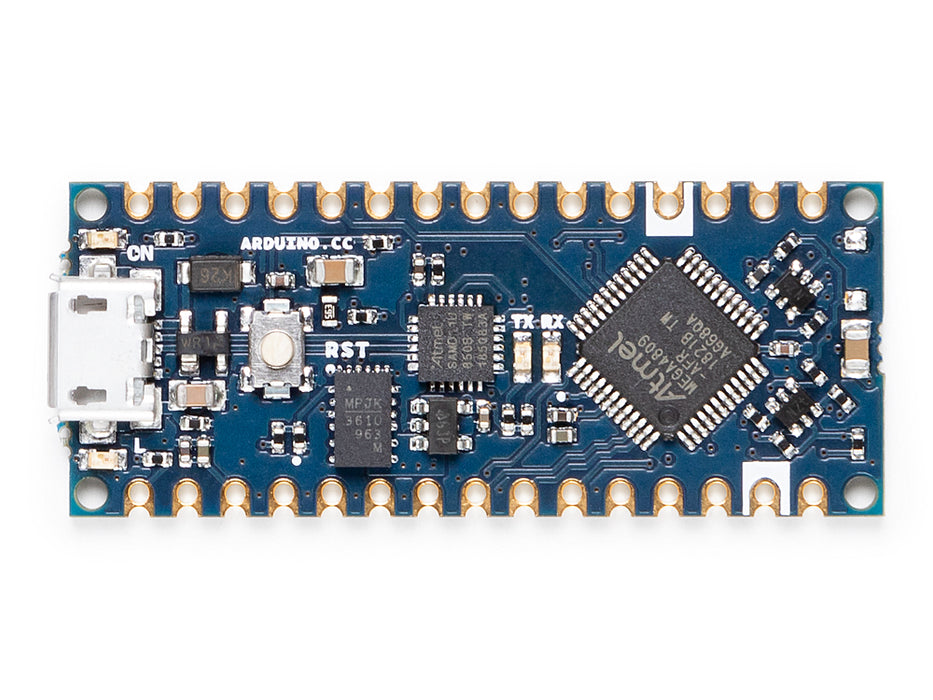
The Arduino Nano Every is the updated successor to the original Arduino Nano, released in 2019. It retains the same 18 × 45 mm breadboard-friendly form factor and pin layout as the classic Nano, making it a near drop-in replacement for most projects. Under the hood, the classic ATmega328P has been replaced with the ATmega4809 — a newer 8-bit AVR microcontroller running at 20 MHz with significantly more Flash (48 KB vs. 32 KB) and SRAM (6 KB vs. 2 KB).
The USB connection has been updated from mini-USB to micro-USB, and the USB-to-serial function is now handled by an onboard SAMD11 microcontroller, which also serves as the interface for firmware updates. This architecture removes the need for a dedicated USB-to-serial bridge chip.
Most Arduino library code written for the classic Nano or Uno will run on the Nano Every without modification. However, the ATmega4809 is a different processor from the ATmega328P, so low-level register access and code that relies on AVR-specific internals may require porting. For the vast majority of projects that use the standard Arduino API, the Nano Every is a transparent upgrade.
Quick Overview
| Feature | Detail |
|---|---|
| Microcontroller | ATmega4809 (8-bit AVR) |
| Clock Speed | 20 MHz |
| Operating Voltage | 5V |
| Flash Memory | 48 KB |
| SRAM | 6 KB |
| EEPROM | 256 bytes |
| Digital I/O Pins | 22 |
| PWM Pins | 5 |
| Analog Input Pins | 8 (A0–A7) |
| USB Interface | micro-USB (via SAMD11) |
| Dimensions | 18 × 45 mm |
Key Features
- ATmega4809 MCU: 48 KB Flash and 6 KB SRAM — a substantial increase over the classic Nano
- Same 18 × 45 mm form factor and pin layout as the Arduino Nano — pin-compatible
- 20 MHz clock speed (vs. 16 MHz on the classic Nano)
- Micro-USB connector replaces the older mini-USB
- SAMD11 acts as USB-to-serial bridge and enables firmware updates
- 8 analog input pins (A0–A7), all also usable as digital I/O
- 5 PWM outputs
- Hardware UART, I2C, and SPI interfaces
- 5V operating voltage — compatible with 5V sensors and peripherals
- Operates from 5V USB or up to 21V on the VIN pin
- Board package: Arduino megaAVR Boards (Arduino IDE)
Technical Specifications
| Parameter | Value |
|---|---|
| Microcontroller | ATmega4809 |
| Architecture | 8-bit AVR (megaAVR 0-series) |
| Clock Speed | 20 MHz |
| Operating Voltage | 5V |
| Input Voltage (VIN) | 5–21V |
| USB Connector | micro-USB |
| USB Bridge | SAMD11 |
| Flash Memory | 48 KB |
| SRAM | 6 KB |
| EEPROM | 256 bytes |
| Digital I/O Pins | 22 |
| PWM Channels | 5 |
| Analog Input Pins | 8 (A0–A7) |
| ADC Resolution | 10-bit |
| UART | 1 |
| I2C | 1 |
| SPI | 1 |
| DC Current per I/O Pin | 40 mA |
| Board Dimensions | 18 × 45 mm |
| Weight | ~5 g |
Pinout
Digital Pins
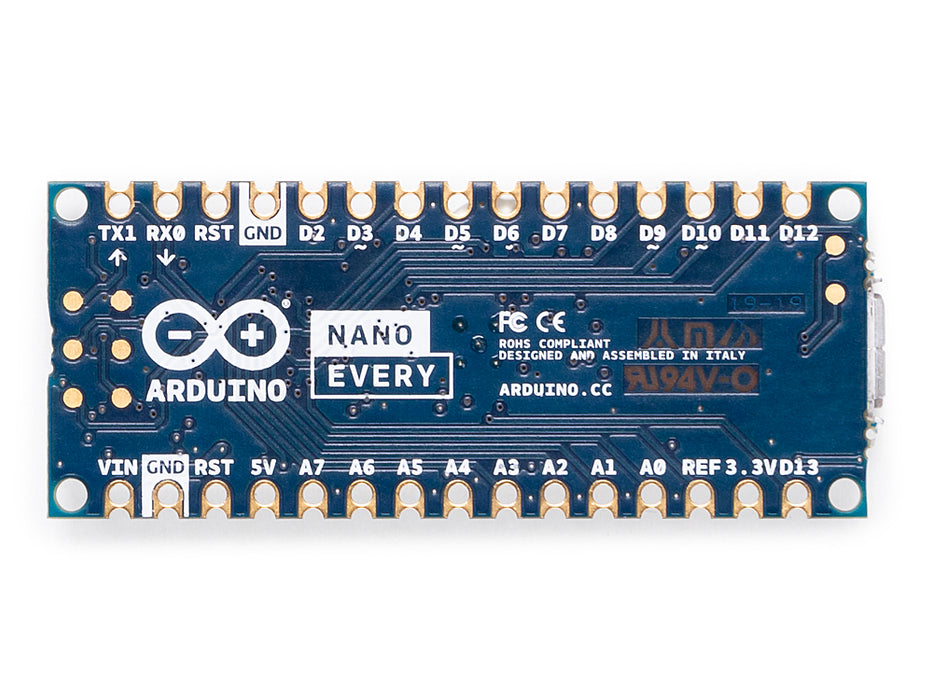
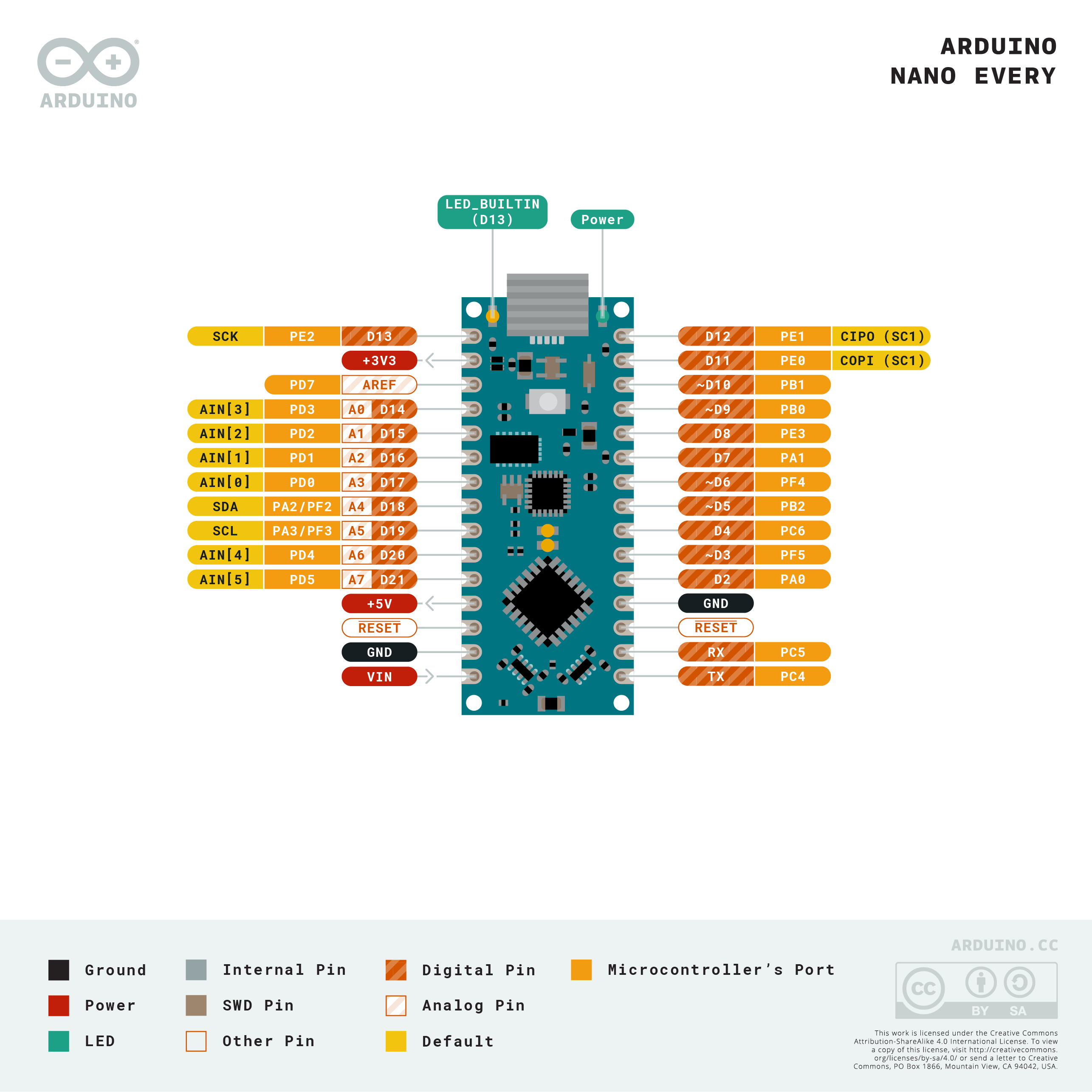
Pins D0–D13 are digital I/O. D0 (RX) and D1 (TX) are shared with the hardware UART. D13 is connected to the onboard LED.
PWM Pins
The ATmega4809 provides 5 PWM-capable pins. Check the official pinout diagram for the specific pins available in the Arduino IDE mapping.
Analog Pins
A0–A7 are all usable as both analog input and digital I/O, unlike the classic Nano where A6 and A7 were analog-only.
Communication Pins
| Interface | Pins |
|---|---|
| UART | D0 (RX), D1 (TX) |
| I2C | A4 (SDA), A5 (SCL) |
| SPI | D10 (SS), D11 (MOSI), D12 (MISO), D13 (SCK) |
Power Pins
| Pin | Function |
|---|---|
| VIN | External supply input (5–21V) |
| 5V | Regulated 5V output |
| 3.3V | 3.3V output (from SAMD11, limited current) |
| GND | Ground |
| RESET | Resets the microcontroller when pulled LOW |
Power
The Arduino Nano Every can be powered via:
- Micro-USB: 5V USB bus power from a computer or USB charger.
- VIN pin: accepts 5–21V and regulates down to 5V.
The board draws approximately 11 mA at idle. The 3.3V pin is provided by the SAMD11 and is limited in current capacity — use it only for low-current references, not to power external modules.
Getting Started
Install the Arduino IDE
Download the Arduino IDE from https://www.arduino.cc/en/software. To program the Nano Every, install the Arduino megaAVR Boards package via Tools > Board > Boards Manager, then select Arduino Nano Every.
Blink Example
Serial Communication
Programming
The Nano Every is programmed through the Arduino IDE using the megaAVR Boards package. Uploading is done via the micro-USB port. There is no separate bootloader burn step required for most users.
Because the ATmega4809 belongs to the newer megaAVR 0-series, it has updated peripheral registers compared to the classic ATmega328P. Standard Arduino library functions work the same, but direct register manipulation (e.g., accessing TCCR0B for timer control) requires updating to the new register names.
Package Contents
| Item | Quantity |
|---|---|
| Arduino Nano Every board | 1 |
| micro-USB cable | 1 (included with some retail versions; check listing) |
Applications
- Direct replacement for classic Nano in existing projects needing more memory
- Data logging with larger buffers and more complex sketch logic
- Multi-sensor projects (benefits from expanded SRAM)
- Robotics and motor controllers
- Educational projects requiring a modern AVR board
- Compact embedded systems and IoT edge nodes (without wireless)
- Serial protocol bridges (UART, I2C, SPI conversion)
Where to Buy
| Retailer | Link | |
|---|---|---|
| Arduino Official Store | https | //store.arduino.cc/products/arduino-nano-every |
| Amazon | https | //www.amazon.com/s?k=Arduino+Nano+Every |
Equivalent Boards
| Board | Key Difference |
|---|---|
| Arduino Nano | Same form factor, ATmega328P, 32 KB Flash, 2 KB SRAM, 16 MHz, mini-USB |
| Arduino Nano 33 IoT | Same size, ARM Cortex-M0+ (SAMD21), Wi-Fi + BLE, 3.3V I/O |
| Arduino UNO WiFi Rev2 | Same ATmega4809 MCU, Uno form factor, adds Wi-Fi |
Documentation
| Resource | Link | |
|---|---|---|
| Official Product Page | https | //store.arduino.cc/products/arduino-nano-every |
| Documentation & Pinout | https | //docs.arduino.cc/hardware/nano-every |
| Arduino IDE Download | https | //www.arduino.cc/en/software |
| ATmega4809 Datasheet | https | //ww1.microchip.com/downloads/en/DeviceDoc/ATmega4808-4809-Data-Sheet-DS40002173A.pdf |
Notes
- The ATmega4809 is NOT pin-for-pin register-compatible with the ATmega328P. Most high-level Arduino sketches will work unchanged, but low-level AVR register code requires updates.
- All analog pins (A0–A7) on the Nano Every can also be used as digital I/O, unlike the classic Nano where A6 and A7 were analog-only.
- The SAMD11 USB bridge also enables firmware upgrade of the SAMD11 itself via USB. Do not interrupt a SAMD11 firmware update.
- The 3.3V pin on the Nano Every is sourced from the SAMD11 and supplies only a few milliamps — it is not suitable for powering external modules.
- I/O pins operate at 5V logic — compatible with most 5V sensors and modules.
Community
- Arduino Forum — official community for questions and projects
- Arduino Discord — real-time chat with the Arduino community
- r/arduino (Reddit) — share projects and ask questions
- Arduino Project Hub — browse community-submitted projects
Revision History
| Version | Date | Notes |
|---|---|---|
| v1.0 | 2026-06 | Initial entry |