
Raspberry Pi 3 Model B+
Image Gallery
Overview
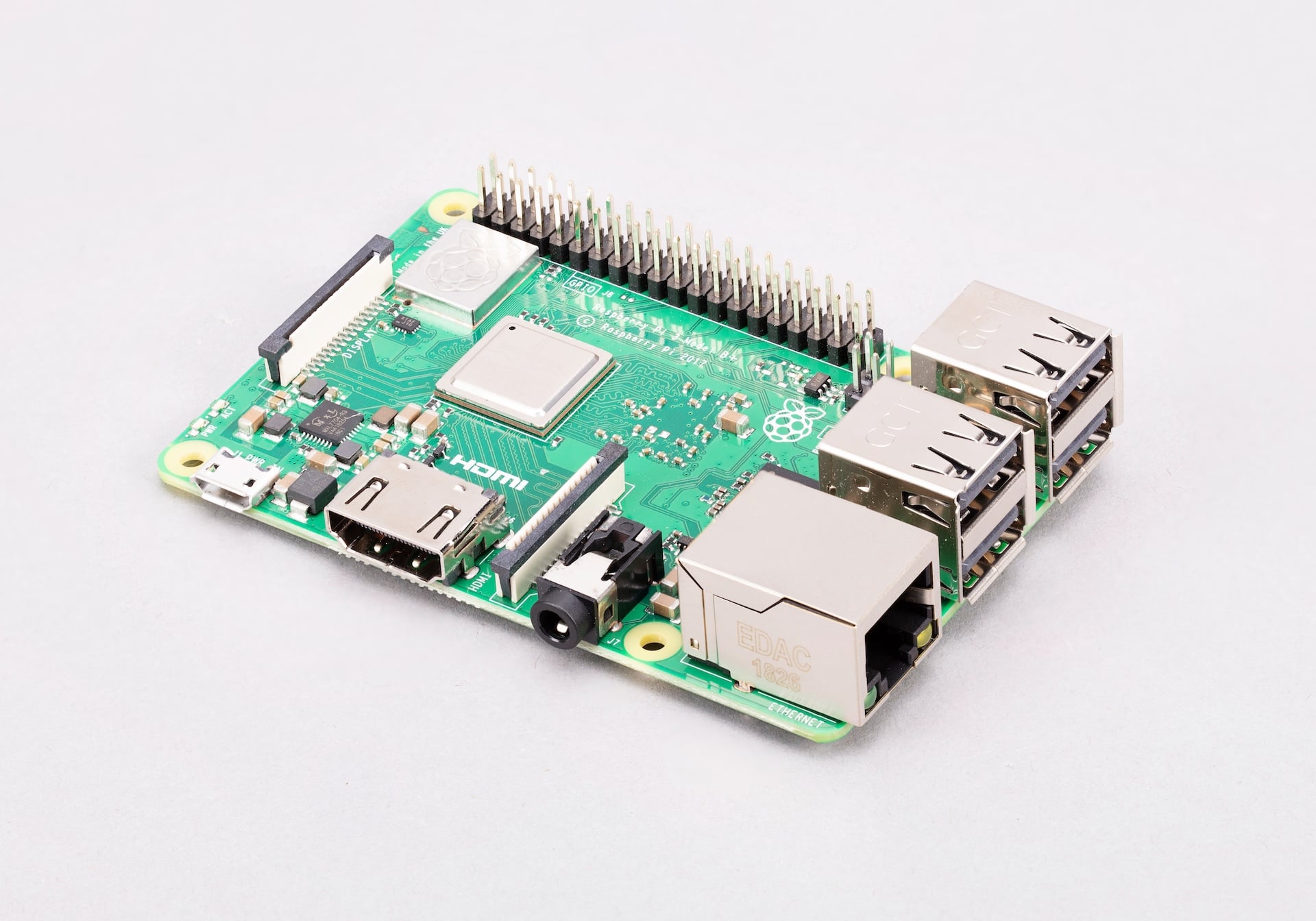
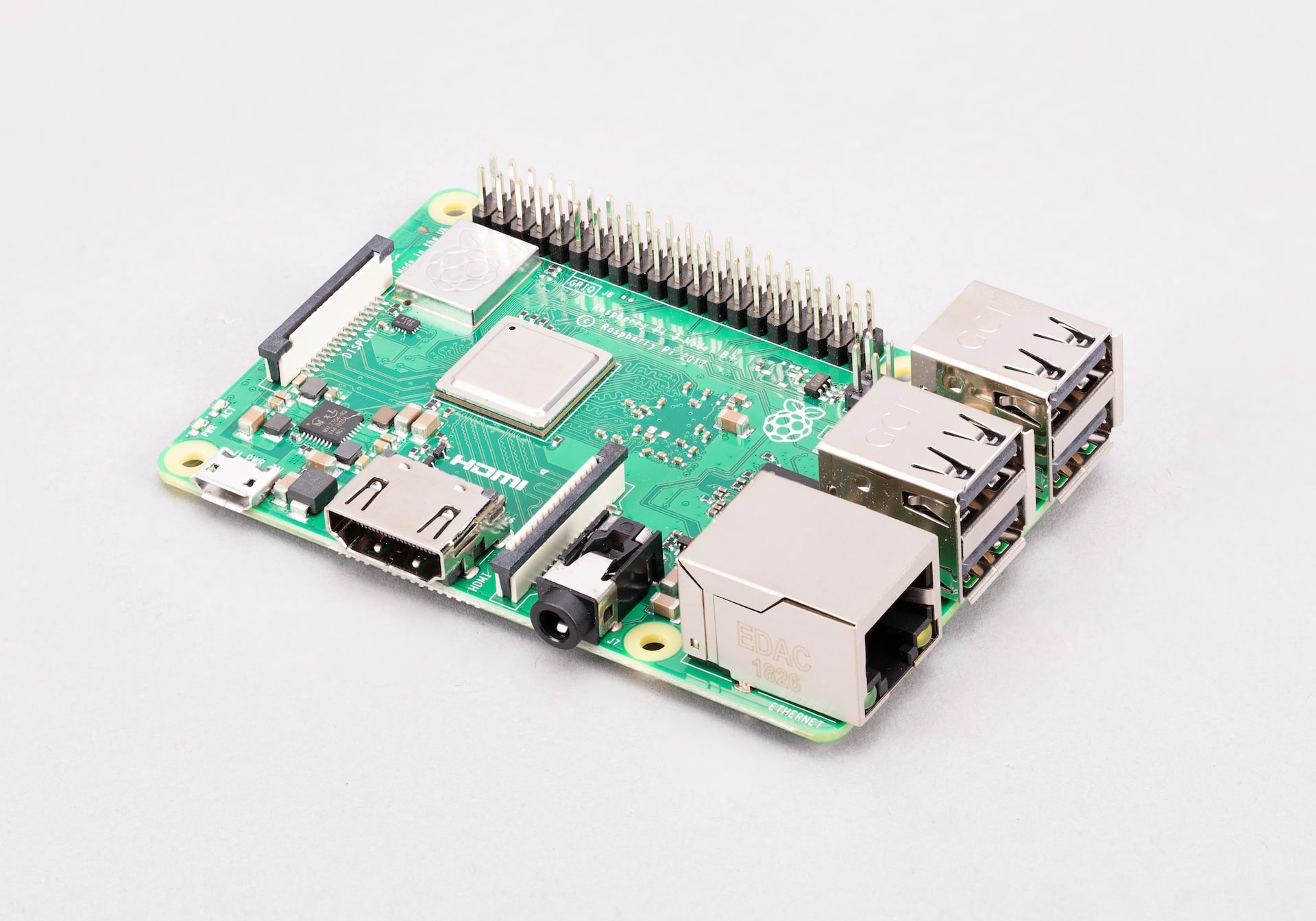
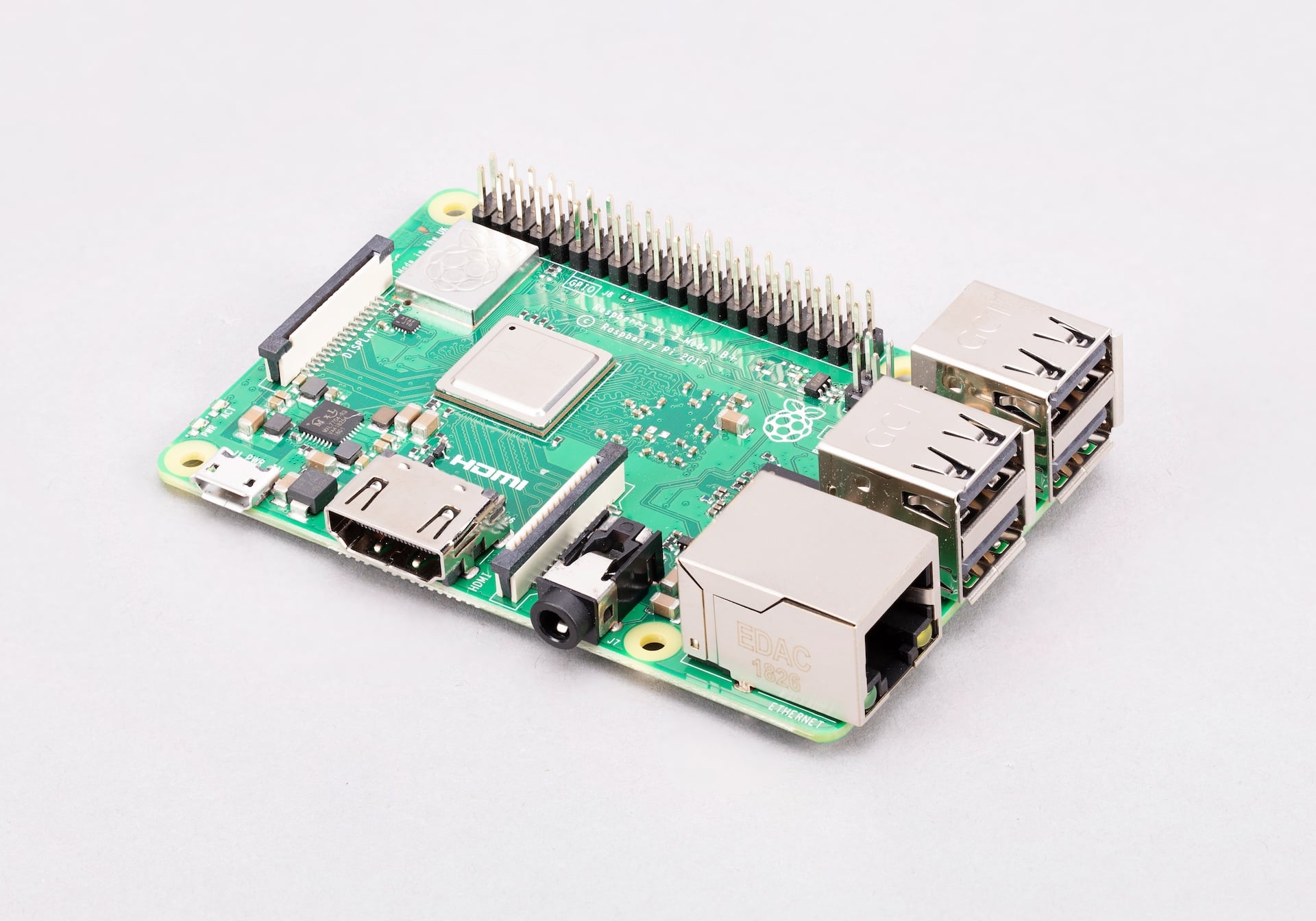
The Raspberry Pi 3 Model B+ is the final revision of the Raspberry Pi 3 series, released in March 2018. It improves on the Raspberry Pi 3 Model B with a faster 1.4 GHz processor, dual-band 802.11ac Wi-Fi, faster Ethernet, and a PoE HAT header. It remains one of the most widely used Raspberry Pi boards for education, home automation, media centers, and embedded projects.
The 3B+ is often considered the sweet spot of the Pi 3 generation — more powerful than earlier Pi 3 boards yet more affordable than the Pi 4 series. Its dual-band Wi-Fi was a first for the Raspberry Pi line, significantly improving wireless reliability in congested 2.4 GHz environments.
Key Features
- Broadcom BCM2837B0 quad-core ARM Cortex-A53 processor at 1.4 GHz
- 1 GB LPDDR2-900 SDRAM
- Dual-band 802.11 b/g/n/ac Wi-Fi (2.4 GHz and 5 GHz) — first Raspberry Pi with 5 GHz Wi-Fi
- Bluetooth 4.2 with BLE support
- Gigabit Ethernet over USB 2.0 (real throughput ~300 Mbps)
- 4× USB 2.0 ports
- 40-pin GPIO header compatible with all standard Raspberry Pi HATs
- Full-size HDMI output up to 1080p60
- Combined 3.5mm audio and composite video jack
- CSI camera connector and DSI display connector
- MicroSD card slot for OS and storage
- PoE HAT header (4-pin) — enables Power over Ethernet with an optional PoE HAT
Technical Specifications
| Specification | Detail |
|---|---|
| CPU | Broadcom BCM2837B0, quad-core ARM Cortex-A53 at 1.4 GHz |
| RAM | 1 GB LPDDR2-900 SDRAM |
| Wi-Fi | 802.11 b/g/n/ac dual-band (2.4 GHz + 5 GHz) |
| Bluetooth | Bluetooth 4.2, BLE |
| Ethernet | Gigabit Ethernet via USB 2.0 (actual throughput ~300 Mbps) |
| USB | 4× USB 2.0 |
| GPIO | 40-pin header |
| Video Output | 1× full-size HDMI (up to 1080p60) |
| Audio Output | 3.5mm audio+composite jack, HDMI audio |
| Camera Interface | 1× CSI connector |
| Display Interface | 1× DSI connector |
| Storage | microSD card slot |
| Power Input | 5V DC via micro-USB, minimum 2.5A recommended |
| PoE | 4-pin PoE HAT header (requires PoE HAT add-on) |
| Dimensions | 85 × 56 mm |
Pinout
The Raspberry Pi 3 Model B+ uses the standard 40-pin GPIO header shared by all Raspberry Pi Model B boards from the Pi 1 B+ onward.
Power Pins
Pins 1 and 17 provide 3.3V output. Pins 2 and 4 provide 5V output. Pins 6, 9, 14, 20, 25, 30, 34, and 39 are ground. The 3.3V rail can supply up to 50 mA for external components; the 5V rail is limited only by the power supply.
GPIO Pins
General-purpose input/output pins can be configured as digital input or output. All GPIO pins operate at 3.3V logic. Do not connect 5V signals directly to GPIO pins without a level shifter.
Communication Interfaces
| Interface | Pins | Notes |
|---|---|---|
| SPI0 | GPIO 9, 10, 11, 8, 7 | MISO, MOSI, SCLK, CE0, CE1 |
| I2C1 | GPIO 2, 3 | SDA, SCL (3.3V, with 1.8kΩ pull-ups) |
| UART0 | GPIO 14, 15 | TX, RX — shared with Bluetooth on Pi 3 |
| I2S | GPIO 18, 19, 20, 21 | PCM CLK, FS, DIN, DOUT |
| PWM | GPIO 12, 13, 18, 19 | Hardware PWM channels |
Power
The Raspberry Pi 3 Model B+ is powered via the micro-USB port and requires a stable 5V supply. The Raspberry Pi Foundation recommends a minimum of 2.5A to avoid undervoltage warnings, especially under load with USB peripherals connected.
An official PoE HAT accessory connects to the 4-pin PoE header and draws power from an 802.3af-compliant network switch, eliminating the need for a separate power cable.
| Power Method | Detail |
|---|---|
| Micro-USB | 5V / 2.5A recommended |
| PoE HAT | 802.3af Power over Ethernet via optional PoE HAT |
| GPIO 5V Pins | 5V direct input (bypasses polyfuse — use with care) |
On-Board Components
| Component | Description |
|---|---|
| BCM2837B0 SoC | Main processor with CPU, GPU, and memory bus |
| LPDDR2 RAM | 1 GB memory stacked on SoC package |
| CYW43455 | Dual-band Wi-Fi and Bluetooth 4.2 combo chip |
| LAN7515 | USB 2.0 hub + Gigabit Ethernet controller |
| HDMI port | Full-size HDMI video output |
| CSI connector | 15-pin ribbon cable port for Pi Camera |
| DSI connector | 15-pin ribbon cable port for Pi Display |
| 3.5mm jack | Combined audio and composite video output |
| microSD slot | Push-push card slot for OS and user storage |
| PoE header | 4-pin header for PoE HAT accessory |
Wireless Connectivity
The Raspberry Pi 3 Model B+ was the first Raspberry Pi to feature dual-band Wi-Fi, using a Cypress CYW43455 chip with a custom RF shield. The 5 GHz band offers lower interference and improved throughput compared to the 2.4 GHz-only radios in earlier Pi models.
| Wireless Feature | Detail |
|---|---|
| Wi-Fi Standard | 802.11 b/g/n/ac |
| Frequency Bands | 2.4 GHz and 5 GHz (dual-band) |
| Bluetooth Version | 4.2 |
| Bluetooth Modes | Classic and BLE (Bluetooth Low Energy) |
| RF Module | Cypress CYW43455 under metal RF shield |
Getting Started
What You Need
- Raspberry Pi 3 Model B+
- MicroSD card (8 GB minimum, 16 GB or larger recommended, Class 10 or UHS-1)
- 5V/2.5A micro-USB power supply
- HDMI cable and monitor or TV
- USB keyboard and mouse
Step 1 — Flash the OS
Download and install the Raspberry Pi Imager on your computer. Insert the microSD card into your computer, open the Imager, select your board (Raspberry Pi 3), choose an OS (Raspberry Pi OS is recommended), select the SD card, and click Write.
Step 2 — First Boot
Insert the flashed microSD card into the slot on the underside of the Pi 3 Model B+. Connect the HDMI cable, USB keyboard, and USB mouse, then plug in the micro-USB power supply. The Pi will boot automatically — no power button is needed.
Step 3 — Initial Setup
On first boot, the Raspberry Pi OS setup wizard will guide you through selecting language, timezone, and Wi-Fi network, and setting a password. After setup completes, the desktop environment loads.
Step 4 — Update the System
Open a terminal and run the following commands to update all installed packages:
Step 5 — GPIO Blink Example
Connect an LED with a 330Ω resistor between GPIO 18 (pin 12) and a ground pin. Then run this Python script:
Programming
The Raspberry Pi 3 Model B+ supports multiple programming languages out of the box.
Python
Python is the primary and recommended language for Raspberry Pi projects. The RPi.GPIO library provides GPIO control, and gpiozero offers a higher-level interface suited to beginners.
C and C++
C and C++ offer maximum performance and direct hardware access. The wiringPi and pigpio libraries provide GPIO access from C. GCC is pre-installed on Raspberry Pi OS.
Scratch
Scratch 3 is available in Raspberry Pi OS and is designed for young learners. It supports GPIO control through extensions, making it suitable for classroom projects.
Other Languages
Node.js, Java, and Ruby are all installable via apt. The Pi 3B+ is powerful enough to run lightweight development servers and scripting environments.
Applications
- Desktop computer replacement for everyday tasks and web browsing
- Home automation hub (Home Assistant, openHAB)
- Media center (Kodi, LibreELEC)
- Retro gaming console (RetroPie)
- Network-attached storage (NAS) server
- VPN server or Pi-hole ad blocker
- Learning Python, Linux, and electronics
- Robotics and IoT prototyping
Where to Buy
- Authorized resellers: PiShop, Adafruit, SparkFun, The Pi Hut, Pimoroni
Equivalent Boards
| Board | Key Difference |
|---|---|
| Raspberry Pi 4 Model B | Faster Cortex-A72 CPU, USB 3.0, up to 8 GB RAM, more capable |
| Raspberry Pi 3 Model B | Older revision — single-band 2.4 GHz Wi-Fi, 1.2 GHz CPU |
| Raspberry Pi Zero 2 W | Same BCM2837B0 chip but smaller form factor, lower cost, fewer ports |
Documentation
Notes
- The Raspberry Pi 3 Model B+ is compatible with all standard 40-pin Raspberry Pi HATs, including motor driver HATs, display HATs, sensor HATs (such as the Sense HAT), and the official PoE HAT.
- The PoE HAT requires the 4-pin PoE header present on this board and compatible PoE-capable network switches or injectors (802.3af).
- The 5 GHz Wi-Fi band availability depends on local regulations. In some countries, certain 5 GHz channels may be restricted.
- The BCM2837B0 SoC includes an integrated heatspreader, improving thermal performance over the BCM2837 used in the Pi 3 Model B.
Community
- Raspberry Pi Forums — official community
- r/raspberry_pi (Reddit) — share projects
- Raspberry Pi Discord — real-time chat
Revision History
| Version | Date | Notes |
|---|---|---|
| v1.0 | 2026-06 | Initial entry |