
Raspberry Pi 400
Image Gallery
Overview
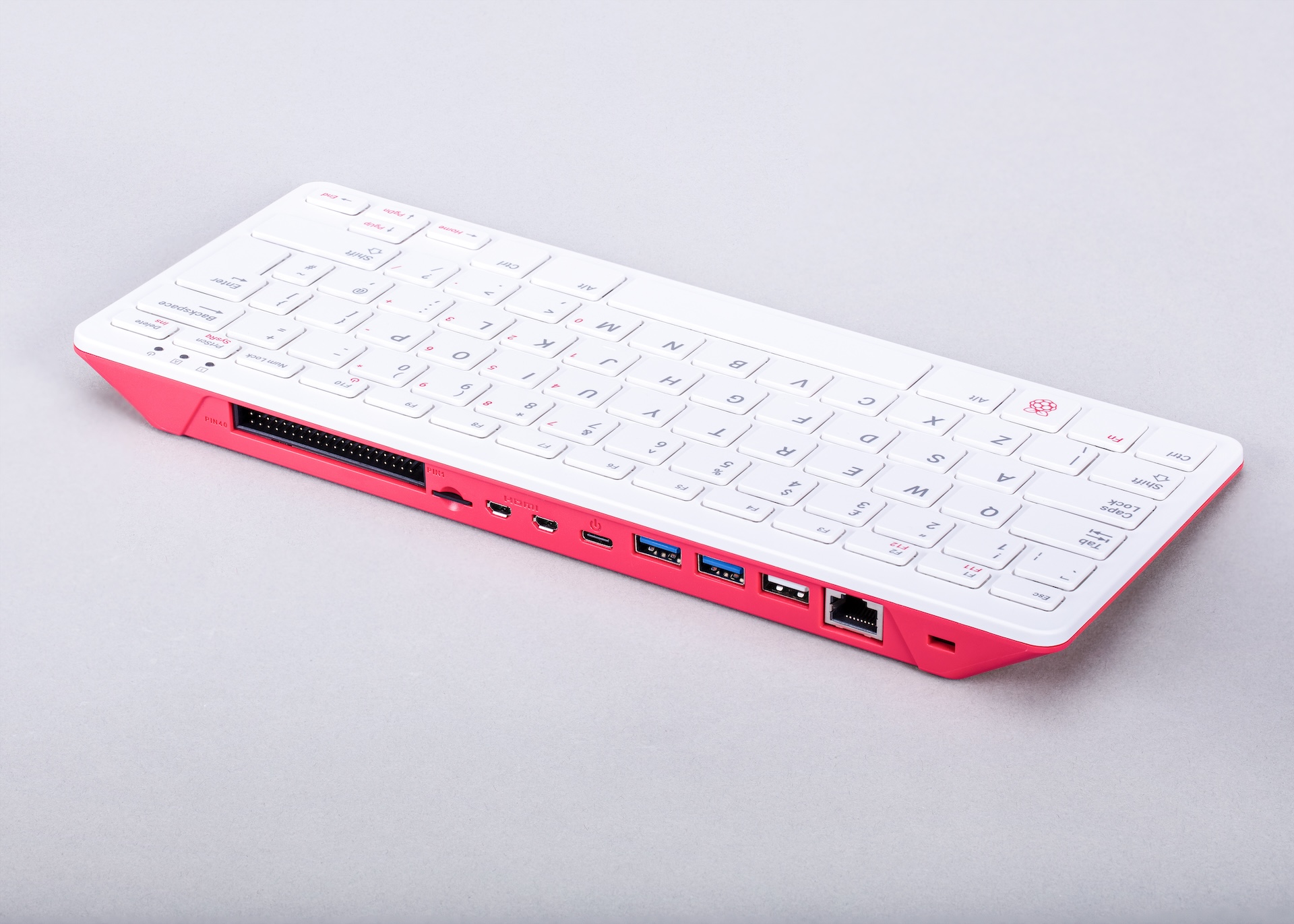
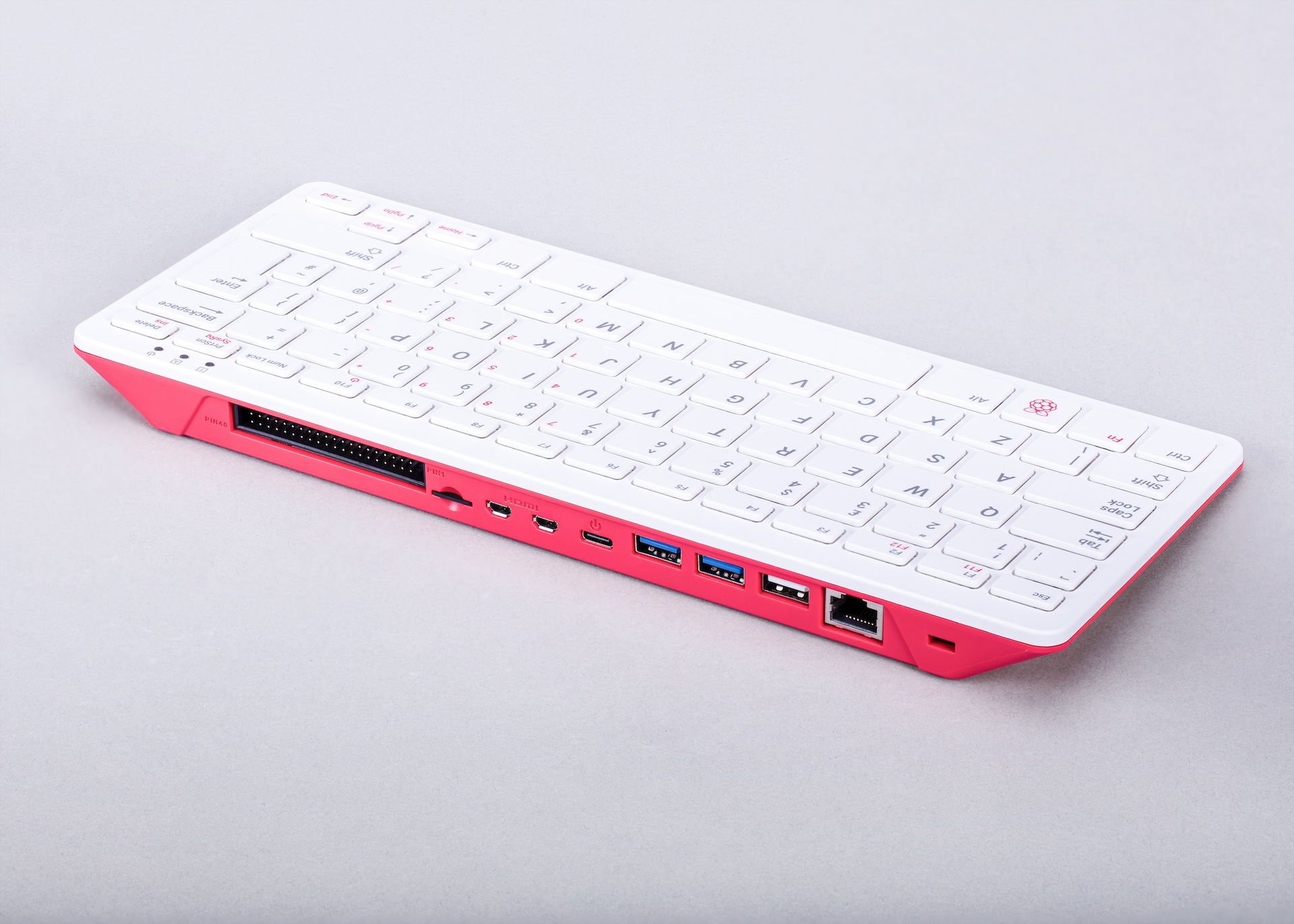
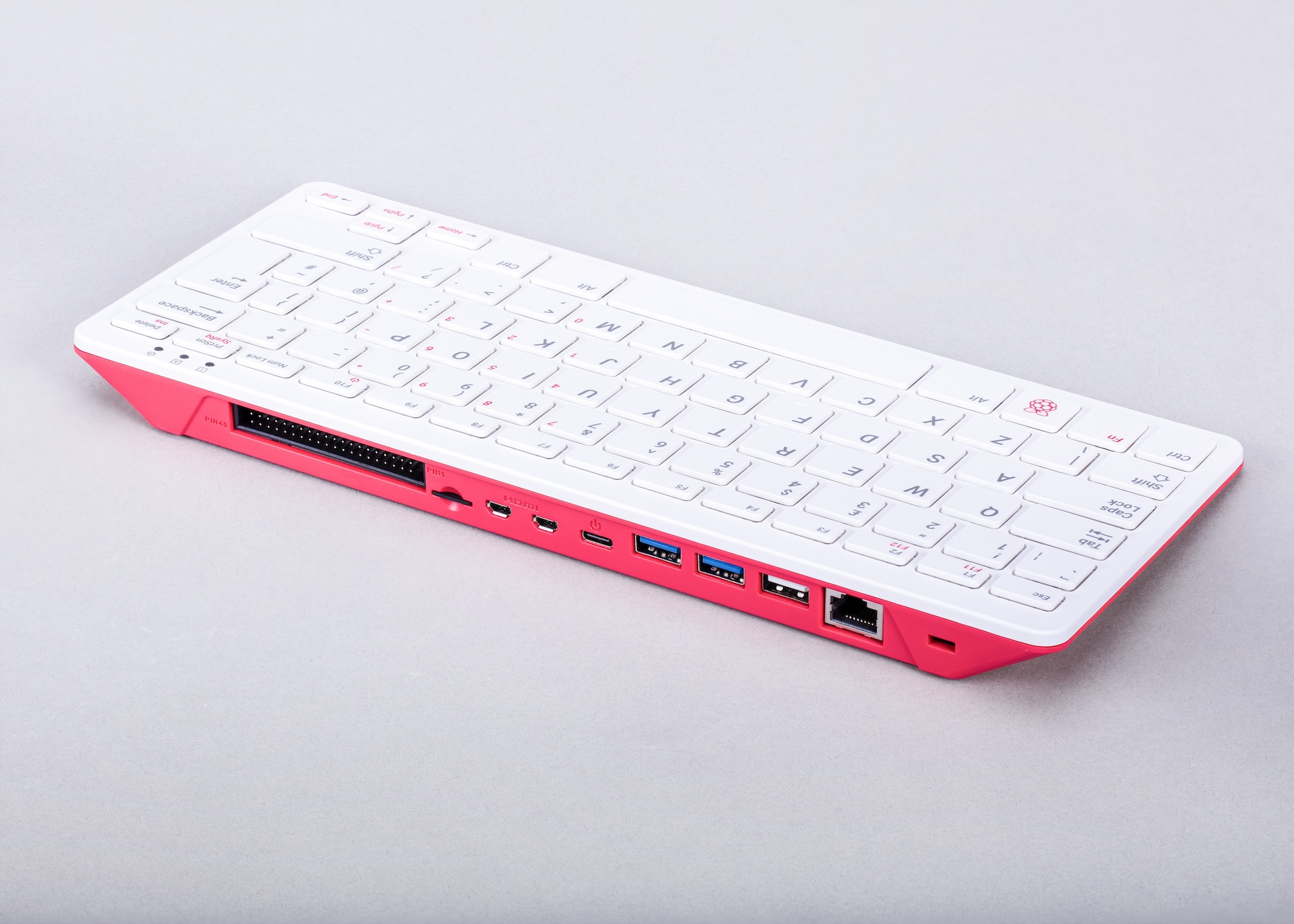
The Raspberry Pi 400 is a complete personal computer built into a compact keyboard, released in November 2020. It takes the electronics of the Raspberry Pi 4 Model B and integrates them directly into a custom keyboard chassis, delivering a full Linux desktop experience without a separate board, case, or cable mess. Users simply connect a monitor, plug in the power supply, and are ready to go.
The BCM2711 SoC runs at 1.8 GHz — slightly higher than the 1.5 GHz on the standard Pi 4 Model B — made possible by improved thermal management within the keyboard chassis. The 4 GB LPDDR4-3200 RAM configuration is the only option; unlike the Pi 4B, the 400 does not offer a choice of RAM capacities. The keyboard chassis acts as a large heatsink, helping the processor sustain its boosted clock speed without requiring a separate cooling solution.
The 40-pin GPIO header is exposed along the rear edge of the keyboard, allowing connection to HATs, sensors, motors, and other electronics accessories just as with any other Raspberry Pi board.
The Raspberry Pi 400 was designed with education and affordability in mind. It ships in a "Personal Computer Kit" that includes a power supply, mouse, microSD card with Raspberry Pi OS, and a beginner's book. This made it one of the most accessible complete-computer offerings from the Foundation.
Quick Overview
| Feature | Detail |
|---|---|
| CPU | Broadcom BCM2711, quad-core ARM Cortex-A72 @ 1.8 GHz |
| RAM | 4 GB LPDDR4-3200 |
| GPU | VideoCore VI (OpenGL ES 3.1, H.265 4Kp60 decode) |
| Video Out | 2× micro-HDMI (4K60 single / dual 4K30) |
| USB | 3× USB 3.0 + 1× USB 2.0 (rear) |
| GPIO | 40-pin header (rear of keyboard) |
| Networking | Gigabit Ethernet + 802.11ac dual-band Wi-Fi + Bluetooth 5.0 BLE |
| Storage | microSD card slot |
| Power | USB-C 5V / 3A |
| Form Factor | Keyboard computer (keyboard IS the computer) |
| Dimensions | 286 × 122 × 23 mm |
Key Features
- Pi 4 silicon in a self-contained keyboard chassis — no separate case or board to handle
- BCM2711 quad-core Cortex-A72 at 1.8 GHz — 20% clock boost over standard Pi 4 Model B
- Dual micro-HDMI supporting 4K60 on one screen or dual 4K30 simultaneously
- 3× USB 3.0 ports for fast external storage and peripherals
- 40-pin GPIO header at rear — full HAT compatibility
- Dual-band 802.11ac Wi-Fi and Bluetooth 5.0 BLE
- Gigabit Ethernet for wired networking
- Keyboard chassis provides passive cooling for the CPU
- Available in regional keyboard layouts (US, UK, German, French, Italian, Spanish, and others)
- Kit version includes everything needed to start computing out of the box
Technical Specifications
| Specification | Value |
|---|---|
| SoC | Broadcom BCM2711 |
| CPU | Quad-core ARM Cortex-A72 @ 1.8 GHz |
| GPU | VideoCore VI |
| GPU APIs | OpenGL ES 3.1 |
| H.265 Decode | 4Kp60 |
| H.264 Decode | 1080p60 |
| RAM | 4 GB LPDDR4-3200 SDRAM |
| Video Output | 2× micro-HDMI (4K60 single / dual 4K30) |
| USB | 3× USB 3.0 (5 Gbps) + 1× USB 2.0 |
| GPIO | 40-pin header at rear (3.3V logic) |
| Ethernet | Gigabit Ethernet (RJ45) |
| Wi-Fi | 802.11b/g/n/ac (2.4 GHz + 5 GHz dual-band) |
| Bluetooth | Bluetooth 5.0 BLE |
| Storage | microSD card slot |
| Power Connector | USB-C (5V / 3A) |
| Keyboard Layouts | US, UK, DE, FR, IT, ES and others |
| Form Factor | Integrated keyboard computer |
| Dimensions | 286 × 122 × 23 mm |
Pinout
The 40-pin GPIO header is located along the rear edge of the keyboard unit, matching the standard Raspberry Pi pinout used since the Model B+ (2014).
Power Pins
- Pins 1 and 17: 3.3V output (~300 mA combined maximum)
- Pins 2 and 4: 5V (direct from input supply)
- Ground: Pins 6, 9, 14, 20, 25, 30, 34, 39
GPIO and Communication
- GPIO pins operate at 3.3V logic; they are NOT 5V tolerant
- I2C1: GPIO 2 (SDA), GPIO 3 (SCL)
- SPI0: GPIO 8 (CE0), GPIO 9 (MISO), GPIO 10 (MOSI), GPIO 11 (SCLK)
- UART0: GPIO 14 (TXD), GPIO 15 (RXD)
- PWM: GPIO 12, 13, 18, 19
Power
The Raspberry Pi 400 is powered via a USB-C connector on the rear panel. A 5V/3A supply is required. Unlike the Raspberry Pi 5, the 400 does not use USB Power Delivery (USB-PD) negotiation.
| Power Input | Specification |
|---|---|
| Connector | USB-C |
| Voltage | 5V DC |
| Current | 3A (15W) |
On-Board Components
| Component | Description |
|---|---|
| BCM2711 SoC | Quad-core Cortex-A72 CPU + VideoCore VI GPU |
| 4 GB LPDDR4-3200 | On-package RAM |
| Wi-Fi / BT Module | CYW43455 — 802.11ac dual-band + Bluetooth 5.0 BLE |
| Gigabit Ethernet PHY | LAN7515 USB hub + Ethernet controller (shared USB bus) |
| microSD Slot | OS storage |
| 40-pin GPIO Header | Rear-facing full HAT pinout |
| Integrated Keyboard | Regional layout variants |
Wireless Connectivity
Wi-Fi
- Standard: 802.11b/g/n/ac (Wi-Fi 5)
- Frequencies: 2.4 GHz and 5 GHz dual-band
- Antenna integrated in keyboard chassis
Bluetooth
- Version: Bluetooth 5.0 BLE
- Use with mice, headphones, keyboards, sensors, and BLE IoT devices
Getting Started
What You Need
- Raspberry Pi 400 keyboard computer
- MicroSD card (16 GB or larger)
- USB-C power supply (5V / 3A)
- Monitor with HDMI input and micro-HDMI cable
- USB mouse (keyboard is built in)
Step 1: Flash the microSD Card
Download Raspberry Pi Imager from https://www.raspberrypi.com/software/ and flash Raspberry Pi OS (32-bit or 64-bit) to the microSD card. Use the settings to pre-configure Wi-Fi, hostname, SSH, and password.
Step 2: Connect and Power On
Insert the microSD card into the rear slot of the keyboard. Connect micro-HDMI to your monitor, plug in a USB mouse, and connect the USB-C power supply. The board boots to the Raspberry Pi OS desktop in about 30 seconds.
Step 3: Update the System
After the first-run wizard, update your system from the terminal:
Connect an LED and 330-ohm resistor between GPIO 17 (header pin 11) and a ground pin on the rear header before running the script.
Programming
Python
Python 3 is pre-installed and is the recommended language for Raspberry Pi projects. Libraries such as gpiozero, RPi.GPIO, picamera2, and thousands of others are installable via pip.
Scratch
Scratch 3 is pre-installed on the desktop — ideal for younger learners learning logic and basic programming concepts.
C / C++
GCC is available. The pigpio and WiringPi libraries provide GPIO access from C and C++ programs.
Node.js / JavaScript
Node.js can be installed via NodeSource. Suitable for web servers, dashboards, and API development.
Java
OpenJDK is available via apt. Used widely in educational institutions teaching computer science.
Package Contents
The Raspberry Pi 400 Personal Computer Kit includes:
- Raspberry Pi 400 keyboard computer
- Official USB-C Power Supply
- Pre-installed microSD card with Raspberry Pi OS
- USB mouse
- Micro-HDMI to HDMI cable
- The Official Raspberry Pi Beginner's Guide
The standalone Raspberry Pi 400 unit is also sold without accessories.
Applications
- Affordable personal computing and web browsing
- Teaching Python and Scratch in schools
- Electronics learning via rear GPIO header
- Home office computing
- Lightweight software development
- Media consumption
- Classroom deployments where a self-contained unit is required
Where to Buy
- Official product page: https://www.raspberrypi.com/products/raspberry-pi-400/
- Amazon: https://www.amazon.com/s?k=Raspberry+Pi+400
- Authorised resellers: Adafruit, PiShop, Farnell, RS Components, Mouser, Digi-Key
Equivalent Boards
| Board | CPU | RAM | Key Difference |
|---|---|---|---|
| Raspberry Pi 500 | Cortex-A76 @ 2.4 GHz | 8 GB | Next generation keyboard computer (Pi 5 silicon) |
| Raspberry Pi 4 Model B | Cortex-A72 @ 1.5 GHz | 1–8 GB | Same SoC in bare board form, more RAM options |
| Raspberry Pi 400 (bare) | Cortex-A72 @ 1.8 GHz | 4 GB | This is the keyboard unit itself |
Documentation
- Official Raspberry Pi 400 page: https://www.raspberrypi.com/products/raspberry-pi-400/
- Raspberry Pi documentation: https://www.raspberrypi.com/documentation/
- Raspberry Pi Imager: https://www.raspberrypi.com/software/
- The Official Raspberry Pi Beginner's Guide: included in kit
Notes
- HAT compatibility: The rear 40-pin GPIO header is fully HAT-compatible. Most HATs designed for Raspberry Pi B+ through Pi 4 are electrically compatible with the 400. Tall HATs or those requiring access to non-GPIO connectors (such as the camera or display CSI/DSI) cannot be used, since those connectors are not exposed on the 400.
- The keyboard chassis provides excellent passive cooling for the BCM2711, enabling the sustained 1.8 GHz overclock without throttling under typical workloads.
- The Gigabit Ethernet on the Pi 400 (same as Pi 4) is routed through a USB 2.0 hub internally, limiting practical throughput to approximately 300 Mbps rather than the nominal gigabit rate.
- USB 3.0 throughput is not limited by the same constraint and runs at full speed.
Community
- Raspberry Pi Forums — official community for questions and projects
- r/raspberry_pi (Reddit) — share projects and ask questions
- Raspberry Pi Discord — real-time chat with the community
Revision History
| Version | Date | Notes |
|---|---|---|
| v1.0 | 2026-06 | Initial entry |