
Raspberry Pi 5
Image Gallery
Overview
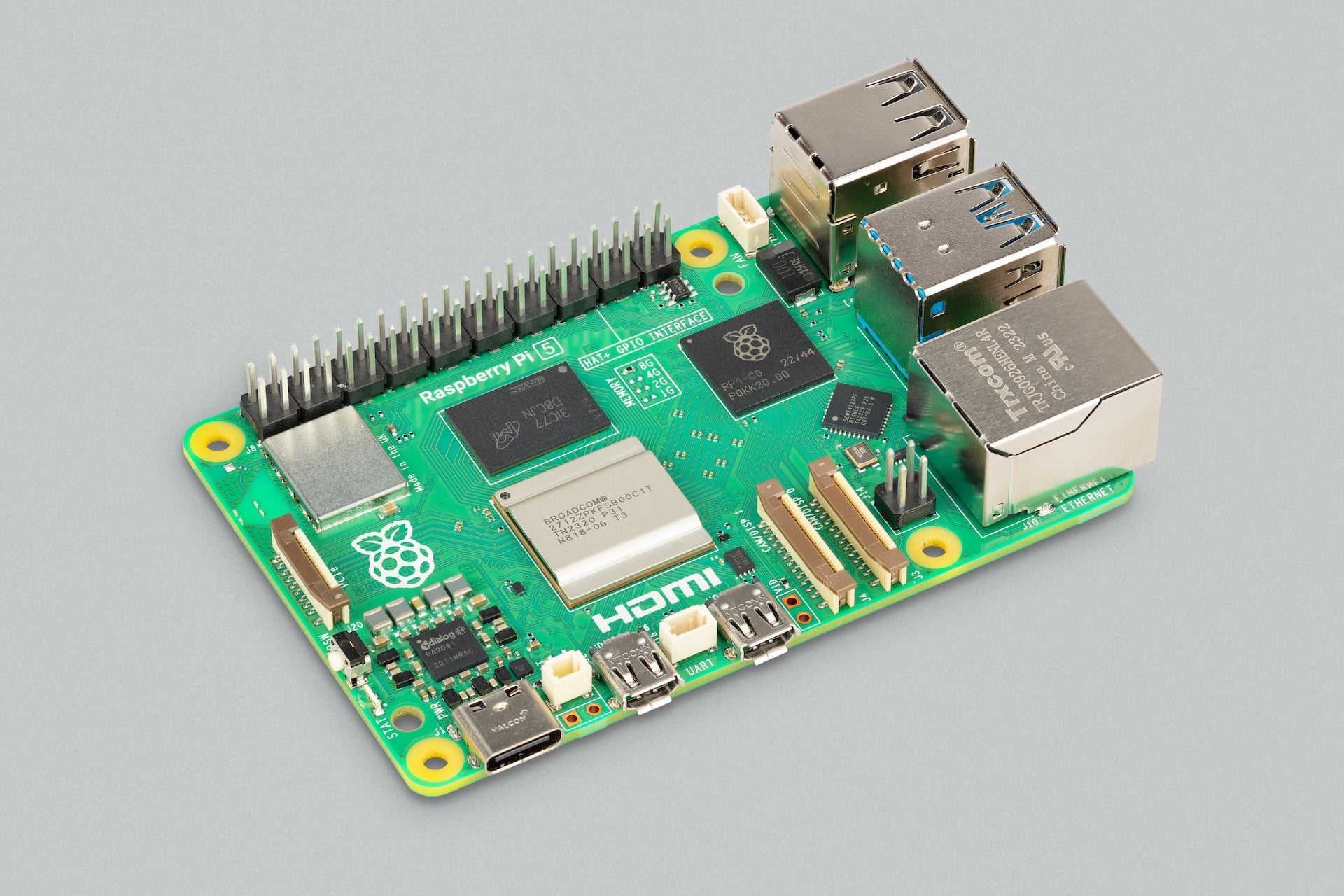
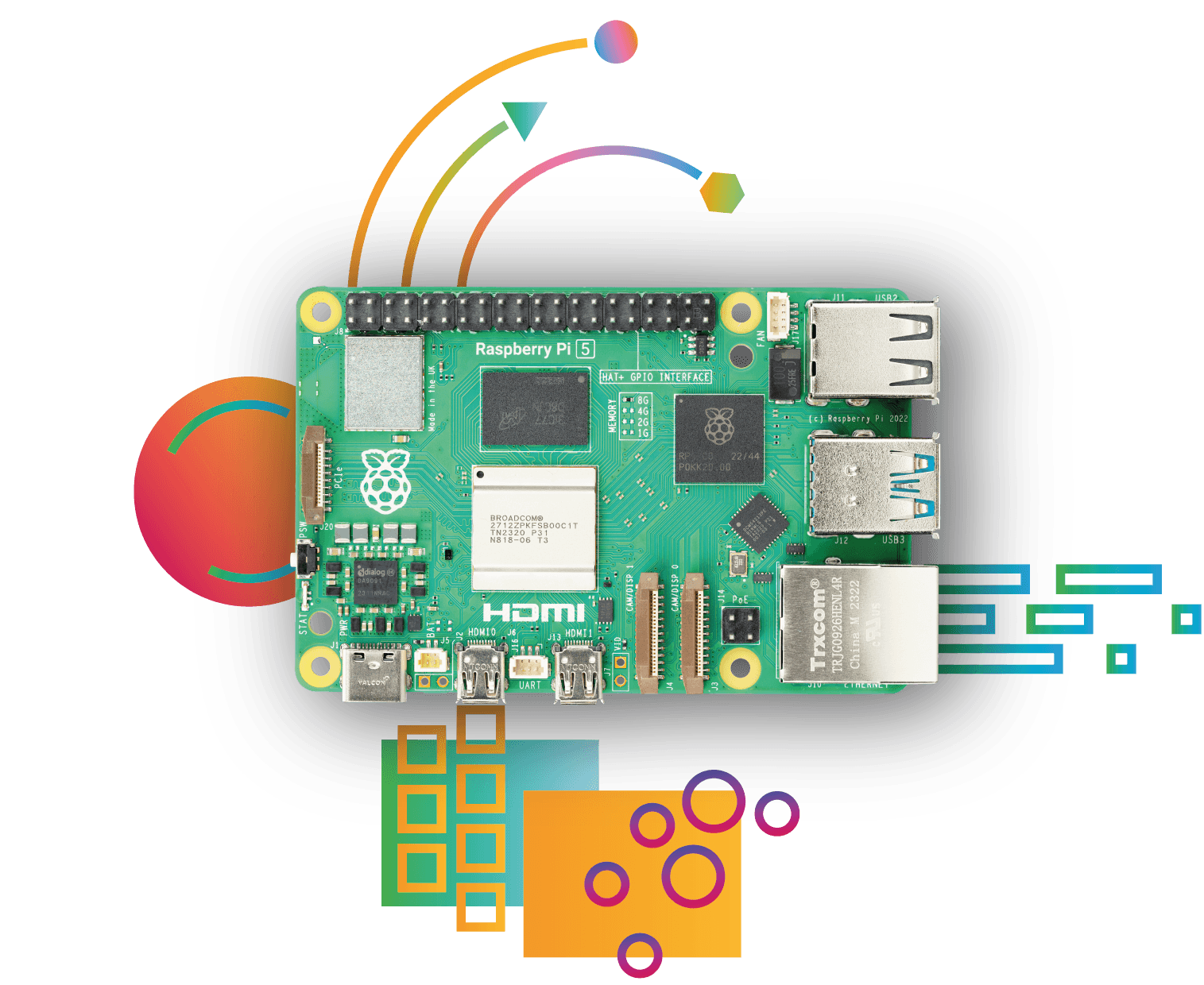
The Raspberry Pi 5 is the fifth generation flagship single-board computer from the Raspberry Pi Foundation, released in October 2023. It represents the most significant generational leap in the product's history, delivering roughly twice the CPU performance of the Raspberry Pi 4 Model B thanks to the move from a Cortex-A72 to a Cortex-A76 architecture running at 2.4 GHz.
Alongside the CPU upgrade, the Pi 5 introduces the custom Raspberry Pi RP1 I/O controller chip — the first piece of custom silicon the Foundation has designed beyond the RP2040 microcontroller. The RP1 handles USB, Ethernet, camera, display, and GPIO I/O, offloading these tasks from the main SoC and enabling higher throughput for peripherals. The board also adds a PCIe 2.0 FPC connector, making it possible to attach NVMe SSDs or other PCIe devices via an optional M.2 HAT. A real-time clock (RTC) with an on-board battery connector rounds out the new hardware features, allowing the board to keep time without internet access.
The Raspberry Pi 5 is available in 4 GB and 8 GB LPDDR4X-4267 SDRAM configurations and ships without a power supply or case. A new 27W USB-C power supply is recommended to take full advantage of the board's performance and support peripheral power delivery. Active cooling is also recommended as the Pi 5 runs significantly hotter than its predecessor under sustained load.
Quick Overview
| Feature | Detail |
|---|---|
| CPU | Broadcom BCM2712, quad-core ARM Cortex-A76 @ 2.4 GHz |
| GPU | VideoCore VII (OpenGL ES 3.1, Vulkan 1.2) |
| RAM | 4 GB or 8 GB LPDDR4X-4267 |
| Video Out | 2× micro-HDMI (up to 4K60 fps single or dual 4K30 fps) |
| USB | 2× USB 3.0 (5 Gbps) + 2× USB 2.0 |
| GPIO | 40-pin standard header |
| Networking | Gigabit Ethernet + 802.11ac dual-band Wi-Fi + Bluetooth 5.0 |
| PCIe | 1× PCIe 2.0 FPC connector |
| RTC | Yes, with battery connector |
| Power | USB-C 5V/5A (27W recommended) |
| OS | Raspberry Pi OS, Ubuntu, Fedora, and others |
| Dimensions | 85 × 56 mm |
Key Features
- Quad-core ARM Cortex-A76 at 2.4 GHz — approximately 2–3× faster than Pi 4 in CPU benchmarks
- Custom RP1 I/O controller chip developed by Raspberry Pi Foundation for high-performance peripheral handling
- PCIe 2.0 FPC connector enabling NVMe SSD boot and high-speed storage via M.2 HAT
- Dual 4-lane MIPI CSI/DSI connectors (camera and display simultaneously)
- VideoCore VII GPU with Vulkan 1.2 support for modern graphics workloads
- On-board real-time clock (RTC) with battery backup connector
- Dual-band 802.11ac Wi-Fi and Bluetooth 5.0 / BLE
- 2× USB 3.0 ports at 5 Gbps for fast external storage
- PoE+ support via optional HAT
- 40-pin GPIO header compatible with existing HATs and accessories
Technical Specifications
| Specification | Value |
|---|---|
| SoC | Broadcom BCM2712 |
| CPU | Quad-core ARM Cortex-A76 @ 2.4 GHz |
| GPU | VideoCore VII |
| GPU APIs | OpenGL ES 3.1, Vulkan 1.2 |
| RAM | 4 GB or 8 GB LPDDR4X-4267 SDRAM |
| Video Output | 2× micro-HDMI (4K60 fps single / dual 4K30 fps) |
| H.265 Decode | 4Kp60 |
| H.264 Decode | 1080p60 |
| Camera/Display | 2× 4-lane MIPI CSI/DSI connectors |
| USB | 2× USB 3.0 (5 Gbps) + 2× USB 2.0 |
| GPIO | 40-pin header (3.3V logic) |
| Ethernet | Gigabit Ethernet (RJ45) |
| PoE | PoE+ via optional HAT |
| Wi-Fi | 802.11b/g/n/ac (2.4 GHz + 5 GHz) |
| Bluetooth | Bluetooth 5.0 / BLE |
| PCIe | 1× PCIe 2.0 FPC connector |
| RTC | Yes, with external battery connector (CR2032 or similar) |
| Storage | microSD card slot (SDIO 3.0) |
| I/O Controller | Raspberry Pi RP1 custom chip |
| Power Connector | USB-C (5V/5A, 27W recommended) |
| Dimensions | 85 × 56 mm |
Pinout
The Raspberry Pi 5 uses the same 40-pin GPIO header layout introduced with the Raspberry Pi 1 Model B+ in 2014. This ensures compatibility with the vast majority of existing HATs and GPIO accessories.
Power Pins
Pins 1 and 17 supply 3.3V (up to ~300 mA combined). Pins 2 and 4 supply 5V directly from the board input power. Pins 6, 9, 14, 20, 25, 30, 34, and 39 are ground.
GPIO Pins
Pins 3 to 40 (where not power or ground) are general-purpose I/O at 3.3V logic. All GPIO pins can be configured as input or output, and many support alternate functions including SPI, I2C, UART, and PWM.
Communication Interfaces
- SPI0 and SPI1: available on GPIO 7–11 and GPIO 16–21
- I2C1: available on GPIO 2 (SDA) and GPIO 3 (SCL)
- UART0: available on GPIO 14 (TXD) and GPIO 15 (RXD)
- PWM: available on GPIO 12, 13, 18, 19
Note: On the Raspberry Pi 5, GPIO is driven through the RP1 I/O controller, which may affect timing characteristics vs. previous Pi boards when using low-level GPIO libraries.
Power
The Raspberry Pi 5 requires a USB-C power supply capable of delivering at least 5V/3A (15W) for basic operation. For full performance — especially when driving USB peripherals, PCIe devices, or a HAT — a 5V/5A (27W) supply is recommended. The official Raspberry Pi 27W USB-C Power Supply is the recommended choice.
The board communicates with the power supply via USB Power Delivery (USB-PD). When a USB-PD supply is detected, the board unlocks higher current limits for peripheral power. Without a USB-PD supply, a warning icon may appear on screen and USB port current may be limited.
| Power Mode | Supply |
|---|---|
| Minimum (basic use) | 5V / 3A (15W) |
| Recommended (full performance) | 5V / 5A (27W, USB-PD) |
| GPIO 3.3V rail | ~300 mA combined |
| GPIO 5V rail | From input supply (shared) |
On-Board Components
| Component | Description |
|---|---|
| BCM2712 SoC | Main processor with Cortex-A76 CPU and VideoCore VII GPU |
| RP1 I/O Controller | Custom Raspberry Pi chip handling USB, Ethernet, camera, display, and GPIO |
| LPDDR4X SDRAM | 4 GB or 8 GB on-package (PoP) memory |
| PMIC | Power management IC regulating on-board voltages |
| RTC | Real-time clock with battery connector (keeps time when powered off) |
| Wi-Fi/BT Module | CYW43455 dual-band 802.11ac + Bluetooth 5.0 |
| PCIe FPC Connector | 1-lane PCIe 2.0 for M.2 HAT or NVMe drives |
| MIPI Connectors | Two 4-lane camera/display connectors (CAM/DISP 0 and 1) |
| microSD Slot | SDIO 3.0 slot for OS storage |
| 40-pin Header | Standard Raspberry Pi GPIO header (unpopulated by default) |
Wireless Connectivity
The Raspberry Pi 5 includes a combination Wi-Fi and Bluetooth module on-board.
Wi-Fi
- Standards: 802.11b/g/n/ac (Wi-Fi 5)
- Bands: 2.4 GHz and 5 GHz dual-band
- The Wi-Fi antenna is integrated into the PCB
Bluetooth
- Version: Bluetooth 5.0 with BLE (Bluetooth Low Energy)
- Suitable for keyboards, mice, sensors, and other BLE peripherals
Getting Started
What You Need
- Raspberry Pi 5 board
- MicroSD card (16 GB or larger, Class 10 or UHS-I recommended)
- USB-C power supply (5V/5A, 27W recommended)
- Micro-HDMI to HDMI cable and monitor
- USB keyboard and mouse
- A computer to flash the SD card
Step 1: Flash the microSD Card
Download and install Raspberry Pi Imager from https://www.raspberrypi.com/software/ on your computer. Insert the microSD card, open Imager, choose your Pi 5, select Raspberry Pi OS (64-bit), and write to the card. Use the settings gear icon to pre-configure Wi-Fi, SSH, and hostname before writing.
Step 2: Assemble and Boot
Insert the flashed microSD card into the Pi 5. Connect a micro-HDMI cable to a monitor, plug in a USB keyboard and mouse, then connect the USB-C power supply. The green LED will flash and the desktop will appear after about 30 seconds.
Step 3: First-Run Setup
Follow the on-screen setup wizard to configure locale, password, Wi-Fi, and run system updates. It is strongly recommended to run a full update before starting any project:
Step 4: Blink an LED (GPIO Example)
Connect an LED and 330-ohm resistor between GPIO 17 (pin 11) and a ground pin (e.g., pin 9). Then run:
Note: On Raspberry Pi OS Bookworm (2023+), the recommended GPIO library is gpiozero or the new lgpio backend. RPi.GPIO is still available but may show deprecation warnings.
Programming
The Raspberry Pi 5 runs a full Linux operating system, making it compatible with nearly any programming language available on Linux.
Python
Python is the primary language for Raspberry Pi projects. Raspberry Pi OS comes with Python 3 pre-installed along with libraries for GPIO, camera, display, and sensors.
C / C++
C and C++ are fully supported via GCC. The WiringPi and pigpio libraries provide GPIO access from C/C++ programs.
Scratch
Scratch 3 is included with the Raspberry Pi OS desktop, providing a block-based visual programming environment suitable for beginners and younger learners.
Node.js / JavaScript
Node.js can be installed via the official NodeSource repository. Libraries such as onoff and raspi provide GPIO access from JavaScript.
Java
OpenJDK is available via apt. Java is commonly used for teaching computer science fundamentals on Raspberry Pi.
Other Languages
Rust, Go, Ruby, and many other languages are available via their standard package managers or installers.
Package Contents
The Raspberry Pi 5 is sold as a bare board only. The following items are not included and must be purchased separately:
- USB-C power supply (27W recommended)
- MicroSD card
- Micro-HDMI cable(s)
- Case or cooling solution
- Keyboard and mouse
The official Raspberry Pi 5 starter kits from various distributors bundle these accessories together.
Applications
- Desktop computing and web browsing
- Retro gaming and emulation stations
- Home media servers and NAS devices
- Machine learning inference at the edge
- Network-attached storage with NVMe (via M.2 HAT)
- Digital signage and kiosk systems
- Robotics and automation controllers
- Learning Linux, Python, and electronics
- CI/CD build servers for lightweight workloads
- Camera and computer vision projects
Where to Buy
- Official product page: https://www.raspberrypi.com/products/raspberry-pi-5/
- Amazon: https://www.amazon.com/s?k=Raspberry+Pi+5
- Approved resellers: Adafruit, SparkFun, PiShop, Farnell, RS Components, Mouser, Digi-Key
Equivalent Boards
| Board | CPU | RAM | Key Difference |
|---|---|---|---|
| Raspberry Pi 4 Model B | Cortex-A72 @ 1.5 GHz | 1–8 GB | Previous generation, no PCIe, no RTC |
| Raspberry Pi 400 | Cortex-A72 @ 1.8 GHz | 4 GB | Pi 4 in keyboard form factor |
| Banana Pi M7 | Cortex-A76 (RK3588S) | 8–16 GB | Faster GPU, more RAM options, different ecosystem |
| Orange Pi 5 | Cortex-A76 (RK3588S) | 4–32 GB | More RAM options, PCIe, different software support |
| ODROID-N2+ | Cortex-A73/A53 | 4 GB | Different SoC, strong media playback |
Documentation
- Official Raspberry Pi 5 documentation: https://www.raspberrypi.com/documentation/
- Raspberry Pi hardware reference: https://datasheets.raspberrypi.com/rpi5/raspberry-pi-5-product-brief.pdf
- BCM2712 datasheet: available via Raspberry Pi Foundation
- RP1 datasheet: https://datasheets.raspberrypi.com/rp1/rp1-peripherals.pdf
- Raspberry Pi Imager: https://www.raspberrypi.com/software/
Notes
- The Raspberry Pi 5 requires more power than any previous Pi. Always use a quality USB-C supply rated for at least 15W, and ideally 27W.
- Active cooling (fan or heatsink with fan) is strongly recommended for sustained workloads. The Raspberry Pi Active Cooler or the official case with fan are both suitable options.
- HAT compatibility: The 40-pin GPIO header follows the standard HAT specification. Most HATs designed for Raspberry Pi B+ and later are electrically compatible, though some older HATs may conflict with the RP1's GPIO implementation. Always check HAT compatibility with Pi 5 before purchasing.
- PCIe NVMe boot requires enabling PCIe boot in the firmware and using an M.2 HAT that provides the physical M.2 slot.
- GPIO timing on Pi 5 differs from Pi 4 due to the RP1 intermediate controller. Bit-banging time-sensitive protocols may require updated libraries.
- The RTC uses a small external battery (CR2032 or similar coin cell) connected via the JST connector on the board. The battery is not included.
Community
- Raspberry Pi Forums — official community for questions and projects
- r/raspberry_pi (Reddit) — share projects and ask questions
- Raspberry Pi Discord — real-time chat with the community
Revision History
| Version | Date | Notes |
|---|---|---|
| v1.0 | 2026-06 | Initial entry |