
Raspberry Pi 500
Image Gallery
Overview
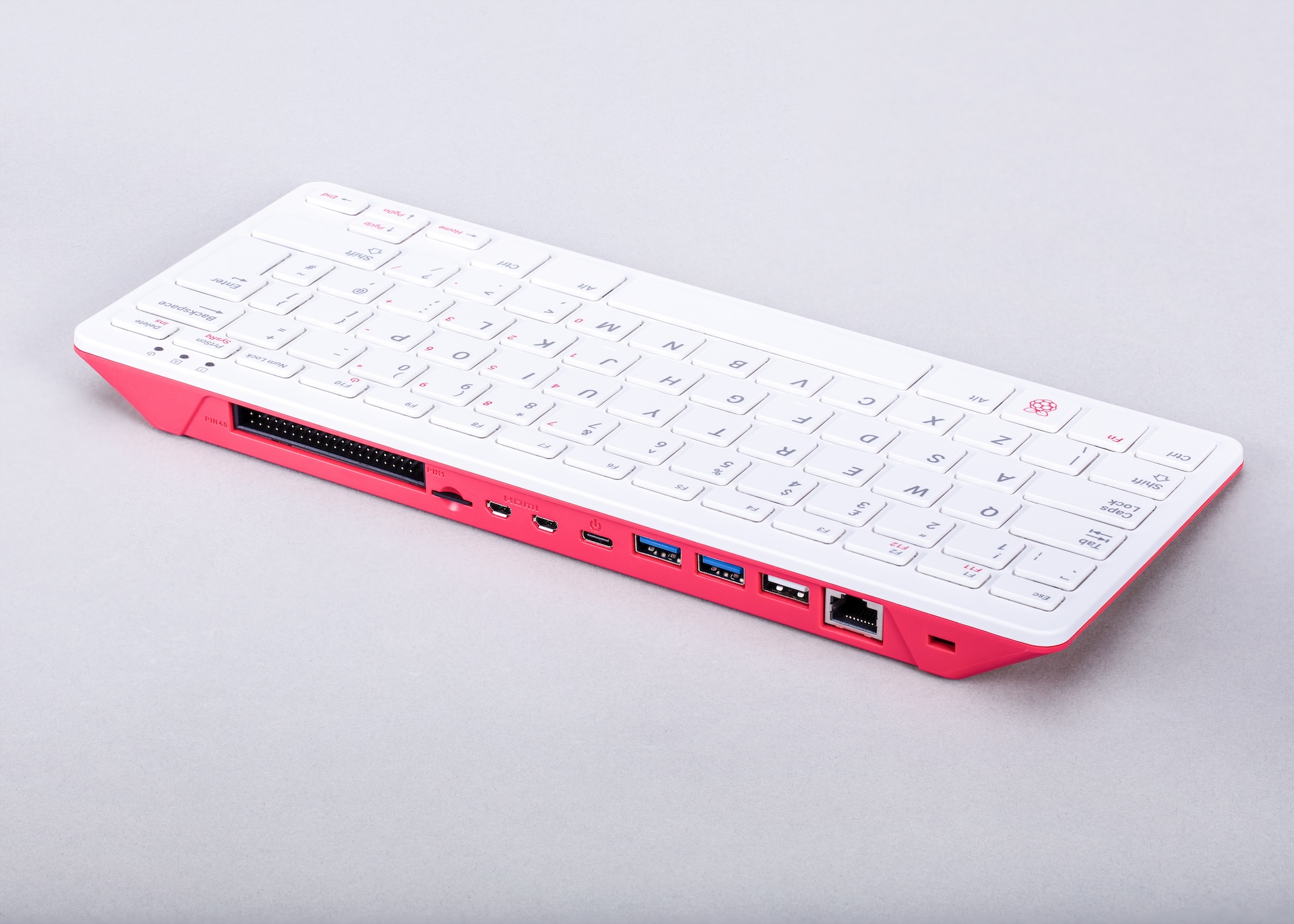
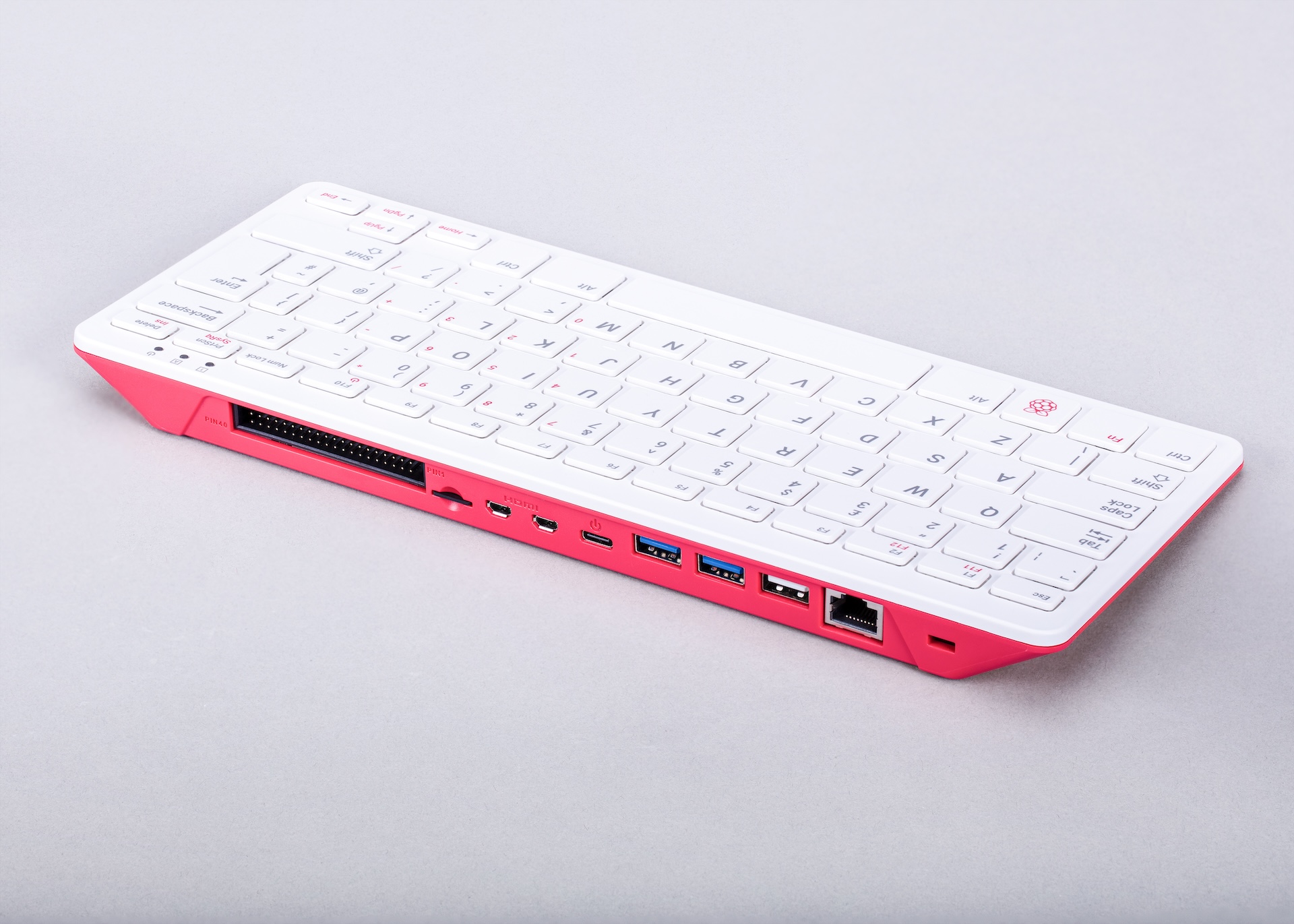
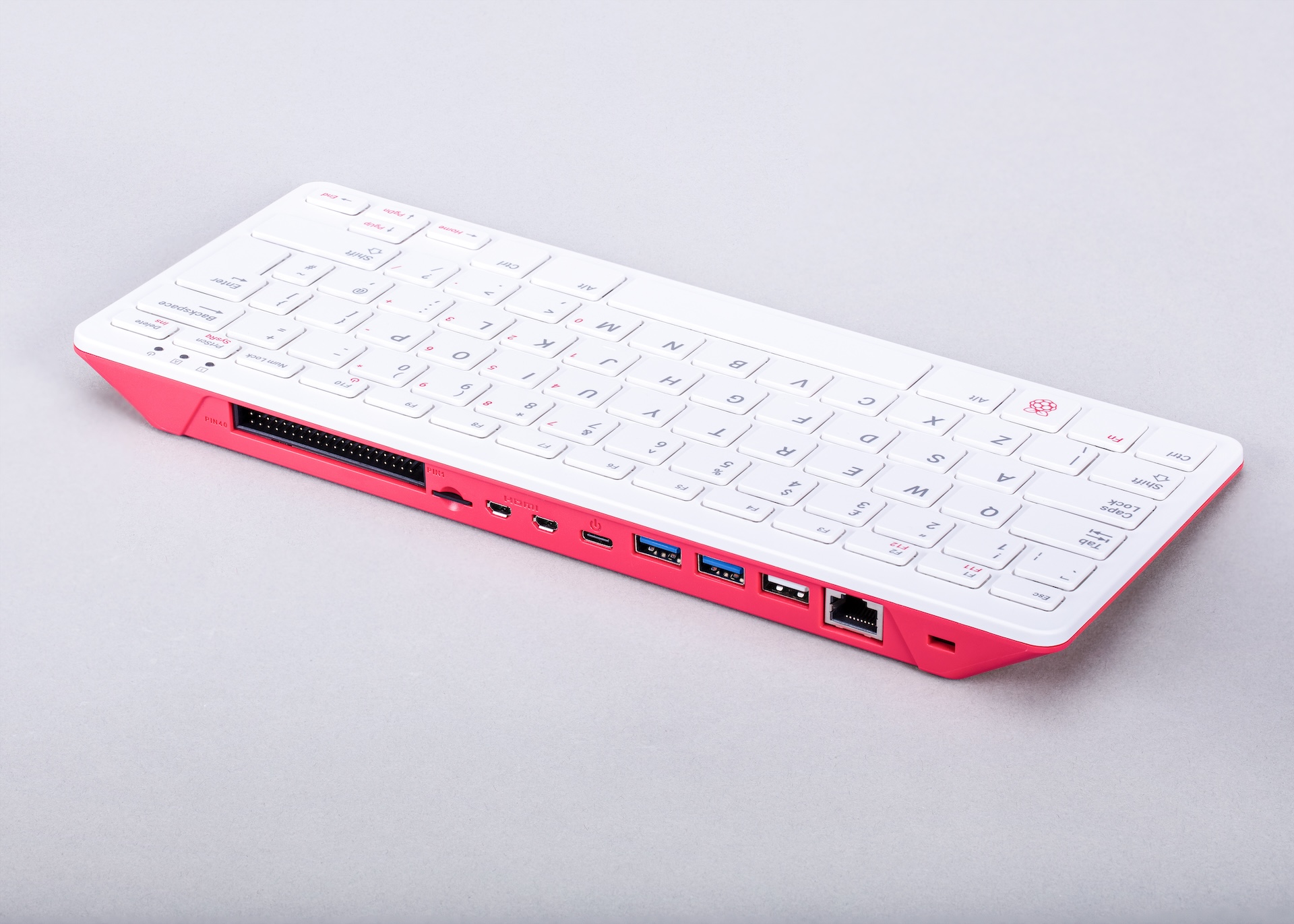
The Raspberry Pi 500 is an all-in-one personal computer released in late 2024 by the Raspberry Pi Foundation. Following the successful formula of the Raspberry Pi 400, it integrates a complete Raspberry Pi 5-class computer directly inside a compact keyboard chassis. Users simply connect a monitor, a USB mouse, and a power supply to have a fully functional Linux desktop computer — no separate board, case, or cable management is required.
At the heart of the Raspberry Pi 500 is the Broadcom BCM2712 SoC with a quad-core ARM Cortex-A76 processor running at 2.4 GHz — the same chip found in the Raspberry Pi 5 single-board computer. The keyboard unit ships with 8 GB of LPDDR4X-4267 SDRAM, making it the highest-RAM keyboard computer Raspberry Pi had offered at launch. The 40-pin GPIO header, exposed at the rear of the keyboard, ensures that makers and educators can still attach sensors, HATs, and peripherals for hands-on electronics projects.
The Raspberry Pi 500 represents a significant upgrade from the Raspberry Pi 400, which was based on the older Pi 4 / BCM2711 SoC. The move to Cortex-A76 silicon brings roughly double the single-thread performance, better GPU support (VideoCore VII with Vulkan 1.2), and improved media decode capabilities.
Quick Overview
| Feature | Detail |
|---|---|
| CPU | Broadcom BCM2712, quad-core ARM Cortex-A76 @ 2.4 GHz |
| GPU | VideoCore VII (OpenGL ES 3.1, Vulkan 1.2) |
| RAM | 8 GB LPDDR4X-4267 |
| Video Out | 2× micro-HDMI (4K60 single / dual 4K30) |
| USB | 2× USB 3.0 + 1× USB 2.0 (rear) |
| GPIO | 40-pin header (rear of keyboard) |
| Networking | Gigabit Ethernet + 802.11ac dual-band Wi-Fi + Bluetooth 5.0 |
| Storage | microSD card slot |
| Power | USB-C (27W recommended) |
| OS | Raspberry Pi OS 64-bit, Ubuntu, others |
| Form Factor | Keyboard computer (keyboard IS the computer) |
Key Features
- Raspberry Pi 5 silicon — BCM2712 quad-core Cortex-A76 at 2.4 GHz
- 8 GB LPDDR4X-4267 SDRAM for smooth desktop multitasking
- VideoCore VII GPU supporting OpenGL ES 3.1 and Vulkan 1.2
- Dual micro-HDMI ports for single 4K60 or dual 4K30 display outputs
- 40-pin GPIO header at rear — full HAT compatibility
- Gigabit Ethernet, dual-band Wi-Fi 5 (802.11ac), and Bluetooth 5.0
- Compact keyboard form factor — the keyboard is the entire computer
- MicroSD card slot for OS and storage
- Compatible with all Raspberry Pi OS software and most Linux distributions
- Available in regional keyboard layouts (ISO, ANSI, and others)
Technical Specifications
| Specification | Value |
|---|---|
| SoC | Broadcom BCM2712 |
| CPU | Quad-core ARM Cortex-A76 @ 2.4 GHz |
| GPU | VideoCore VII |
| GPU APIs | OpenGL ES 3.1, Vulkan 1.2 |
| RAM | 8 GB LPDDR4X-4267 SDRAM |
| Video Output | 2× micro-HDMI (4K60 single / dual 4K30) |
| USB | 2× USB 3.0 (5 Gbps) + 1× USB 2.0 |
| GPIO | 40-pin header at rear (3.3V logic) |
| Ethernet | Gigabit Ethernet (RJ45) |
| Wi-Fi | 802.11b/g/n/ac (2.4 GHz + 5 GHz) |
| Bluetooth | Bluetooth 5.0 / BLE |
| Storage | microSD card slot |
| Power Connector | USB-C (5V / 5A, 27W recommended) |
| Form Factor | Integrated keyboard computer |
| Keyboard Layouts | Regional variants (ISO/ANSI) |
| Dimensions | Approximately 286 × 122 × 23 mm |
Pinout
The Raspberry Pi 500 exposes the standard 40-pin GPIO header along the rear edge of the keyboard, identical in pinout to all Raspberry Pi boards since the 1 Model B+ (2014).
Power Pins
- Pin 1, 17: 3.3V (up to ~300 mA combined)
- Pin 2, 4: 5V (from input supply)
- Pins 6, 9, 14, 20, 25, 30, 34, 39: Ground
GPIO and Communication Interfaces
- General-purpose I/O on most non-power pins, 3.3V logic
- I2C1: GPIO 2 (SDA), GPIO 3 (SCL)
- SPI0: GPIO 7 (CE1), GPIO 8 (CE0), GPIO 9 (MISO), GPIO 10 (MOSI), GPIO 11 (CLK)
- UART0: GPIO 14 (TXD), GPIO 15 (RXD)
- PWM: GPIO 12, 13, 18, 19
GPIO access on the Raspberry Pi 500 goes through the RP1 I/O controller (same as Pi 5), so timing characteristics differ slightly from Pi 4.
Power
The Raspberry Pi 500 is powered via a USB-C connector at the rear. A 5V/5A (27W) USB Power Delivery supply is recommended for full performance. Using a lower-rated supply may limit USB port current and reduce performance under load.
| Power Mode | Supply |
|---|---|
| Minimum (light use) | 5V / 3A (15W) |
| Recommended | 5V / 5A (27W USB-PD) |
On-Board Components
| Component | Description |
|---|---|
| BCM2712 SoC | Quad-core Cortex-A76 CPU + VideoCore VII GPU |
| RP1 I/O Controller | Raspberry Pi custom chip for USB, Ethernet, GPIO, camera I/O |
| 8 GB LPDDR4X | On-package high-speed SDRAM |
| Wi-Fi / BT Module | Dual-band 802.11ac + Bluetooth 5.0 |
| Gigabit Ethernet PHY | Wired network controller |
| microSD Slot | OS and storage |
| 40-pin GPIO Header | Rear-facing, full HAT pinout |
| Integrated Keyboard | Built-in keyboard with regional layout options |
Wireless Connectivity
Wi-Fi
- Standard: 802.11b/g/n/ac (Wi-Fi 5)
- Frequencies: 2.4 GHz and 5 GHz dual-band
- Antenna integrated within the keyboard chassis
Bluetooth
- Version: Bluetooth 5.0 with BLE support
- Use for mice, speakers, sensors, and other wireless peripherals
Getting Started
What You Need
- Raspberry Pi 500 keyboard computer
- MicroSD card (16 GB or larger) — may be included in kit versions
- USB-C power supply (27W recommended)
- Monitor with HDMI input + micro-HDMI to HDMI cable
- USB mouse (keyboard is built in)
Step 1: Flash the microSD Card
Download Raspberry Pi Imager from https://www.raspberrypi.com/software/ and flash Raspberry Pi OS 64-bit to the microSD card. Use the Imager's settings (gear icon) to pre-configure hostname, Wi-Fi credentials, SSH, and user password.
Step 2: Insert Card and Connect
Insert the microSD card into the slot at the rear of the keyboard. Connect the micro-HDMI cable to your monitor and to a micro-HDMI port on the rear of the 500. Optionally plug in a USB mouse. Connect the USB-C power supply.
Step 3: Boot and Configure
The Raspberry Pi OS desktop appears within about 30 seconds. Complete the first-run wizard to set locale, timezone, and password, and download system updates.
Step 4: GPIO Blink Example
With the keyboard computer running, connect an LED and 330-ohm resistor to the rear GPIO header between pin 11 (GPIO 17) and any ground pin.
For newer Raspberry Pi OS releases, the gpiozero library is also recommended:
Programming
Python
Python 3 is pre-installed. The Raspberry Pi 500 is a full Linux computer, so all standard Python packages are available via pip. GPIO libraries include gpiozero (recommended), RPi.GPIO, and lgpio.
C / C++
GCC is pre-installed. Use pigpio or WiringPi for low-level GPIO access from C/C++.
Scratch
Scratch 3 is included on the Raspberry Pi OS desktop — ideal for younger learners and educators.
Node.js / JavaScript
Install Node.js via the NodeSource repository. Useful for building web servers, APIs, and IoT dashboards.
Java
OpenJDK is available via apt. Common in school and university curricula.
Other Languages
Rust, Go, Ruby, PHP, and many others are available through standard Linux package managers.
Package Contents
The Raspberry Pi 500 is sold as a standalone keyboard unit or as part of a kit. Kit contents vary by retailer but typically include:
- Raspberry Pi 500 keyboard computer
- USB-C power supply
- Mouse
- Pre-loaded microSD card with Raspberry Pi OS
Verify the exact bundle with your retailer before purchase.
Applications
- Affordable desktop computing and web browsing
- Teaching Python, Scratch, and Linux to students
- Electronics education using the rear GPIO header
- Home office productivity
- Media consumption and streaming
- Lightweight software development
- Introduction to Linux for beginners
- Classroom deployments (single unit = complete computer)
Where to Buy
- Official product page: https://www.raspberrypi.com/products/raspberry-pi-500/
- Amazon: https://www.amazon.com/s?k=Raspberry+Pi+500
- Authorised resellers: Adafruit, PiShop, Farnell, RS Components, Mouser, Digi-Key
Equivalent Boards
| Board | CPU | RAM | Key Difference |
|---|---|---|---|
| Raspberry Pi 500+ | Cortex-A76 @ 2.4 GHz | 8 GB | Premium bundle or higher-spec variant |
| Raspberry Pi 400 | Cortex-A72 @ 1.8 GHz | 4 GB | Previous generation keyboard computer (Pi 4) |
| Raspberry Pi 5 | Cortex-A76 @ 2.4 GHz | 4 or 8 GB | Bare board — same silicon but no keyboard |
Documentation
- Official Raspberry Pi 500 page: https://www.raspberrypi.com/products/raspberry-pi-500/
- Raspberry Pi documentation: https://www.raspberrypi.com/documentation/
- Raspberry Pi Imager: https://www.raspberrypi.com/software/
Notes
- HAT compatibility: The 40-pin GPIO header at the rear of the keyboard follows the standard Raspberry Pi HAT specification. Most HATs designed for Raspberry Pi B+ and later are electrically compatible. However, because the 500 uses the RP1 I/O controller (same as Pi 5), some older HATs with strict timing requirements may behave differently. Always check HAT documentation for Pi 5 compatibility.
- The keyboard chassis encloses the electronics, so unlike the bare Pi 5 board, PCIe and camera/display MIPI connectors are not externally accessible on the 500.
- Keyboard layout variants are available for different regions. Confirm the layout before purchase if ordering internationally.
Community
- Raspberry Pi Forums — official community for questions and projects
- r/raspberry_pi (Reddit) — share projects and ask questions
- Raspberry Pi Discord — real-time chat with the community
Revision History
| Version | Date | Notes |
|---|---|---|
| v1.0 | 2026-06 | Initial entry |