
Raspberry Pi 500+
Image Gallery
Overview
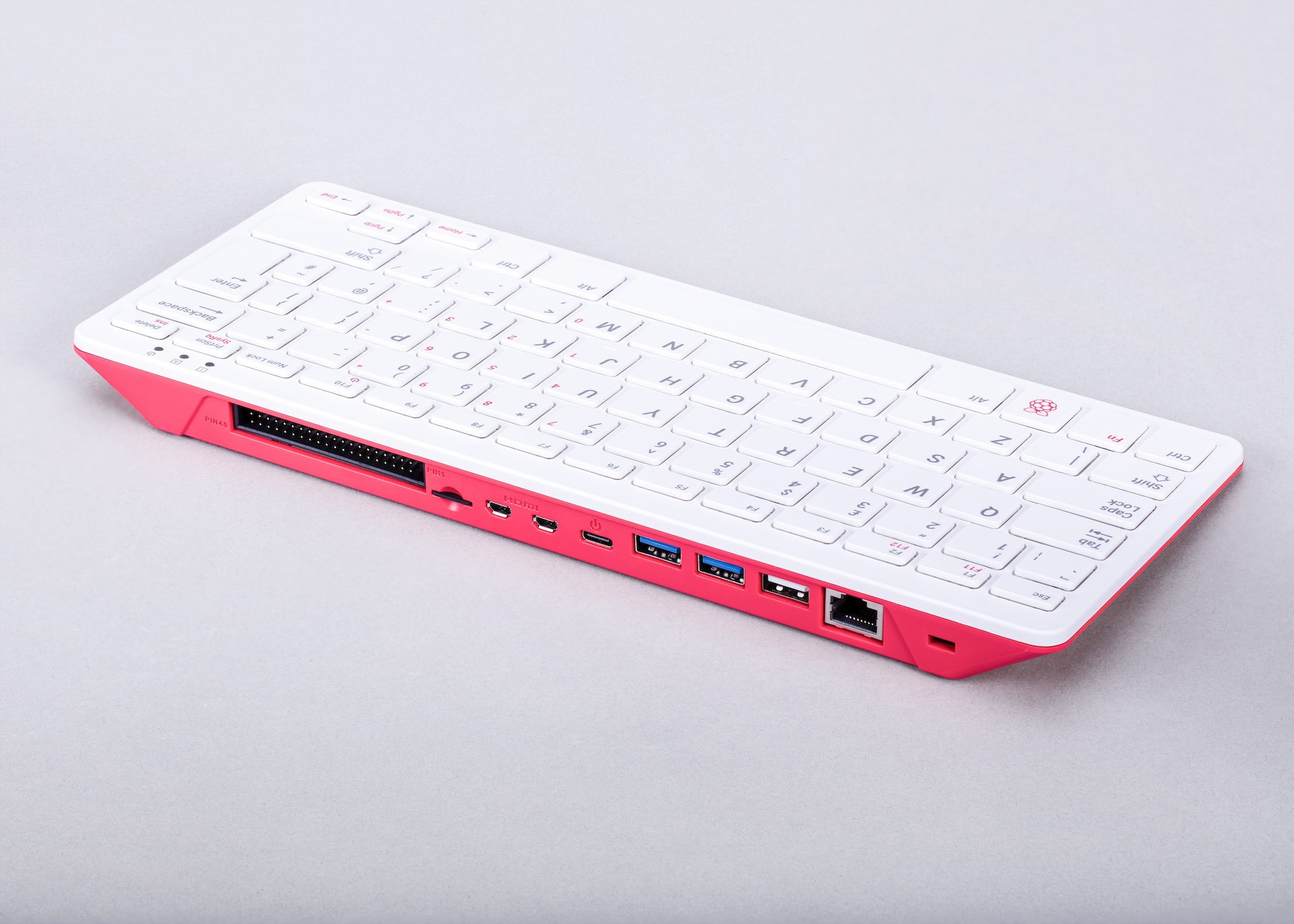
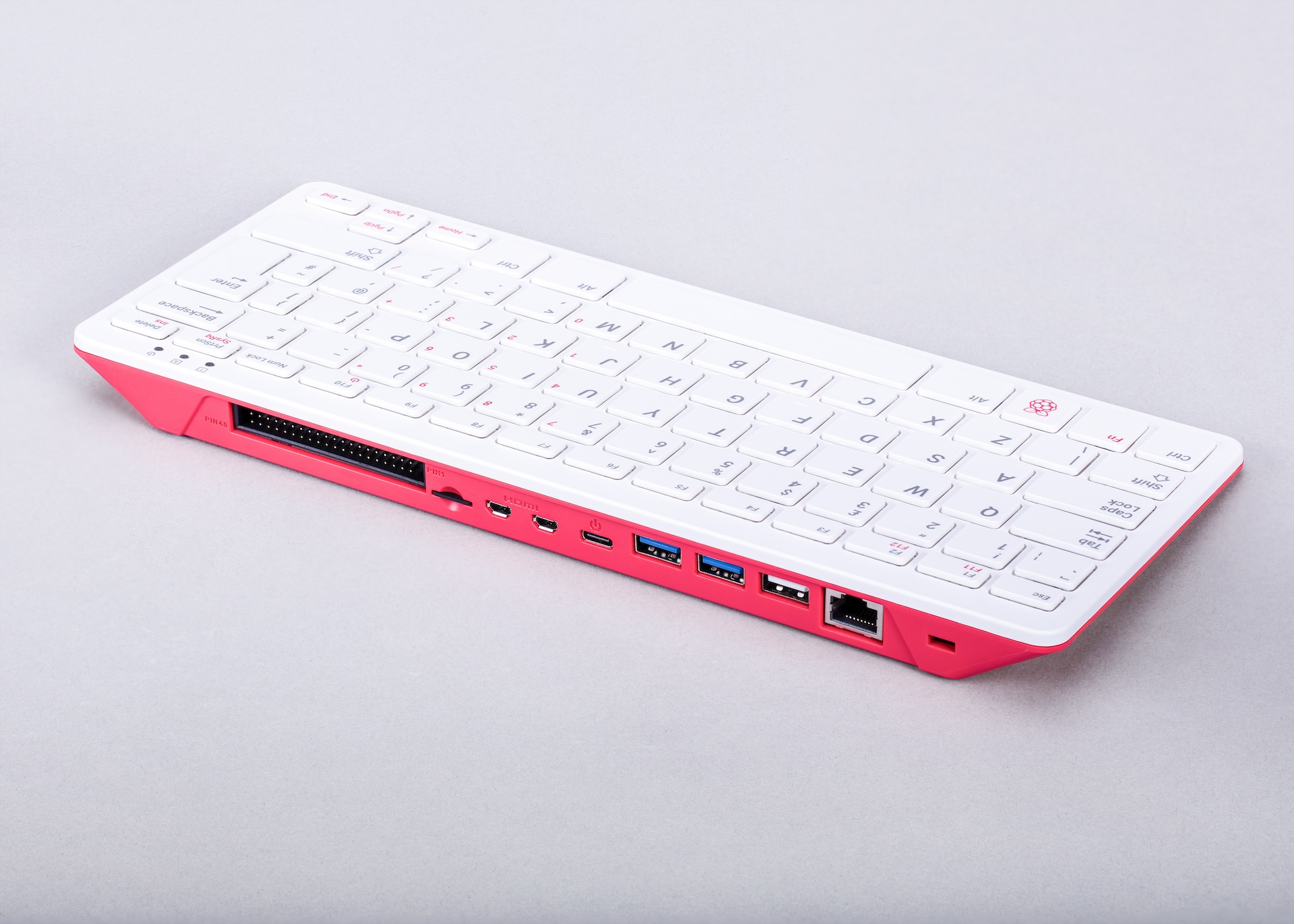
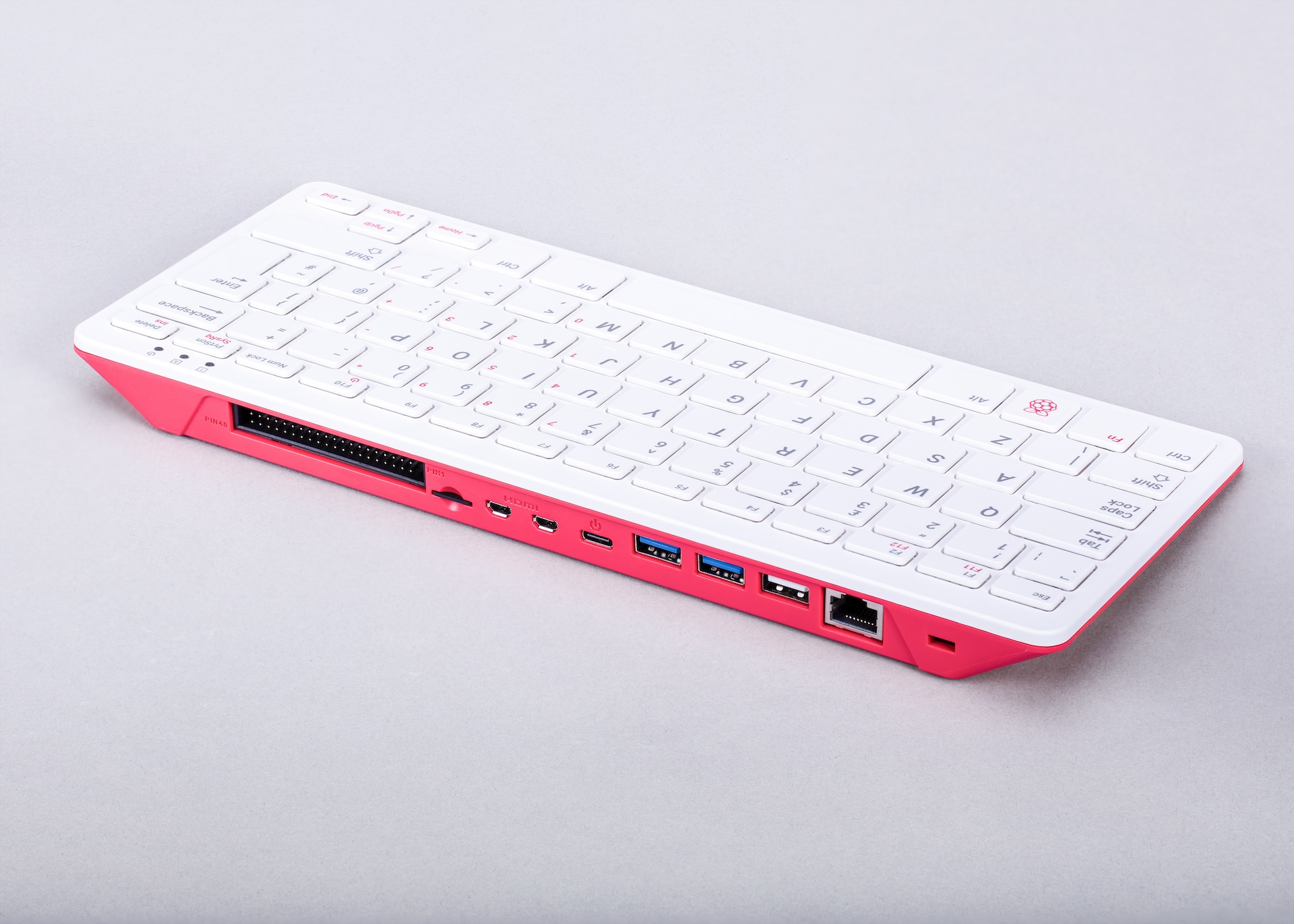
The Raspberry Pi 500+ is the premium evolution of the keyboard computer line from the Raspberry Pi Foundation. Building on the success of the Raspberry Pi 400 (which placed a Pi 4 inside a keyboard), the 500+ integrates Raspberry Pi 5 technology into an elegant all-in-one keyboard form factor. It is designed as a complete personal computer — the keyboard itself is the computer — and requires only a monitor and power cable to begin working.
The 500+ steps up from the standard Raspberry Pi 500 with 8 GB of LPDDR4X RAM, making it the highest-specification keyboard computer the Foundation has produced. It targets users who want maximum performance in the keyboard form factor: developers, educators running intensive workloads, or enthusiasts who prefer the compact desktop form but need the headroom of the flagship Pi 5.
Note: Specific product details for the Raspberry Pi 500+ were announced or refined after the initial Raspberry Pi 500 launch. Some specification details in this article may require verification against the official Raspberry Pi product page at https://www.raspberrypi.com/products/.
Quick Overview
| Feature | Detail |
|---|---|
| CPU | Broadcom BCM2712, quad-core ARM Cortex-A76 @ 2.4 GHz |
| GPU | VideoCore VII (OpenGL ES 3.1, Vulkan 1.2) |
| RAM | 8 GB LPDDR4X-4267 |
| Video Out | 2× micro-HDMI (up to 4K60 fps or dual 4K30 fps) |
| USB (rear) | 2× USB 3.0 + 1× USB 2.0 |
| GPIO | 40-pin header at rear of keyboard |
| Networking | Gigabit Ethernet + 802.11ac dual-band Wi-Fi + Bluetooth 5.0 |
| Power | USB-C (27W recommended) |
| Form Factor | Integrated keyboard computer (keyboard IS the computer) |
| OS | Raspberry Pi OS 64-bit, Ubuntu, others |
Key Features
- Raspberry Pi 5 silicon (BCM2712 quad-core Cortex-A76 at 2.4 GHz) inside a keyboard chassis
- 8 GB LPDDR4X-4267 RAM — maximum memory in the keyboard form factor
- Upgraded specification over the standard Raspberry Pi 500 (which ships with 8 GB but may differ in bundle contents or accessories)
- Dual micro-HDMI outputs supporting 4K60 fps on a single display or dual 4K30 fps
- 40-pin GPIO header at the rear for HAT and peripheral connectivity
- Gigabit Ethernet for wired networking
- Dual-band 802.11ac Wi-Fi and Bluetooth 5.0
- MicroSD card slot for OS storage
- Built-in keyboard eliminates the need for a separate input device
- Compact desktop form factor suitable for education, home, and office use
Technical Specifications
| Specification | Value |
|---|---|
| SoC | Broadcom BCM2712 |
| CPU | Quad-core ARM Cortex-A76 @ 2.4 GHz |
| GPU | VideoCore VII (OpenGL ES 3.1, Vulkan 1.2) |
| RAM | 8 GB LPDDR4X-4267 SDRAM |
| Video Output | 2× micro-HDMI (4K60 single / dual 4K30) |
| USB Ports | 2× USB 3.0 + 1× USB 2.0 (rear of keyboard) |
| GPIO | 40-pin header (rear, 3.3V logic) |
| Ethernet | Gigabit Ethernet (RJ45, rear) |
| Wi-Fi | 802.11b/g/n/ac (2.4 GHz + 5 GHz dual-band) |
| Bluetooth | Bluetooth 5.0 / BLE |
| Storage | microSD card slot |
| Power Connector | USB-C (5V/5A, 27W recommended) |
| Form Factor | Integrated keyboard computer |
| Keyboard Layout | ISO / ANSI (regional variants available) |
| Dimensions | Approximately 286 × 122 × 23 mm (verify with official specs) |
Pinout
The Raspberry Pi 500+ exposes the standard 40-pin Raspberry Pi GPIO header at the rear of the keyboard unit. The pinout is identical to all Raspberry Pi boards since the Model B+ (2014), ensuring full HAT compatibility.
Power Pins
Pins 1 and 17 provide 3.3V. Pins 2 and 4 provide 5V from the board supply. Multiple ground pins are distributed throughout the header.
GPIO and Communication
- GPIO pins operate at 3.3V logic level
- I2C1 on GPIO 2 (SDA) and GPIO 3 (SCL)
- SPI0 on GPIO 7–11
- UART0 on GPIO 14 (TX) and GPIO 15 (RX)
- PWM available on GPIO 12, 13, 18, 19
Power
The Raspberry Pi 500+ uses a USB-C power connector at the rear of the keyboard. A 27W (5V/5A) USB-PD power supply is recommended for full performance, particularly when driving USB peripherals and running the CPU at full speed.
| Power Mode | Supply Needed |
|---|---|
| Minimum (basic desktop use) | 5V / 3A (15W) |
| Recommended (full performance) | 5V / 5A (27W USB-PD) |
On-Board Components
| Component | Description |
|---|---|
| BCM2712 SoC | Main processor — quad-core Cortex-A76 + VideoCore VII GPU |
| RP1 I/O Controller | Custom Raspberry Pi chip for USB, Ethernet, GPIO, camera I/O |
| 8 GB LPDDR4X | On-package memory |
| Wi-Fi / BT Module | Dual-band 802.11ac + Bluetooth 5.0 |
| Gigabit Ethernet PHY | Wired network controller |
| microSD Slot | OS storage |
| 40-pin GPIO Header | Exposed at rear of keyboard chassis |
| Integrated Keyboard | Built-in keyboard (regional layout variants) |
Wireless Connectivity
Wi-Fi
- Standards: 802.11b/g/n/ac (Wi-Fi 5)
- Bands: 2.4 GHz and 5 GHz dual-band
- Antenna integrated into the keyboard chassis
Bluetooth
- Version: Bluetooth 5.0 with BLE support
- Compatible with Bluetooth keyboards, mice, speakers, and BLE sensors
Getting Started
What You Need
- Raspberry Pi 500+ keyboard computer
- MicroSD card (16 GB or larger recommended) or pre-loaded card
- USB-C power supply (27W recommended)
- Monitor with HDMI input and micro-HDMI adapter or cable
- USB mouse (keyboard is built in)
Step 1: Flash the microSD Card
Download Raspberry Pi Imager from https://www.raspberrypi.com/software/ and flash Raspberry Pi OS 64-bit to a microSD card. Use the Imager's settings to configure Wi-Fi, hostname, and SSH if desired.
Step 2: Connect and Boot
Insert the microSD card into the slot at the rear of the 500+ keyboard. Connect a micro-HDMI cable to a monitor. Optionally plug a USB mouse into one of the USB ports. Connect the USB-C power supply. The system will boot to the Raspberry Pi OS desktop within about 30 seconds.
Step 3: Configure
Complete the first-run setup wizard (locale, password, Wi-Fi, updates). It is strongly recommended to run a full system update after first boot.
Step 4: GPIO Blink Example
Connect an LED and 330-ohm resistor between GPIO 17 (pin 11 on the rear header) and a ground pin.
Programming
The Raspberry Pi 500+ runs full Raspberry Pi OS (Debian-based Linux), supporting every major programming language available on Linux.
Python
Python 3 is pre-installed and is the primary language for GPIO, sensors, and automation projects. Libraries include gpiozero, RPi.GPIO, picamera2, and thousands of packages via pip.
C / C++
GCC is included. C and C++ are ideal for performance-critical code and low-level hardware access.
Scratch
Scratch 3 is pre-installed on the Raspberry Pi OS desktop, providing an ideal block-based environment for beginners.
Node.js / JavaScript
Node.js can be installed via NodeSource. Useful for web servers, IoT dashboards, and API projects.
Java
OpenJDK is available and widely used in educational settings.
Package Contents
The Raspberry Pi 500+ may be sold as a kit or standalone unit depending on the retailer. A typical bundle may include:
- Raspberry Pi 500+ keyboard computer
- USB-C power supply
- Pre-loaded microSD card with Raspberry Pi OS
- Mouse
Confirm bundle contents with the specific listing, as the 500+ kit may differ from the standard Raspberry Pi 500 bundle.
Applications
- Desktop computing and everyday productivity
- Software development and coding education
- Classroom computing (single unit = complete computer)
- Python and electronics learning with GPIO at the rear
- Home office and email/web browsing PC
- Media consumption and streaming
- Lightweight server tasks
Where to Buy
- Official Raspberry Pi products: https://www.raspberrypi.com/products/
- Amazon: https://www.amazon.com/s?k=Raspberry+Pi+500
- Authorised resellers: Adafruit, PiShop, Farnell, RS Components, Mouser
Equivalent Boards
| Board | CPU | RAM | Key Difference |
|---|---|---|---|
| Raspberry Pi 500 | Cortex-A76 @ 2.4 GHz | 8 GB | Standard version (may differ in bundle or accessories) |
| Raspberry Pi 400 | Cortex-A72 @ 1.8 GHz | 4 GB | Previous generation keyboard computer, Pi 4 silicon |
| Raspberry Pi 5 | Cortex-A76 @ 2.4 GHz | 4 or 8 GB | Bare board form factor, same silicon |
Documentation
- Raspberry Pi official products page: https://www.raspberrypi.com/products/
- Raspberry Pi documentation: https://www.raspberrypi.com/documentation/
- Raspberry Pi Imager: https://www.raspberrypi.com/software/
Notes
- HAT compatibility: The rear 40-pin GPIO header follows the standard Raspberry Pi HAT specification. Most HATs designed for the Raspberry Pi B+ and later will physically and electrically connect to the 500+. Check individual HAT documentation for Pi 5 compatibility, as some older HATs may have timing or library constraints.
- The Raspberry Pi 500+ represents the top of the keyboard computer line. If maximum GPIO or PCIe expandability is required, the bare Raspberry Pi 5 board offers additional flexibility.
- Some specifications in this article are based on pre-release or early availability information and should be verified against the official Raspberry Pi product page.
Community
- Raspberry Pi Forums — official community for questions and projects
- r/raspberry_pi (Reddit) — share projects and ask questions
- Raspberry Pi Discord — real-time chat with the community
Revision History
| Version | Date | Notes |
|---|---|---|
| v1.0 | 2026-06 | Initial entry |