
Raspberry Pi Compute Module 3+
Image Gallery
Overview
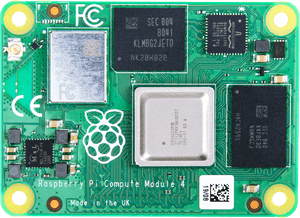
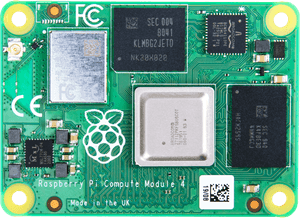
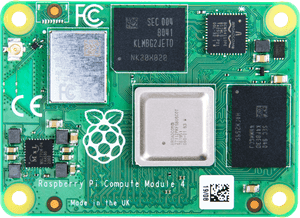
The Raspberry Pi Compute Module 3+ (CM3+) is the third-generation compute module from Raspberry Pi and the final product to use the original DDR2 SODIMM 200-pin form factor established by the CM1 in 2014. Released in January 2019, it was the last significant update to the legacy carrier board platform before the entirely redesigned CM4 connector arrived in 2020.
The CM3+ is based on the Broadcom BCM2837B0 — the same system-on-chip used in the Raspberry Pi 3 Model B+ — running four ARM Cortex-A53 cores at 1.2 GHz. It carries 1 GB of LPDDR2 RAM on the module and was offered with four storage configurations: a Lite variant with no eMMC (suitable for booting from external storage via the carrier board), and 8 GB, 16 GB, and 32 GB eMMC options. The expanded 32 GB eMMC was the primary practical improvement over the earlier CM3, which topped out at 4 GB.
The DDR2 SODIMM form factor means the CM3+ is compatible with carrier boards originally designed for the CM1 and CM3. This made the CM3+ a straightforward drop-in upgrade for existing CM3 installations — same connector, same physical size, more storage.
The CM3+ does not include Wi-Fi or Bluetooth. Any wireless connectivity must be provided by the carrier board or attached peripherals.
The CM3+ has been discontinued and superseded by the Raspberry Pi Compute Module 4 (new CM4 connector; incompatible) and by the Raspberry Pi Compute Module 4S (CM4 silicon in the old SODIMM form factor — a migration path for CM3 carrier boards).
Key Features
- BCM2837B0 quad-core ARM Cortex-A53 at 1.2 GHz
- 1 GB LPDDR2 RAM
- Storage options: 0 GB Lite, 8 GB, 16 GB, or 32 GB eMMC
- DDR2 SODIMM 200-pin form factor — compatible with CM1 and CM3 carrier boards
- No Wi-Fi, no Bluetooth (must be provided externally)
- Requires a carrier board for all I/O
- Full software compatibility with Raspberry Pi 3-generation OS images
- Superseded by CM4 (different connector) and CM4S (CM4 silicon, same connector)
Technical Specifications
| Attribute | Value |
|---|---|
| Module Name | Compute Module 3+ |
| SoC | Broadcom BCM2837B0 |
| CPU | Quad-core ARM Cortex-A53 at 1.2 GHz |
| RAM | 1 GB LPDDR2 |
| Storage Options | 0 GB Lite / 8 GB / 16 GB / 32 GB eMMC |
| Wi-Fi | None |
| Bluetooth | None |
| USB | 1× USB 2.0 (via carrier board) |
| GPIO | 46 accessible (via carrier board) |
| Video Output | 1× HDMI (via carrier board) |
| Camera Interface | 2× MIPI CSI (via carrier board) |
| Display Interface | 1× MIPI DSI (via carrier board) |
| Connector | DDR2 SODIMM 200-pin (CM1/CM3 compatible) |
| Dimensions | 67.6 × 31 mm |
| OS Support | Raspberry Pi OS (32-bit), other ARM Linux distributions |
| Release Year | 2019 |
| Status | Discontinued |
On-Board Components
| Component | Details |
|---|---|
| SoC | Broadcom BCM2837B0 (quad-core Cortex-A53, VideoCore IV GPU) |
| RAM | 1 GB LPDDR2 |
| eMMC Flash | 0 / 8 / 16 / 32 GB depending on SKU (Lite has none) |
| Power Management | On-module PMIC |
Getting Started
Requirements
- Raspberry Pi Compute Module 3+
- CM3-compatible carrier board (e.g., Raspberry Pi Compute Module IO Board v3)
- 5 V power supply for the carrier board
- Micro-USB cable for eMMC flashing (or microSD on Lite variant)
Important: Carrier Board Required
Like all Compute Modules, the CM3+ has no standalone USB ports, HDMI connector, or power jack. All peripherals are exposed through a carrier board. For development, Raspberry Pi produced the Compute Module IO Board (CMIO) which provides USB, HDMI, GPIO header access, and eMMC flashing capability. Third-party carrier boards compatible with the DDR2 SODIMM form factor also accept the CM3+.
Flashing eMMC Variants
- Install rpiboot on your computer
- Connect the CMIO board to your computer via the USB slave port
- Set the J4 or DISABLE eMMC BOOT jumper to enable USB boot
- Run rpiboot — the eMMC mounts as a USB mass-storage device
- Flash Raspberry Pi OS using Raspberry Pi Imager or dd
CM3+ Lite (no eMMC)
The Lite variant has no onboard eMMC. The carrier board must provide a microSD socket. Boot is from microSD.
Applications
- Industrial control panels and HMI systems
- Digital signage (legacy installations)
- Legacy product maintenance and extended production runs using existing CM3 carrier boards
- Custom embedded Linux appliances
- Network equipment with custom Linux software stacks
- Vision systems with MIPI camera interfaces
Where to Buy
- Amazon — search for Raspberry Pi Compute Module 3 Plus (limited availability — discontinued)
Equivalent Boards
| Module | SoC | Form Factor | Wireless | Notes |
|---|---|---|---|---|
| Raspberry Pi CM3 | BCM2837 (Cortex-A53) | SODIMM 200-pin | None | Previous generation; max 4 GB eMMC |
| Raspberry Pi CM4S | BCM2711 (Cortex-A72) | SODIMM 200-pin | Optional | CM4 silicon in old form factor — drop-in upgrade path from CM3+ |
| Raspberry Pi CM4 | BCM2711 (Cortex-A72) | CM4 dual 100-pin | Optional | New connector; not compatible with CM3 carrier boards |
Documentation
Notes
- The CM3+ uses the original DDR2 SODIMM 200-pin form factor, making it a direct replacement for CM1 and CM3 boards in existing carrier board designs without hardware changes.
- All I/O — USB, HDMI, GPIO, camera, display — is accessed only through the carrier board. The CM3+ has no connectors of its own aside from the SODIMM edge connector.
- The CM3+ does not include wireless (Wi-Fi or Bluetooth). Applications requiring wireless must use a USB dongle or carrier board with an integrated wireless module.
- The CM4S was introduced as a direct upgrade path for CM3+ carrier boards: it uses the more powerful BCM2711 (Cortex-A72) while retaining the SODIMM 200-pin connector, allowing hardware to be reused.
- The CM4 (2020) introduced a completely new dual 100-pin connector incompatible with all previous CM carrier boards. Any migration from CM3+ to CM4 requires carrier board redesign.
- Stock availability of the CM3+ may be limited as the product is discontinued. For new designs, the CM4S or CM4 is recommended.
Community
- Raspberry Pi Forums — official community
- r/raspberry_pi (Reddit) — share projects
- Raspberry Pi Discord — real-time chat
Revision History
| Version | Date | Notes |
|---|---|---|
| v1.0 | 2026-06 | Initial entry |