
Raspberry Pi Compute Module 4
Image Gallery
Overview
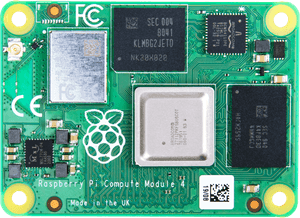
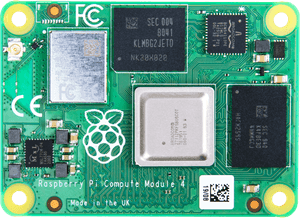
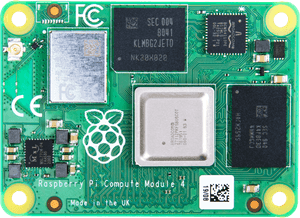
The Raspberry Pi Compute Module 4 (CM4) is Raspberry Pi's fourth-generation system-on-module, released in October 2020. It integrates the same Broadcom BCM2711 SoC used in the Raspberry Pi 4 Model B — a quad-core ARM Cortex-A72 running at 1.5 GHz — into a compact 55 × 40 mm module designed for embedding into custom hardware.
Unlike the Raspberry Pi 4 Model B, which exposes its peripherals directly through USB-A ports, HDMI connectors, and a 40-pin GPIO header, the CM4 breaks all signals out through two 100-pin high-density connectors. A carrier board — either Raspberry Pi's own CM4 IO Board or a custom-designed PCB — provides the physical connectors, power circuitry, and peripheral routing appropriate for the target application.
The CM4 is offered in 32 distinct SKU configurations combining four RAM options (1 GB, 2 GB, 4 GB, or 8 GB LPDDR4-3200), four storage options (0 GB Lite / no eMMC, 8 GB, 16 GB, or 32 GB eMMC), and two wireless variants (with or without 802.11 b/g/n/ac Wi-Fi and Bluetooth 5.0). This allows system designers to select exactly the memory, storage, and connectivity required for their product without paying for unneeded features.
A critical compatibility note: the CM4 uses a completely new dual-connector design that is not compatible with carrier boards designed for the Compute Module 1, CM3, or CM3+. Those earlier modules used a single DDR2 SODIMM 200-pin connector. Existing CM3 carrier boards cannot accept a CM4 without hardware redesign.
Key Features
- BCM2711 quad-core ARM Cortex-A72 at 1.5 GHz (same SoC as Raspberry Pi 4 Model B)
- RAM options: 1 GB, 2 GB, 4 GB, or 8 GB LPDDR4-3200
- Storage options: 0 GB Lite (no eMMC), 8 GB, 16 GB, or 32 GB eMMC
- Optional 802.11 b/g/n/ac (2.4 GHz + 5 GHz) Wi-Fi and Bluetooth 5.0
- 1× PCIe Gen 2 lane via FPC connector (NVMe drives, neural accelerators, PCIe cards)
- 2× MIPI DSI display interfaces via FPC connectors (on carrier board)
- 2× MIPI CSI camera interfaces via FPC connectors (on carrier board)
- 2× USB 2.0 (via carrier board)
- 28 accessible GPIO pins (via carrier board)
- 55 × 40 mm compact module footprint
- New CM4 dual-connector (2× 100-pin) — NOT compatible with CM1/CM3 carrier boards
- Requires a CM4-compatible carrier board
- 32 SKU variants (4 RAM × 4 storage × 2 wireless options)
Technical Specifications
| Attribute | Value |
|---|---|
| Module Name | Compute Module 4 |
| SKU Range | CM4 (32 variants) |
| SoC | Broadcom BCM2711 |
| CPU | Quad-core ARM Cortex-A72 at 1.5 GHz |
| RAM Options | 1 GB / 2 GB / 4 GB / 8 GB LPDDR4-3200 |
| Storage Options | 0 GB Lite / 8 GB / 16 GB / 32 GB eMMC |
| Wi-Fi (optional) | 802.11 b/g/n/ac (2.4 GHz and 5 GHz) |
| Bluetooth (optional) | Bluetooth 5.0 |
| PCIe | 1× Gen 2 lane (via FPC connector) |
| Display Interfaces | 2× MIPI DSI (via carrier board FPC) |
| Camera Interfaces | 2× MIPI CSI (via carrier board FPC) |
| USB | 2× USB 2.0 (via carrier board) |
| GPIO (accessible) | 28 (via carrier board) |
| Video Output | Via carrier board (HDMI, DSI, LVDS with appropriate hardware) |
| Connector | 2× 100-pin CM4 connectors (new — NOT CM1/CM3 compatible) |
| Dimensions | 55 × 40 mm |
| OS Support | Raspberry Pi OS, Ubuntu, other ARM Linux distributions |
| Release Year | 2020 |
On-Board Components
The CM4 integrates all core computing components onto the module itself, leaving the carrier board responsible only for physical connectors and power management:
| Component | Details |
|---|---|
| SoC | Broadcom BCM2711 (quad-core Cortex-A72, VideoCore VI GPU) |
| RAM | LPDDR4-3200 (1/2/4/8 GB depending on SKU) |
| eMMC Flash | 0 / 8 / 16 / 32 GB depending on SKU (Lite has none) |
| Wi-Fi / BT Module | Cypress CYW43455 (on wireless SKUs only) |
| Power Management | On-module PMIC |
| Antenna | On-module antenna (wireless SKUs) |
Wireless Connectivity
Wireless SKUs of the CM4 include an on-module Cypress CYW43455 chip providing:
- 802.11 b/g/n/ac Wi-Fi on both 2.4 GHz and 5 GHz bands
- Bluetooth 5.0
The on-module antenna is adequate for many embedded applications. External antenna connectivity is available through an optional U.FL connector on wireless-equipped modules. Non-wireless SKUs omit the radio hardware entirely, which is useful for products subject to RF regulations that prohibit or restrict radios, or products where radios are supplied by the carrier board.
Getting Started
Requirements
- Raspberry Pi Compute Module 4
- CM4-compatible carrier board (e.g., Raspberry Pi CM4 IO Board)
- 12 V power supply (for the CM4 IO Board)
- Micro-USB cable (for flashing the Lite variant) or the module loads from eMMC
Important: Carrier Board Required
The CM4 is not a standalone board. It has no USB ports, HDMI connector, or power connector of its own. All peripherals are accessed through a carrier board. For development and evaluation, Raspberry Pi produces the CM4 IO Board, which exposes:
- Full-size HDMI ports
- USB 2.0 ports
- 40-pin GPIO header
- PCIe x1 slot
- CSI and DSI FPC connectors
- Micro-USB for eMMC flashing
Flashing the CM4 (eMMC variants)
- Install rpiboot on your computer (available from Raspberry Pi's GitHub)
- Connect the CM4 IO Board to your computer via the micro-USB flashing port
- Set the nRPIBOOT jumper to force USB boot mode
- Run rpiboot — the eMMC appears as a USB mass-storage device
- Flash Raspberry Pi OS using Raspberry Pi Imager
CM4 Lite (no eMMC)
The Lite variant has no onboard eMMC storage. It boots from a microSD card connected through the carrier board, or from an NVMe SSD via the PCIe interface (requires bootloader configuration).
Applications
- Industrial automation and machine vision
- Digital signage and kiosk systems
- Network-attached storage (NAS) with NVMe via PCIe
- AI inference systems with PCIe neural accelerator cards
- Custom router and network appliance hardware
- Medical devices and measurement equipment
- Robotics and autonomous system controllers
- Thin client terminals
- Audio and video processing appliances
Where to Buy
- Raspberry Pi Official — official product page and authorized resellers
- Amazon — search for Raspberry Pi Compute Module 4
Equivalent Boards
| Module | CPU | PCIe | Connector | Notes |
|---|---|---|---|---|
| Raspberry Pi CM4S | BCM2711 (Cortex-A72) | No | SODIMM 200-pin (CM1/CM3 compatible) | CM4 silicon in old form factor for legacy carrier boards |
| Raspberry Pi CM5 | BCM2712 (Cortex-A76) | Yes (PCIe Gen 3) | CM5 connector | Next generation; faster SoC, PCIe Gen 3 |
Documentation
Notes
- The CM4 connector is entirely new and incompatible with carrier boards designed for the CM1, CM3, or CM3+. Migrating an existing CM3 product to CM4 requires carrier board redesign.
- The CM4S (Compute Module 4S) was released later to address this migration path — it uses CM4 silicon but in the old SODIMM 200-pin form factor compatible with CM1/CM3 carrier boards, though without PCIe.
- PCIe Gen 2 on the CM4 enables high-speed storage (NVMe SSDs) and AI accelerators (Google Coral M.2, Hailo-8, etc.) via the FPC connector on the carrier board.
- The VideoCore VI GPU in the BCM2711 supports OpenGL ES 3.1, Vulkan 1.0, and hardware-accelerated H.265/H.264 video decode at up to 4K.
- Wireless SKUs include an antenna printed on the module. A U.FL connector is available for attaching an external antenna in shielded enclosures.
- EMMC storage is faster and more reliable than microSD for production deployments.
Community
- Raspberry Pi Forums — official community
- r/raspberry_pi (Reddit) — share projects
- Raspberry Pi Discord — real-time chat
Revision History
| Version | Date | Notes |
|---|---|---|
| v1.0 | 2026-06 | Initial entry |