
Raspberry Pi Compute Module 4S
Image Gallery
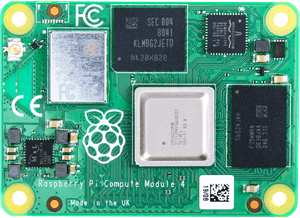
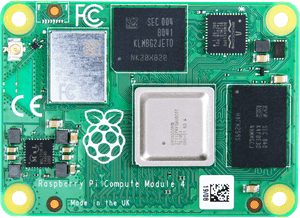
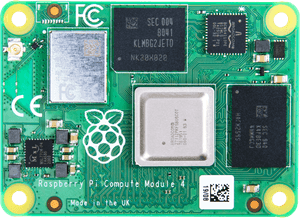
Overview
The Raspberry Pi Compute Module 4S (CM4S) is a specialized variant of the Compute Module 4 designed specifically for backward compatibility with existing CM1, CM3, and CM3+ carrier boards. Released in 2021, CM4S houses the same Broadcom BCM2711 quad-core ARM Cortex-A72 SoC found in the Compute Module 4 and Raspberry Pi 4 Model B, but packages it in the older DDR2 SODIMM 200-pin form factor used by the original Compute Module family.
This makes CM4S the ideal upgrade path for manufacturers and developers who have deployed products based on CM1, CM3, or CM3+ carrier boards and want to gain CM4-class performance without redesigning their hardware. Simply swap out the older module for a CM4S and benefit from significantly improved CPU performance.
CM4S does not include Wi-Fi or Bluetooth in any variant — all configurations are wireless-free. If wireless connectivity is required, it must be added externally via the carrier board.
Quick Overview
| Feature | Detail |
|---|---|
| CPU | Broadcom BCM2711, quad-core ARM Cortex-A72 @ 1.5 GHz |
| RAM | 1 GB, 2 GB, 4 GB, or 8 GB LPDDR4 |
| Storage | Lite (0 GB), 8 GB, 16 GB, or 32 GB eMMC |
| Wireless | None (all variants — no Wi-Fi, no Bluetooth) |
| Form Factor | DDR2 SODIMM 200-pin |
| CM1/CM3/CM3+ Compatible | Yes — drop-in compatible with existing carrier boards |
| Carrier Board Required | Yes |
| GPIO | Via carrier board |
| OS Support | Raspberry Pi OS, Ubuntu, and other Linux distributions |
Key Features
- BCM2711 quad-core ARM Cortex-A72 at 1.5 GHz — same SoC as Raspberry Pi 4 Model B
- Full CM4-class compute performance in the legacy CM1/CM3 SODIMM form factor
- Drop-in compatible with CM1, CM3, and CM3+ carrier boards — no carrier board redesign needed
- Available in 1 GB, 2 GB, 4 GB, and 8 GB LPDDR4 RAM configurations
- Storage options: Lite (no eMMC), 8 GB, 16 GB, or 32 GB eMMC
- No wireless in any variant — clean, deterministic RF environment for industrial use
- MIPI CSI and DSI interfaces via carrier board
- Ideal upgrade path for existing embedded Linux products built on the CM1/CM3 platform
- Supports Raspberry Pi OS, Ubuntu, and other ARM64 Linux distributions
Technical Specifications
| Specification | Value |
|---|---|
| CPU | Broadcom BCM2711 |
| CPU Architecture | Quad-core ARM Cortex-A72 |
| CPU Clock Speed | 1.5 GHz |
| RAM Options | 1 GB, 2 GB, 4 GB, 8 GB LPDDR4 |
| Storage Options | Lite (0 GB), 8 GB, 16 GB, 32 GB eMMC |
| Wi-Fi | None |
| Bluetooth | None |
| GPIO | Via carrier board (DDR2 SODIMM 200-pin connector) |
| Camera Interface | MIPI CSI (via carrier board) |
| Display Interface | MIPI DSI (via carrier board) |
| USB | Via carrier board |
| Form Factor | DDR2 SODIMM 200-pin |
| Carrier Board Compatibility | CM1, CM3, CM3+ carrier boards (drop-in compatible) |
| Operating Voltage | 3.3 V / 1.8 V (supplied by carrier board) |
| OS Support | Raspberry Pi OS, Ubuntu, and other Linux distributions |
| Carrier Board Required | Yes |
Pinout
The CM4S uses the DDR2 SODIMM 200-pin connector, which is the same physical and electrical interface used by the original CM1, CM3, and CM3+ modules. This is the key distinction from the CM4, which uses a completely different 100-pin dual-connector design.
| Signal Group | Description |
|---|---|
| GPIO | General-purpose I/O via carrier board |
| MIPI CSI | Camera interface via carrier board |
| MIPI DSI | Display interface via carrier board |
| USB 2.0 | Two USB 2.0 ports via carrier board |
| HDMI | HDMI output via carrier board |
| UART / I2C / SPI | Standard serial interfaces via GPIO |
| Power Input | 3.3 V and 1.8 V from carrier board |
Power
The CM4S is powered entirely through the SODIMM connector. The carrier board supplies all required voltage rails.
| Power Rail | Supplied By |
|---|---|
| 3.3 V | Carrier board |
| 1.8 V | Carrier board |
| GPIO Logic Level | 3.3 V |
On-Board Components
| Component | Detail |
|---|---|
| SoC | Broadcom BCM2711 (quad-core Cortex-A72 @ 1.5 GHz) |
| RAM | LPDDR4 (1 GB, 2 GB, 4 GB, or 8 GB depending on variant) |
| eMMC Flash | 0 GB (Lite), 8 GB, 16 GB, or 32 GB depending on variant |
| Wi-Fi/BT Module | Not present (no wireless on any CM4S variant) |
| PMIC | Onboard power management IC |
Getting Started
CM4S requires a carrier board. Because it is pin-compatible with CM1/CM3/CM3+ carrier boards, you can use your existing carrier board if you are upgrading from one of those modules.
Step 1 — Confirm Carrier Board Compatibility
Verify your carrier board supports CM1/CM3/CM3+ form factor (DDR2 SODIMM 200-pin). CM4S is NOT compatible with CM4 carrier boards.
Step 2 — Insert the CM4S
Remove the existing CM1/CM3/CM3+ module from the carrier board. Seat the CM4S in the SODIMM slot, applying even pressure until it clicks into place.
Step 3 — Flash the OS
Use the Raspberry Pi Imager to write Raspberry Pi OS to the eMMC (via USB boot mode and rpiboot) or prepare a storage medium compatible with your carrier board.
Step 4 — Power On
Apply power via the carrier board's power input. CM4S will boot normally.
Programming
CM4S runs a full Linux distribution. GPIO and peripheral access follows the standard Raspberry Pi model.
Package Contents
| Item | Included |
|---|---|
| Raspberry Pi Compute Module 4S | Yes |
| Carrier Board | No (sold separately) |
| Power Supply | No (depends on carrier board) |
| Documentation | Online only |
Applications
- Upgrading legacy CM1/CM3/CM3+ products to CM4-class performance
- Industrial control systems with existing carrier board infrastructure
- Embedded Linux appliances requiring wireless-free operation
- Medical and scientific instruments
- Digital signage on CM3-based carrier boards
- Custom embedded products where re-certification of a new carrier board is impractical
Where to Buy
| Retailer | Link | |
|---|---|---|
| Official Raspberry Pi Store | https | //www.raspberrypi.com/products/compute-module-4s/ |
| Amazon | https | //www.amazon.com/s?k=Raspberry+Pi+Compute+Module+4S |
Equivalent Boards
| Board | Key Difference |
|---|---|
| Raspberry Pi Compute Module 4 | Same BCM2711 SoC, but uses new CM4 100-pin dual connector — NOT compatible with CM1/CM3 carrier boards |
| Raspberry Pi Compute Module 5 | Newer BCM2712 Cortex-A76, SODIMM 200-pin but different pinout from CM4S — not CM1/CM3 compatible |
| Raspberry Pi Compute Module 3+ | Same SODIMM 200-pin connector, older Cortex-A53, discontinued |
| Raspberry Pi Compute Module 1 | Original CM, same connector, much older BCM2835 SoC |
Documentation
- Official Product Page: https://www.raspberrypi.com/products/compute-module-4s/
- CM4S Datasheet: https://datasheets.raspberrypi.com/cm4s/cm4s-datasheet.pdf
- Raspberry Pi Documentation: https://www.raspberrypi.com/documentation/
Notes
- CM4S is the ONLY way to use BCM2711 (CM4-class) performance on a CM1/CM3/CM3+ carrier board without redesigning the hardware.
- CM4S is completely wireless-free across all variants. If Wi-Fi or Bluetooth is needed, an external module must be connected via the carrier board (e.g., USB Wi-Fi dongle or UART/SPI Bluetooth module).
- Do not confuse CM4S with CM4. The CM4 uses a completely different connector and is NOT compatible with CM1/CM3 carrier boards.
- GPIO operates at 3.3 V logic. Do not connect 5 V logic directly without a level shifter.
- For regulatory environments requiring no on-board RF emissions, CM4S is preferred over CM4 wireless variants.
Community
- Raspberry Pi Forums — official community
- r/raspberry_pi (Reddit) — share projects
- Raspberry Pi Discord — real-time chat
Revision History
| Version | Date | Notes |
|---|---|---|
| v1.0 | 2026-06 | Initial entry |