
Raspberry Pi Compute Module 5
Image Gallery
Overview
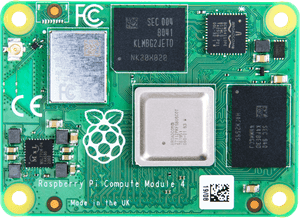
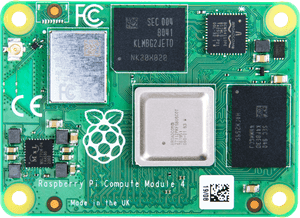
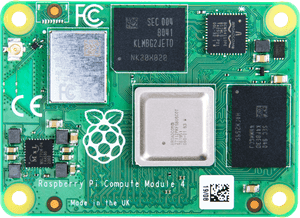
The Raspberry Pi Compute Module 5 (CM5) is the fifth-generation industrial compute module from the Raspberry Pi Foundation, released in late 2024. It brings the full performance of the Raspberry Pi 5 — including the Broadcom BCM2712 quad-core ARM Cortex-A76 processor running at 2.4 GHz — into a compact, carrier-board-friendly SODIMM 200-pin form factor.
CM5 is not a standalone board. It must be paired with a carrier board that exposes the module's I/O. The Raspberry Pi Foundation provides the official CM5 IO Board for development and prototyping. In production environments, manufacturers design custom carrier boards tailored to their application.
CM5 is available in a wide matrix of configurations: four RAM options (2 GB, 4 GB, 8 GB, 16 GB), four storage options (Lite/no eMMC, 16 GB, 32 GB, 64 GB eMMC), and two wireless options (with or without Wi-Fi/Bluetooth). This yields up to 32 SKU combinations.
The CM5 connector is NOT backward-compatible with CM4 carrier boards. If you are migrating from CM4, you will need a new carrier board or the CM5 IO Board.
Quick Overview
| Feature | Detail |
|---|---|
| CPU | Broadcom BCM2712, quad-core ARM Cortex-A76 @ 2.4 GHz |
| RAM | 2 GB / 4 GB / 8 GB / 16 GB LPDDR4X-4267 |
| Storage | Lite (no eMMC) / 16 GB / 32 GB / 64 GB eMMC |
| Wireless | 802.11b/g/n/ac (2.4 & 5 GHz) + Bluetooth 5.0 (optional) |
| PCIe | 1× PCIe 2.0 |
| Form Factor | SODIMM 200-pin (DDR3L connector) |
| Carrier Board | Required (not included — sold separately) |
| GPIO | 40 user-accessible pins via carrier board |
| Video Output | MIPI DSI (4-lane) + HDMI via carrier board |
| Camera Interface | 2× MIPI CSI (4-lane each) |
| USB | 2× USB 2.0 via carrier board |
| OS Support | Raspberry Pi OS, Ubuntu, and other Linux distributions |
Key Features
- Broadcom BCM2712 SoC — the same chip used in the Raspberry Pi 5 single-board computer
- Quad-core ARM Cortex-A76 at 2.4 GHz, delivering a significant performance leap over CM4's Cortex-A72
- Up to 16 GB LPDDR4X-4267 RAM — the highest memory capacity in any Compute Module to date
- Up to 64 GB onboard eMMC storage, or Lite variant for custom storage solutions
- Optional onboard 802.11b/g/n/ac dual-band Wi-Fi and Bluetooth 5.0
- 1× PCIe 2.0 lane for NVMe SSDs, AI accelerators, or other PCIe peripherals via carrier board
- Dual MIPI CSI-2 camera ports (4-lane each) for stereo vision or multi-camera applications
- MIPI DSI display output (4-lane) via carrier board
- 40 user-accessible GPIO pins via carrier board
- SODIMM 200-pin DDR3L connector — robust mechanical interface for industrial environments
- Suitable for custom embedded Linux products, digital signage, industrial automation, and edge AI
Technical Specifications
| Specification | Value |
|---|---|
| CPU | Broadcom BCM2712 |
| CPU Architecture | Quad-core ARM Cortex-A76 |
| CPU Clock Speed | 2.4 GHz |
| RAM Options | 2 GB, 4 GB, 8 GB, 16 GB LPDDR4X-4267 |
| Storage Options | Lite (0 GB), 16 GB, 32 GB, 64 GB eMMC |
| Wi-Fi | 802.11b/g/n/ac, 2.4 GHz and 5 GHz (optional) |
| Bluetooth | 5.0 (optional, same module as Wi-Fi) |
| PCIe | 1× PCIe 2.0 (via carrier board) |
| GPIO | 40 user-accessible (via carrier board) |
| Camera Interface | 2× MIPI CSI-2 (4-lane each) |
| Display Interface | 1× MIPI DSI (4-lane, via carrier board) |
| HDMI | Via carrier board |
| USB | 2× USB 2.0 (via carrier board) |
| Form Factor | DDR3L SODIMM 200-pin |
| Dimensions | 55 mm × 39 mm |
| Operating Voltage | 3.3 V / 1.8 V (supplied by carrier board) |
| OS Support | Raspberry Pi OS, Ubuntu, and other Linux distributions |
| Carrier Board Required | Yes |
Pinout
The CM5 uses a DDR3L SODIMM 200-pin edge connector. All I/O is exposed through this connector to the carrier board. Key signal groups include:
| Signal Group | Description |
|---|---|
| GPIO (40 pins) | General-purpose I/O, accessible via carrier board |
| MIPI CSI (2×) | Two 4-lane camera interfaces for high-resolution cameras |
| MIPI DSI (1×) | 4-lane display interface for LCD/OLED panels |
| PCIe 2.0 (1×) | Single PCIe 2.0 lane for M.2 NVMe, AI accelerators, etc. |
| USB 2.0 (2×) | Two USB 2.0 host ports via carrier board |
| HDMI | HDMI output routed via carrier board |
| UART / I2C / SPI | Standard serial interfaces accessible via GPIO |
| Power Input | 3.3 V and 1.8 V rails supplied by carrier board |
Power
The CM5 is powered entirely through the SODIMM 200-pin connector. The carrier board is responsible for supplying stable 3.3 V and 1.8 V rails. The CM5 does not have its own USB power input — power comes exclusively from the carrier board.
| Power Rail | Supplied By |
|---|---|
| 3.3 V | Carrier board |
| 1.8 V | Carrier board |
| GPIO Logic Level | 3.3 V |
| Typical Power Consumption | Varies by RAM/eMMC config; approximately 3–7 W under load |
On-Board Components
| Component | Detail |
|---|---|
| SoC | Broadcom BCM2712 (quad-core Cortex-A76 @ 2.4 GHz) |
| RAM | LPDDR4X-4267 (2 GB, 4 GB, 8 GB, or 16 GB depending on variant) |
| eMMC Flash | 0 GB (Lite), 16 GB, 32 GB, or 64 GB depending on variant |
| Wi-Fi/BT Module | Cypress CYW43455 (optional — not present on Lite wireless variants) |
| PMIC | Onboard power management IC |
Getting Started
To use the CM5, you need a compatible carrier board. The official Raspberry Pi CM5 IO Board is the recommended starting point for development.
Step 1 — Obtain a Carrier Board
Purchase the Raspberry Pi CM5 IO Board or a compatible third-party carrier board. The CM5 IO Board exposes HDMI, USB, GPIO, camera, and PCIe interfaces.
Step 2 — Seat the CM5 on the Carrier Board
Insert the CM5 into the SODIMM 200-pin slot on the carrier board. Apply gentle, even pressure until the module clicks into the retention clips.
Step 3 — Connect Peripherals
Connect a display via HDMI, keyboard and mouse via USB, and optionally a camera via CSI connector on the IO Board.
Step 4 — Flash the OS
Use the Raspberry Pi Imager to write Raspberry Pi OS (or another supported OS) to a microSD card or directly to the eMMC via USB boot mode.
- Download Raspberry Pi Imager: https://www.raspberrypi.com/software/
- For eMMC models, you must boot into USB boot mode on the IO Board and flash using rpiboot
Step 5 — Power On
Connect power to the carrier board and power on. The CM5 will boot from the eMMC or SD card depending on configuration.
Programming
The CM5 runs a full Linux distribution and is programmed like any Linux computer. GPIO can be accessed using the standard Raspberry Pi GPIO libraries.
For PCIe devices, standard Linux kernel drivers apply. For AI inference workloads, libraries such as TensorFlow Lite, ONNX Runtime, or the Raspberry Pi AI HAT+ SDK can be used.
Package Contents
| Item | Included |
|---|---|
| Raspberry Pi Compute Module 5 | Yes |
| CM5 IO Board | No (sold separately) |
| Power Supply | No (depends on carrier board) |
| Heat Sink | No (optional accessory) |
| Documentation | Online only |
Applications
- Digital signage and kiosk systems
- Industrial automation and machine vision
- Edge AI and inference (with PCIe AI accelerator)
- Network-attached storage (NAS) via PCIe
- Embedded Linux appliances
- Robotics control systems
- Medical and scientific instrumentation
- Custom single-purpose Linux computers
Where to Buy
| Retailer | Link | |
|---|---|---|
| Official Raspberry Pi Store | https | //www.raspberrypi.com/products/compute-module-5/ |
| Amazon | https | //www.amazon.com/s?k=Raspberry+Pi+Compute+Module+5 |
Equivalent Boards
| Board | Key Difference |
|---|---|
| Raspberry Pi Compute Module 4 | Previous gen, Cortex-A72 @ 1.5 GHz, different connector (CM4 100-pin dual connector) |
| Raspberry Pi Compute Module 4S | CM4 silicon in CM1/CM3 SODIMM form factor, no wireless |
| Raspberry Pi 5 | Same BCM2712 SoC, standalone board with full I/O, not modular |
| Raspberry Pi Compute Module 3+ | Older Cortex-A53, same SODIMM form factor as CM1/CM3, discontinued |
Documentation
- Official Product Page: https://www.raspberrypi.com/products/compute-module-5/
- Datasheet and Hardware Design Files: https://datasheets.raspberrypi.com/cm5/cm5-datasheet.pdf
- CM5 IO Board: https://www.raspberrypi.com/products/compute-module-5-io-board/
- Raspberry Pi Documentation: https://www.raspberrypi.com/documentation/
Notes
- CM5 is NOT backward-compatible with CM4 carrier boards. The CM4 used a 100-pin dual-connector design; CM5 returns to a SODIMM 200-pin connector (DDR3L style), but this is a different pinout from the older CM1/CM3/CM3+/CM4S SODIMM connector.
- Always verify your carrier board is explicitly rated for CM5 before purchasing.
- Wireless variants include both Wi-Fi and Bluetooth on the same optional module. There is no Wi-Fi-only or BT-only variant.
- The eMMC Lite variants have no onboard storage; a carrier board with microSD, NVMe, or other storage is required.
- GPIO operates at 3.3 V logic. Do not connect 5 V logic signals directly without a level shifter.
Community
- Raspberry Pi Forums — official community
- r/raspberry_pi (Reddit) — share projects
- Raspberry Pi Discord — real-time chat
Revision History
| Version | Date | Notes |
|---|---|---|
| v1.0 | 2026-06 | Initial entry |