
Raspberry Pi Pico H
Image Gallery
Overview
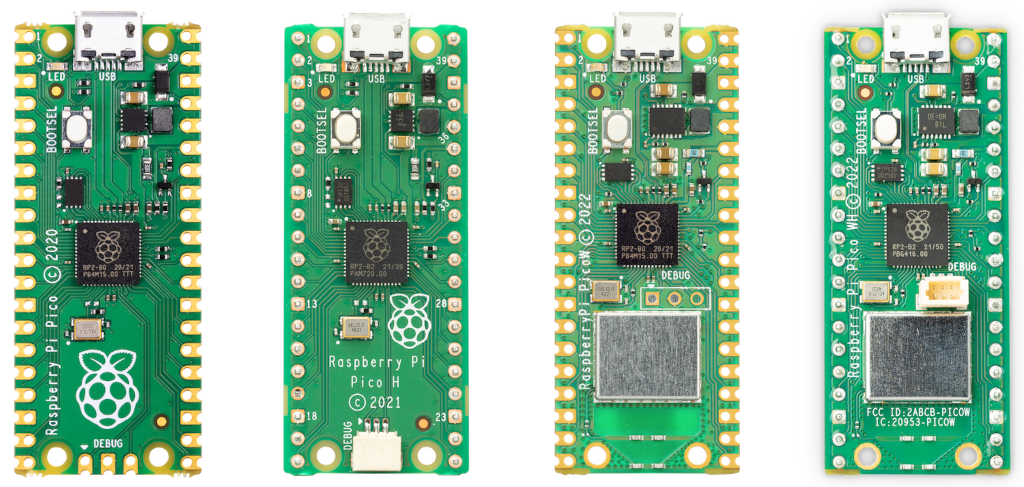
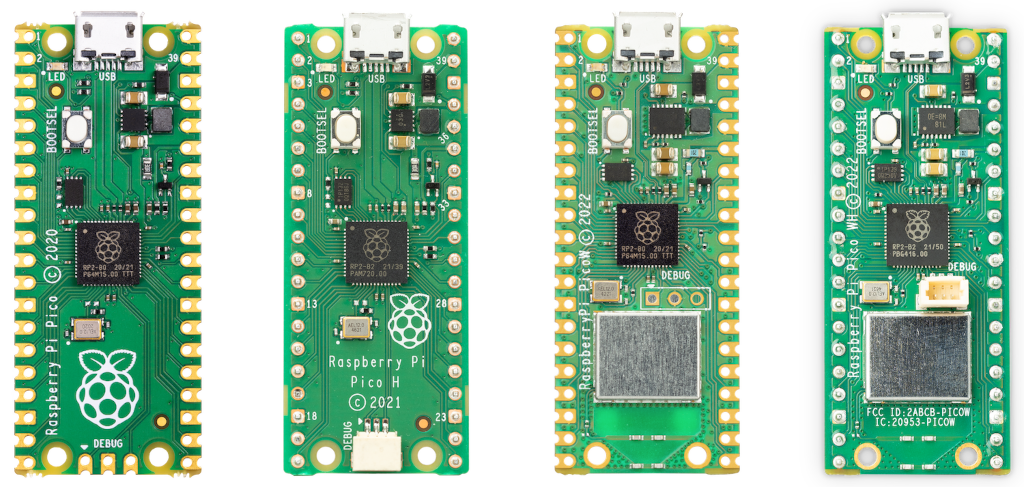
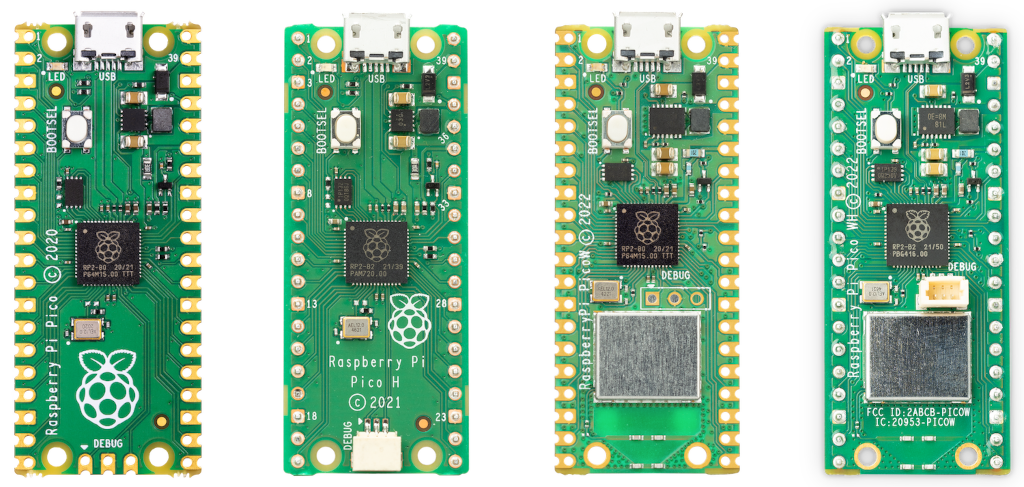
The Raspberry Pi Pico H is a convenience variant of the original Raspberry Pi Pico. It is electrically identical to the standard Pico — the same RP2040 microcontroller, 2 MB QSPI Flash, 264 KB SRAM, and identical GPIO count — but it ships with male 0.1" pin headers already soldered on all GPIO pads and a 3-pin JST SH (1 mm pitch) connector pre-soldered on the SWD debug port.
The pre-soldered headers make the Pico H ready to plug into a breadboard or use with dupont jumper wires immediately, without requiring any soldering equipment or skill. This makes it the preferred option for beginners, educators, and rapid prototyping scenarios where getting hardware running quickly matters more than saving a small amount of board height.
The 3-pin SWD debug connector enables step-through hardware debugging when paired with a Raspberry Pi Debug Probe or any compatible SWD adapter. This allows breakpoints, variable inspection, and register reads — debugging capabilities that are otherwise difficult to access on bare microcontroller boards without dedicated debug hardware.
Like all Pico-family boards, the Pico H does not include Wi-Fi or Bluetooth. For wireless capability, see the Raspberry Pi Pico W or Pico WH.
Key Features
- RP2040 dual-core ARM Cortex-M0+ at up to 133 MHz
- Pre-soldered male 0.1" pin headers — breadboard-ready immediately
- Pre-soldered 3-pin JST SH SWD debug connector
- 2 MB QSPI Flash, 264 KB SRAM (6 banks)
- 26 user-accessible GPIO pins (30 total on RP2040 silicon)
- 3 × 12-bit ADC channels plus 1 internal temperature sensor
- Up to 16 PWM channels (8 independent slices)
- 2 × PIO blocks with 4 state machines each (8 total)
- 2 × I2C, 2 × SPI, 2 × UART
- USB 1.1 (device and host mode)
- Micro-USB or VSYS pin power (1.8–5.5 V)
- No Wi-Fi, no Bluetooth
- MicroPython, CircuitPython, C/C++ SDK, and Arduino supported
- Compact 51 × 21 mm form factor
Technical Specifications
| Attribute | Value |
|---|---|
| SKU | SC0917 |
| MCU | RP2040 (dual-core ARM Cortex-M0+) |
| Clock Speed | Up to 133 MHz |
| SRAM | 264 KB (6 independent banks) |
| Flash | 2 MB QSPI (off-chip) |
| GPIO (accessible) | 26 user-accessible pins |
| GPIO (RP2040 total) | 30 |
| ADC | 3 × 12-bit + 1 internal temperature sensor |
| PWM Channels | Up to 16 (8 slices) |
| PIO | 2 blocks × 4 state machines = 8 total |
| I2C | 2 |
| SPI | 2 |
| UART | 2 |
| USB | USB 1.1 (device and host mode) |
| Wi-Fi | None |
| Bluetooth | None |
| Operating Voltage | 1.8–5.5 V |
| Power Input | Micro-USB or VSYS pin |
| On-board Regulator | 3.3 V switching regulator |
| Headers | Pre-soldered male 0.1" pin headers |
| Debug Connector | 3-pin JST SH (SWD), pre-soldered |
| Dimensions | 51 × 21 mm |
| Release Year | 2021 |
Microcontroller
The Pico H uses the RP2040 — Raspberry Pi's first in-house silicon design. The chip contains two ARM Cortex-M0+ cores running at up to 133 MHz. Both cores can execute code simultaneously, enabling parallel processing tasks at a very low price point.
Dual-Core Architecture
Both M0+ cores operate independently. In MicroPython the _thread module exposes cooperative multithreading across both cores. In C/C++, the Pico SDK's multicore_launch_core1() function launches a function on Core 1 while Core 0 continues its own work. A common pattern keeps time-critical tasks on Core 1 and application logic on Core 0.
PIO — Programmable I/O
The RP2040's most distinctive feature is its Programmable I/O subsystem. Two PIO blocks each contain four state machines capable of executing compact PIO assembly programs at system clock rates, completely independently of the CPU cores. PIO programs can implement:
- WS2812 NeoPixel LED control
- Stepper motor pulse generation
- Custom SPI, I2C, and UART variants
- I2S digital audio
- Virtually any clocked serial protocol
This eliminates the need for external protocol translator chips in many designs.
USB Controller
The built-in USB 1.1 controller supports both device mode and host mode. In device mode, the board can appear as a CDC serial port, HID keyboard/mouse, or mass-storage device. The BOOTSEL button puts the board into USB mass-storage bootloader mode, allowing UF2 firmware files to be dropped directly without a separate programmer.
Getting Started
Requirements
- Raspberry Pi Pico H
- Micro-USB cable (data-capable)
- Computer with USB port
- Breadboard and jumper wires (optional for GPIO experiments)
Installing MicroPython
- Download the Pico MicroPython .uf2 from https://www.raspberrypi.com/documentation/microcontrollers/
- Hold the BOOTSEL button and connect micro-USB to your computer
- Release BOOTSEL — the board appears as RPI-RP2 mass-storage
- Drag the .uf2 file onto the drive
- The board reboots with MicroPython running
- Open Thonny IDE and select the Pico's serial port to access the REPL
MicroPython Blink Example
GPIO 25 is the on-board LED on the Pico H (same as original Pico — not via CYW43439 like the Pico W):
Using the SWD Debug Connector
Pair the Pico H with a Raspberry Pi Debug Probe (or another Pico running picoprobe firmware) connected to the 3-pin JST SH connector. In VS Code with the cortex-debug extension and OpenOCD configured, this enables full step-through debugging with breakpoints.
Programming
MicroPython
Thonny IDE is the recommended beginner environment. The interactive REPL allows running Python lines one at a time, which is useful for testing pin assignments and sensor reads before writing full scripts.
C/C++ SDK
The official pico-sdk provides CMake-based projects with complete access to all RP2040 hardware. The SWD connector on the Pico H (pre-soldered) is particularly valuable here — GDB debugging via OpenOCD and the Debug Probe works without any extra preparation.
CircuitPython
Adafruit's CircuitPython runs on the Pico H. The large CircuitPython library bundle covers most common sensors and peripherals.
Arduino
The community arduino-pico core supports the Pico H in the Arduino IDE with the same pin numbering as the original Pico.
Applications
- Learning embedded programming with MicroPython
- Breadboard prototyping (no soldering required)
- Hardware debugging with SWD step-through debugger
- Educational kits and classroom labs
- Sensor data acquisition (ADC, I2C, SPI sensors)
- PWM motor control and servo driving
- PIO-driven LED strips (WS2812 NeoPixels)
- USB HID devices (keyboards, gamepads)
Where to Buy
- Raspberry Pi Official — official product page and authorized resellers
- Amazon — search for Raspberry Pi Pico H
Equivalent Boards
| Board | Headers | Wi-Fi | Debug Connector | Notes |
|---|---|---|---|---|
| Raspberry Pi Pico | Unpopulated | No | No | Requires soldering headers |
| Raspberry Pi Pico H | Pre-soldered | No | 3-pin JST SH (SWD) | This board — breadboard-ready, debuggable |
| Raspberry Pi Pico W | Unpopulated | Yes | No | Adds Wi-Fi/BLE; requires soldering |
| Raspberry Pi Pico WH | Pre-soldered | Yes | 3-pin JST SH (SWD) | Pico W with pre-soldered headers |
Documentation
Notes
- The Pico H is electrically identical to the standard Pico — the only physical differences are the pre-soldered 0.1" headers and the pre-soldered 3-pin SWD connector.
- The on-board LED is on GPIO 25, directly accessible — unlike the Pico W where the LED routes through the CYW43439 chip.
- The pre-soldered headers add a few millimetres of board height, which may matter in very space-constrained enclosures.
- The 3-pin SWD connector uses a JST SH 1 mm pitch connector. Raspberry Pi's Debug Probe ships with the correct cable. Compatible with any standard SWD adapter using the appropriate cable.
- For wireless capability, the Pico WH provides the same pre-soldered convenience with the addition of Wi-Fi and BLE.
Community
- Raspberry Pi Forums — official community
- r/raspberry_pi (Reddit) — share projects
- Raspberry Pi Discord — real-time chat
Revision History
| Version | Date | Notes |
|---|---|---|
| v1.0 | 2026-06 | Initial entry |