
Raspberry Pi Pico W
Image Gallery
Overview
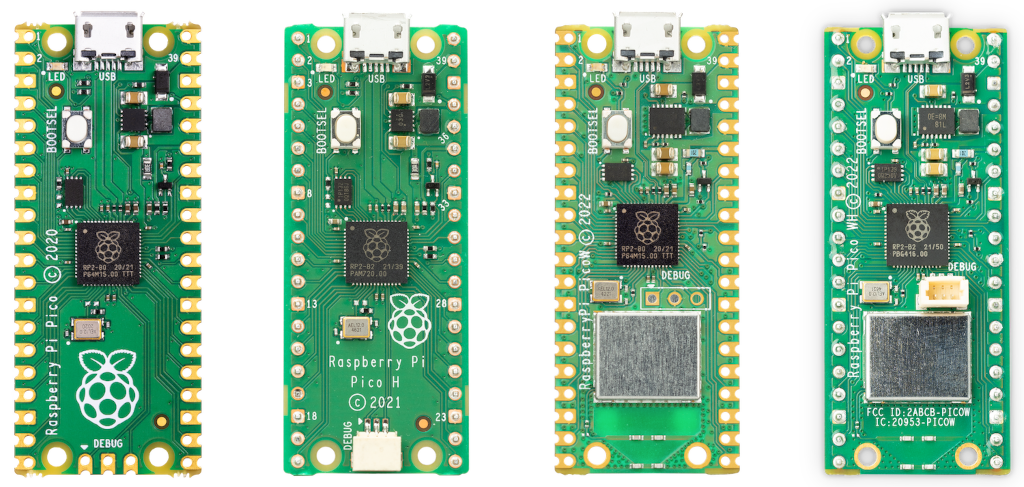
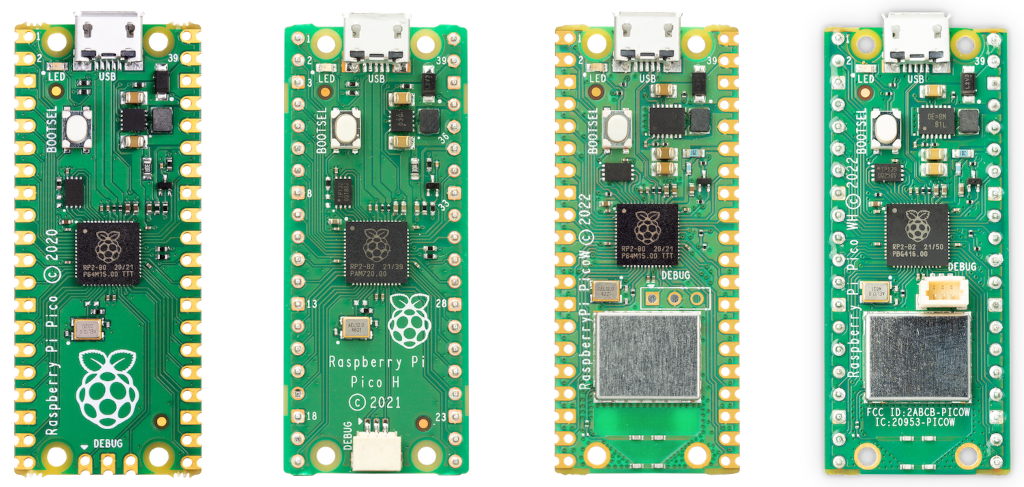
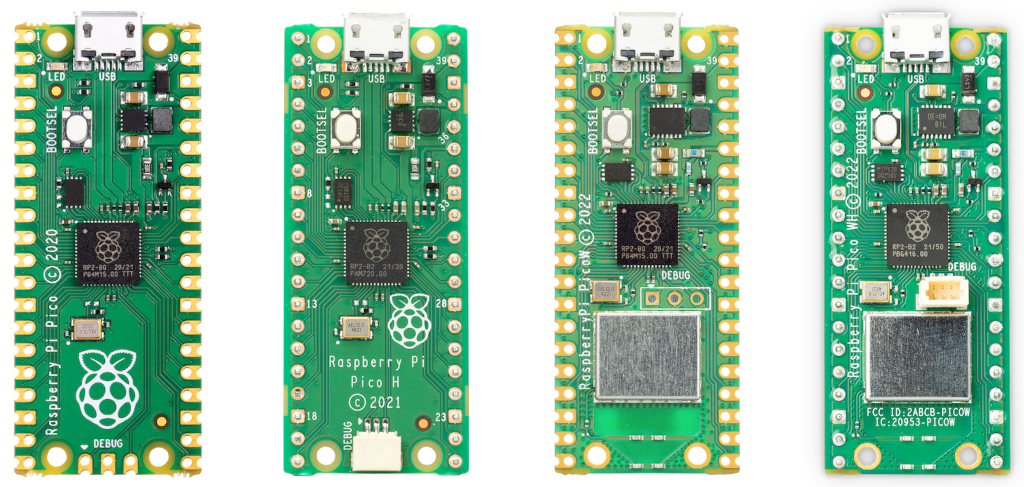
The Raspberry Pi Pico W is a wireless-capable microcontroller board built around the RP2040 chip — Raspberry Pi's own silicon design. Announced in June 2022, it extends the original Pico by integrating an Infineon CYW43439 module that provides 802.11 b/g/n Wi-Fi (2.4 GHz) and Bluetooth Low Energy 5.2, enabling the board to participate in home and industrial IoT networks.
The RP2040 is a dual-core ARM Cortex-M0+ processor running at up to 133 MHz, accompanied by 264 KB of SRAM and 2 MB of external QSPI Flash. Like all Pico-family boards, the Pico W features Programmable I/O (PIO) state machines — a uniquely flexible hardware peripheral that lets users implement custom serial protocols entirely in firmware without consuming CPU cycles.
The CYW43439 wireless chip connects to the RP2040 via SPI and also takes over a small number of GPIO expander duties. This means a few GPIO lines visible in the RP2040 datasheet are not directly accessible on the Pico W and are instead routed through the wireless chip. Network programming is done through the network module in MicroPython or the lwIP stack when using the C/C++ SDK.
Power can be supplied via the micro-USB connector or directly through the VSYS pin (1.8–5.5 V). An on-board switching regulator produces the 3.3 V rail used by both the RP2040 and the CYW43439. The board ships without pre-soldered headers; users solder their own 0.1" male or female headers. The Pico WH variant ships with headers pre-soldered.
Key Features
- Dual-core ARM Cortex-M0+ (RP2040) running up to 133 MHz
- 802.11 b/g/n Wi-Fi (2.4 GHz) via Infineon CYW43439
- Bluetooth Low Energy 5.2 via CYW43439 (enabled by firmware update)
- 2 MB QSPI Flash, 264 KB SRAM (6 banks)
- 26 user-accessible GPIO pins (30 total on RP2040 silicon)
- 3 × 12-bit ADC channels plus 1 internal temperature sensor
- Up to 16 PWM channels across 8 independent slices
- 2 × PIO blocks with 4 state machines each (8 total)
- 2 × I2C, 2 × SPI, 2 × UART
- USB 1.1 (device and host mode)
- Micro-USB or VSYS pin power (1.8–5.5 V input)
- MicroPython, CircuitPython, and C/C++ SDK supported
- Compact 51 × 21 mm form factor — breadboard-compatible
- ~$6 USD
Technical Specifications
| Attribute | Value |
|---|---|
| SKU | SC0918 |
| MCU | RP2040 (dual-core ARM Cortex-M0+) |
| Clock Speed | Up to 133 MHz |
| SRAM | 264 KB (6 independent banks) |
| Flash | 2 MB QSPI (off-chip) |
| GPIO (accessible) | 26 user-accessible pins |
| GPIO (RP2040 total) | 30 |
| ADC | 3 × 12-bit + 1 internal temperature sensor |
| PWM Channels | Up to 16 (8 slices) |
| PIO | 2 blocks × 4 state machines = 8 total |
| I2C | 2 |
| SPI | 2 |
| UART | 2 |
| USB | USB 1.1 (device and host mode) |
| Wi-Fi | 802.11 b/g/n, 2.4 GHz (Infineon CYW43439) |
| Bluetooth | BLE 5.2 (CYW43439, firmware-enabled) |
| Operating Voltage | 1.8–5.5 V |
| Power Input | Micro-USB or VSYS pin |
| On-board Regulator | 3.3 V switching regulator |
| Headers | Unpopulated (solder required) |
| Dimensions | 51 × 21 mm |
| Release Year | 2022 |
| Price (approx.) | ~$6 USD |
Microcontroller
The Pico W is powered by the RP2040 — the first microcontroller designed entirely in-house by Raspberry Pi. The chip contains two ARM Cortex-M0+ cores, each capable of running at up to 133 MHz independently. Both cores can execute code simultaneously, enabling true parallel processing on a device in the $6 price bracket.
Dual-Core Architecture
Each M0+ core has its own execution pipeline and can be started independently from firmware. In MicroPython, _thread provides cooperative multithreading across both cores. In C/C++, multicore_launch_core1() from the SDK starts an arbitrary function on Core 1. Common patterns place time-critical I/O work on Core 1 while Core 0 handles application logic or network communication.
PIO — Programmable I/O
PIO is the most distinctive feature of the RP2040. The chip contains two PIO blocks, each containing four state machines running their own small instruction sets at up to the system clock speed. Unlike software bit-banging, PIO state machines run deterministically in hardware, independent of the CPU cores. They can implement:
- WS2812 / NeoPixel LED protocols
- Stepper motor step-generation
- Custom SPI or I2C variants
- I2S audio
- DMX512 lighting control
- Virtually any clocked serial protocol
PIO programs are written in a minimal assembly language and loaded at runtime, making the peripheral highly adaptable without hardware changes.
USB Controller
The RP2040 contains a built-in USB 1.1 controller supporting both device mode (appearing as a CDC serial port, HID device, or mass storage to a host computer) and host mode (driving USB peripherals). No external USB transceiver chip is required. This USB controller also handles the UF2 drag-and-drop firmware flashing: hold BOOTSEL while applying power and the board appears as a USB mass-storage device where a .uf2 file can be dropped directly.
Memory
The 264 KB SRAM is divided into 6 independent banks with separate bus connections, allowing simultaneous access from both cores and the DMA controller with reduced contention. The 2 MB of Flash is external QSPI — it is not on the RP2040 die itself, which is why the chip can be used on carrier boards with different Flash sizes.
Wireless Connectivity
The Infineon CYW43439 provides both Wi-Fi and Bluetooth. The chip connects to the RP2040 via SPI. On the Pico W, the antenna is an on-board trace antenna printed directly on the PCB, and a small keep-out region at the board's end should remain free of metal objects in end applications.
Enabling Wi-Fi in MicroPython
MicroPython (v1.19.1 and later) ships with the network module supporting the CYW43439. The board must be programmed with the Pico W build of MicroPython — not the plain Pico build.
Bluetooth
Bluetooth LE 5.2 support was added via a firmware update after the initial launch. MicroPython provides bluetooth / aioble modules for BLE central and peripheral roles. The C/C++ SDK supports BLE through the BTstack library included in the SDK.
Access Point Mode
The CYW43439 also supports AP (access point) mode, allowing the Pico W to host its own Wi-Fi network. This is useful for configuration portals and peer-to-peer device communication without an existing router.
Getting Started
Requirements
- Raspberry Pi Pico W board
- Micro-USB cable (data-capable, not charge-only)
- Computer with USB port
Installing MicroPython
- Download the Pico W MicroPython .uf2 file from https://www.raspberrypi.com/documentation/microcontrollers/
- Hold the BOOTSEL button on the Pico W while connecting the micro-USB cable to your computer
- The board appears as a USB drive named RPI-RP2
- Drag and drop the .uf2 file onto that drive
- The board reboots automatically and MicroPython is running
- Open a serial terminal (Thonny IDE is recommended for beginners) at the board's COM port
First Blink (On-board LED)
On the Pico W, the on-board LED is connected to the CYW43439, not directly to a GPIO pin. Use Pin("LED") instead of Pin(25):
Programming
The Pico W supports multiple programming environments:
MicroPython
The most accessible option. Thonny IDE provides a one-click MicroPython installer and interactive REPL. The network, socket, urequests, and mqtt_simple modules cover the majority of Wi-Fi use cases.
C/C++ SDK
The official Raspberry Pi Pico SDK (pico-sdk) provides full access to all hardware including PIO, USB, and the CYW43439 via the pico_cyw43_arch library. Build system is CMake. Produces the smallest and fastest binaries.
CircuitPython
Adafruit's CircuitPython port supports the Pico W with its wifi and socketpool modules. A large library ecosystem (Adafruit CircuitPython Bundle) covers sensors, displays, and network services.
Arduino
The community arduino-pico core (by Earle Philhower) adds Pico W support to the Arduino IDE, including Wi-Fi via the WiFi library familiar from ESP8266/ESP32 development.
Applications
- Wi-Fi–connected sensor nodes (temperature, humidity, air quality)
- MQTT clients for home automation (Home Assistant, Node-RED)
- HTTP/HTTPS data loggers pushing to cloud services
- BLE peripherals (HID keyboards, sensor beacons)
- Wi-Fi–controlled robotics and motor drivers
- Simple web servers hosted from the Pico W itself
- OTA (over-the-air) firmware update receivers
- Network-connected LED matrix and NeoPixel displays
Where to Buy
- Raspberry Pi Official — official product page and authorized resellers
- Amazon — search for Raspberry Pi Pico W
Equivalent Boards
| Board | MCU | Wi-Fi | BLE | Notes |
|---|---|---|---|---|
| Raspberry Pi Pico | RP2040 | No | No | Original, no wireless |
| Raspberry Pi Pico WH | RP2040 | Yes (CYW43439) | BLE 5.2 | Same spec as Pico W with pre-soldered headers |
| Arduino Nano RP2040 Connect | RP2040 | Yes (u-blox Nina-W102) | Yes | RP2040 in Arduino ecosystem with wireless |
| ESP32 (various) | Xtensa LX6 / RISC-V | Yes | Yes | Different architecture; extensive ecosystem |
Documentation
Notes
- The on-board LED on Pico W is driven through the CYW43439 GPIO expander — use Pin("LED") in MicroPython, not Pin(25) as used on the plain Pico.
- Some RP2040 GPIO lines visible in the silicon documentation are routed through the CYW43439 on this board and are not directly accessible to user code.
- Bluetooth LE was added after launch via a firmware update; ensure your MicroPython or SDK build is recent enough to include it.
- The Pico WH is electrically identical to the Pico W — the only difference is factory-soldered male headers and a 3-pin SWD debug connector.
- The board's antenna area (the notched end of the PCB) should be kept free of ground planes and metallic objects in custom enclosures to preserve RF performance.
Community
- Raspberry Pi Forums — official community
- r/raspberry_pi (Reddit) — share projects
- Raspberry Pi Discord — real-time chat
Revision History
| Version | Date | Notes |
|---|---|---|
| v1.0 | 2026-06 | Initial entry |