
Raspberry Pi Pico WH
Image Gallery
Overview
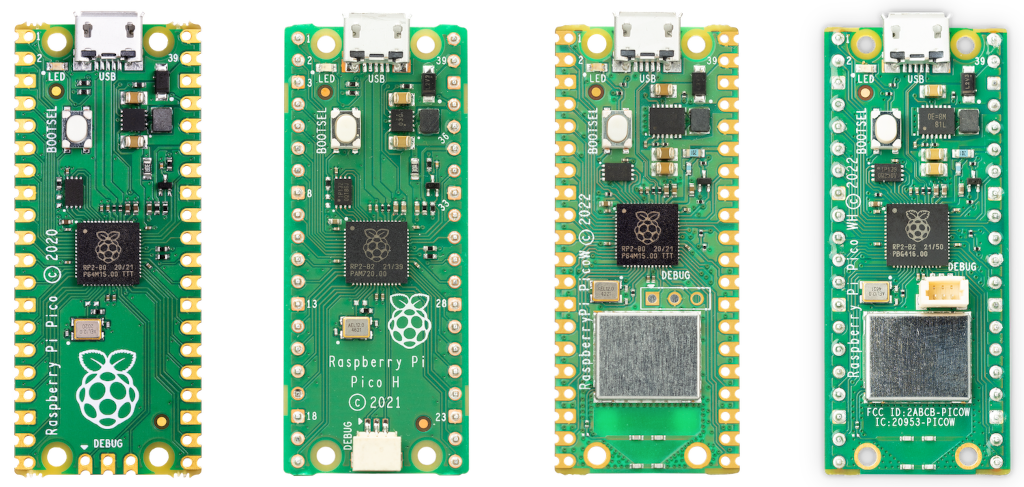
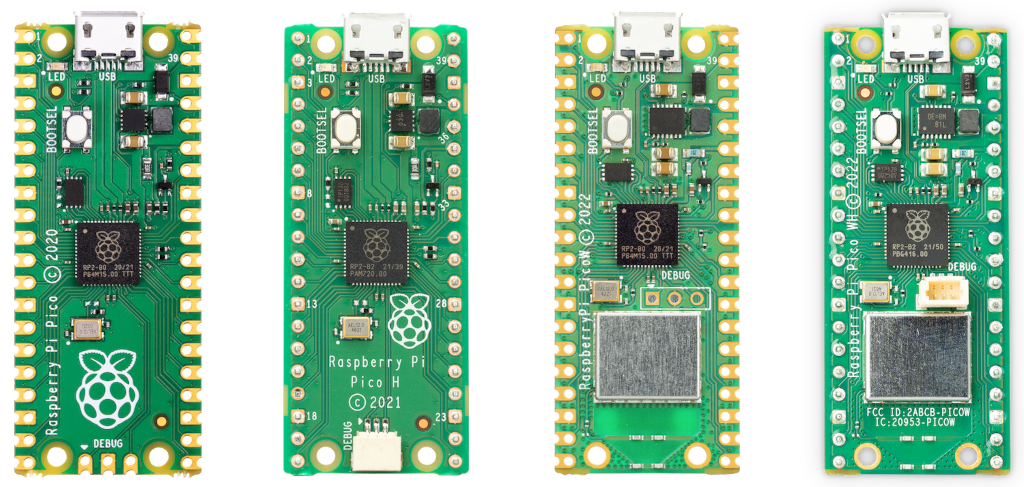
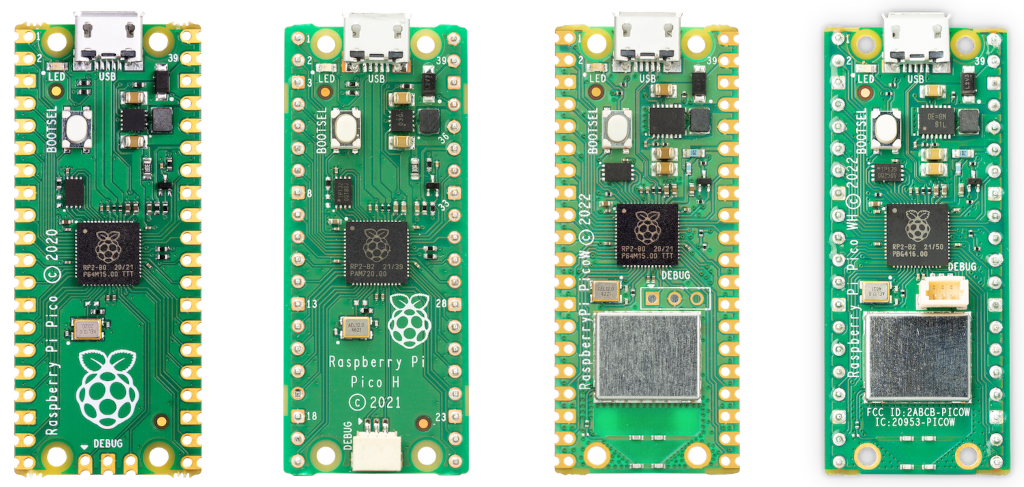
The Raspberry Pi Pico WH is the pre-soldered-header variant of the Raspberry Pi Pico W. It combines the RP2040 microcontroller, 2.4 GHz Wi-Fi (802.11 b/g/n), and Bluetooth 5.2 BLE via the Infineon CYW43439 module, with factory-installed 40-pin male headers and a 3-pin SWD debug connector. This means the board plugs directly into a breadboard or jumper wires without any soldering work required.
Released alongside the Pico W in 2022, the Pico WH is aimed at beginners, educators, and rapid-prototyping scenarios where immediate breadboard use and easier debugging access are priorities. Functionally, it is identical to the Pico W in every respect — same RP2040 chip, same wireless capability, same software support — with the sole difference being the pre-installed headers.
Key Features
- RP2040 dual-core ARM Cortex-M0+ at up to 133 MHz
- 2 MB QSPI flash · 264 KB SRAM
- 2.4 GHz 802.11 b/g/n Wi-Fi and Bluetooth 5.2 BLE via Infineon CYW43439
- Pre-soldered 40-pin male headers — no soldering required
- Pre-soldered 3-pin SWD debug connector
- 26 user-accessible GPIO pins
- 3 × 12-bit ADC inputs + 1 internal temperature sensor
- USB 1.1 device and host mode
- Micro USB for power and programming
- Identical software support to Pico W (MicroPython, C/C++ SDK, CircuitPython)
- Dimensions: 51 × 21 mm
Technical Specifications
| Specification | Details |
|---|---|
| MCU | Raspberry Pi RP2040 |
| Cores | Dual ARM Cortex-M0+ @ up to 133 MHz |
| SRAM | 264 KB on-chip (6 banks) |
| Flash | 2 MB QSPI |
| Wi-Fi | 802.11 b/g/n 2.4 GHz (Infineon CYW43439) |
| Bluetooth | BLE 5.2 (CYW43439) |
| GPIO (user) | 26 (GP0–GP22, GP26–GP28) |
| ADC | 3× 12-bit GPIO ADC + 1 internal temperature sensor |
| PWM | Up to 16 channels (8 slices) |
| PIO | 2 blocks × 4 state machines = 8 total |
| I2C | 2 |
| SPI | 2 |
| UART | 2 |
| USB | USB 1.1 device and host |
| Operating Voltage | 1.8–5.5V (VSYS) |
| Power Input | Micro USB or VSYS pin |
| Headers | Pre-soldered 40-pin male + 3-pin SWD debug |
| Dimensions | 51 × 21 mm |
| OS / Runtime | MicroPython, CircuitPython, C/C++ SDK |
Pinout
The Pico WH uses the standard Raspberry Pi Pico 40-pin header layout. All pins are pre-soldered and ready to plug into a standard 400- or 830-point breadboard. The 3-pin SWD connector on the bottom edge enables hardware debugging via a Raspberry Pi Debug Probe or compatible adapter.
| Pin(s) | Function |
|---|---|
| 1–2 | GP0, GP1 (UART0 TX/RX, SPI0 RX/CSn, I2C0 SDA/SCL) |
| 4–5 | GP2, GP3 (SPI0 SCK/TX, I2C1 SDA/SCL) |
| 31–32 | GP26, GP27 (ADC0, ADC1) |
| 34 | GP28 (ADC2) |
| 36 | 3V3 Out (max 300 mA) |
| 37 | 3V3_EN |
| 38 | GND |
| 39 | VSYS (input voltage) |
| 40 | VBUS (USB 5V) |
| SWD | SWCLK, GND, SWDIO (3-pin debug connector) |
Power
The Pico WH is powered via micro USB (5V) or the VSYS pin (1.8–5.5V). The on-board switching regulator supplies 3.3V to the RP2040 and CYW43439. Note that the CYW43439 Wi-Fi module draws additional current during active transmission — plan for at least 500 mA from the USB supply.
Getting Started
What You Need
- Raspberry Pi Pico WH
- Micro USB cable
- Breadboard (the headers are already soldered)
- Computer with Thonny IDE or similar
Flashing MicroPython
- Download the Pico W MicroPython UF2 from https://micropython.org/download/RPI_PICO_W/
- Hold BOOTSEL and plug the Pico WH into USB. Release BOOTSEL when the RPI-RP2 drive appears.
- Drag the UF2 file onto the drive. The board reboots automatically.
- Open Thonny, select MicroPython (Raspberry Pi Pico) as the interpreter.
Programming
MicroPython LED Blink
The Pico WH on-board LED is controlled via the CYW43439 module. Use machine.Pin("LED") in MicroPython.
MicroPython Wi-Fi Connection
Applications
- Beginner and classroom electronics projects (no soldering needed)
- IoT prototyping on breadboard
- Wi-Fi sensor dashboards
- Bluetooth Low Energy peripherals
- Rapid proof-of-concept builds
- Hardware debugging with SWD probe
Where to Buy
- Official page: https://www.raspberrypi.com/products/raspberry-pi-pico/?variant=raspberry-pi-pico-wh
- Amazon: https://www.amazon.com/s?k=Raspberry+Pi+Pico+WH
- Approved resellers: https://www.raspberrypi.com/products/raspberry-pi-pico/
Equivalent Boards
| Board | Key Difference |
|---|---|
| Raspberry Pi Pico W | Same board without pre-soldered headers — requires soldering |
| Raspberry Pi Pico H | Pre-soldered headers, no wireless connectivity |
| Raspberry Pi Pico WH | This board — wireless + pre-soldered headers |
| Arduino Nano 33 IoT | Arduino ecosystem, Wi-Fi, Bluetooth, pre-soldered headers |
Documentation
- Official page: https://www.raspberrypi.com/products/raspberry-pi-pico/
- Microcontroller documentation: https://www.raspberrypi.com/documentation/microcontrollers/
- MicroPython for Pico W/WH: https://micropython.org/download/RPI_PICO_W/
Community
- Raspberry Pi Forums — official community
- r/raspberry_pi (Reddit) — share projects
- Raspberry Pi Discord — real-time chat
Revision History
| Version | Date | Notes |
|---|---|---|
| v1.0 | 2026-06 | Initial entry |